
More actions
mNo edit summary |
|||
| Line 1: | Line 1: | ||
[[Category:Guides]] | [[Category:Guides]] | ||
[[Category:Work_in_progress]] | [[Category:Work_in_progress]] | ||
As you know, the [[ | As you know, the [[EVE University Class Library]] is an invaluable knowledge base for new [[Capsuleer|capsuleers]]. This guide will illustrate, step-by-step, how to record, encode, edit and upload your class recordings. We encourage [[unista|unistas]] to record classes they attend. | ||
__TOC__ | __TOC__ | ||
| Line 73: | Line 73: | ||
E-UNI <Class name>.mp3 | E-UNI <Class name>.mp3 | ||
</pre> | </pre> | ||
*'''Ex: E-UNI Intorduction to | *'''Ex: E-UNI Intorduction to EVE University.mp3''' or '''E-UNI Drones 101.mp3''' | ||
* Click '''Save''' | * Click '''Save''' | ||
| Line 99: | Line 99: | ||
==Uploading== | ==Uploading== | ||
You can use [http://eve-files.com Eve-Files] to upload your | You can use [http://eve-files.com Eve-Files] to upload your EVE related files. When you're done uploading the file, please see [http://forum.eveuniversity.org/viewtopic.php?f=72&t=35175#p325226 this forum thread] and scroll down to '''4. Posting your files''' section for further instructions. | ||
===Uploading to Wiki Yourself=== | ===Uploading to Wiki Yourself=== | ||
Revision as of 15:58, 6 March 2011
As you know, the EVE University Class Library is an invaluable knowledge base for new capsuleers. This guide will illustrate, step-by-step, how to record, encode, edit and upload your class recordings. We encourage unistas to record classes they attend.
Recording
In order to be able to record a class on mumble, you must be using Mumble version 1.2.3
Recording a Class is simple enough; Once you join the class sub-channel under Class.E-UNI on Mumble, click the red button on your menu, select Mode: downmix, select your output format (for the purposes of this guide, it is assumed you're using .wav format.) When you're all set, hit Start. Please be informed that you can not join the channel Class.E-UNI directly, but you must join the sub-channel with the name of the class.
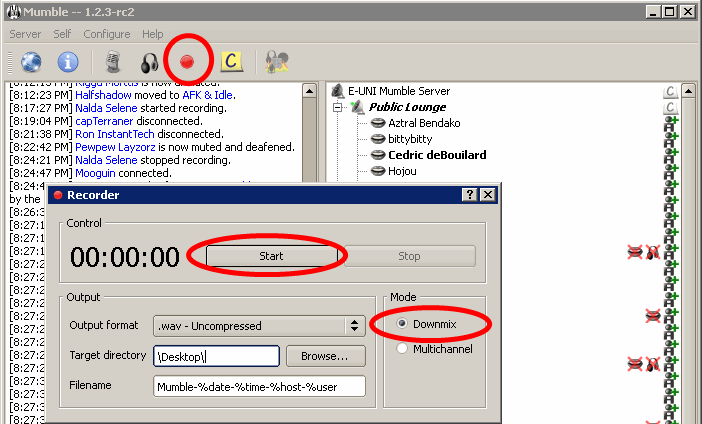
- Congratulations, barring the ever-present possibility of connection problems, you should now be successfully recording a class.
- unlike teamspeak, when using Mumble sound notifications will not be recorded even if you leave them on during the class. (tested in rc2)
Editing & Encoding
After you record the lecture, you might need to edit it: the class might have started late and you want to remove the first 2 mins or maybe you forgot to stop the recording and you recorded 30mins of silence. Whatever the reason, if you need to edit the file, you can use a software such as Audacity, its a free, multi-platform and easy to use program and in the following sections we'll demonstrate its use. You can always use other software if you prefer to do so.
Installing Audiacity & Lame Encoder
Please download & install Audacity and install the lame encoder for audacity, we'll need it to export our class audio files into mp3 in later steps. You can download audacity from this link and lame encoder for audaicty from this link. Please check this page for instructions on properly installing the encoder. We will not provide the details of installing the software or the encoder as the steps or methods may vary between different platforms.
Editing
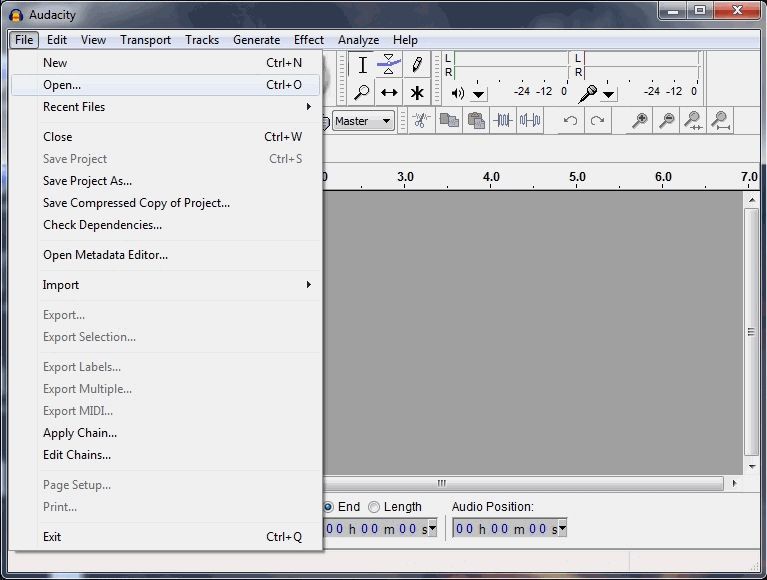
- Once you have audacity installed and lame encoder is properly set, start the program, Go to File > Open... and select the .wav file you recorded with Teamspeak.
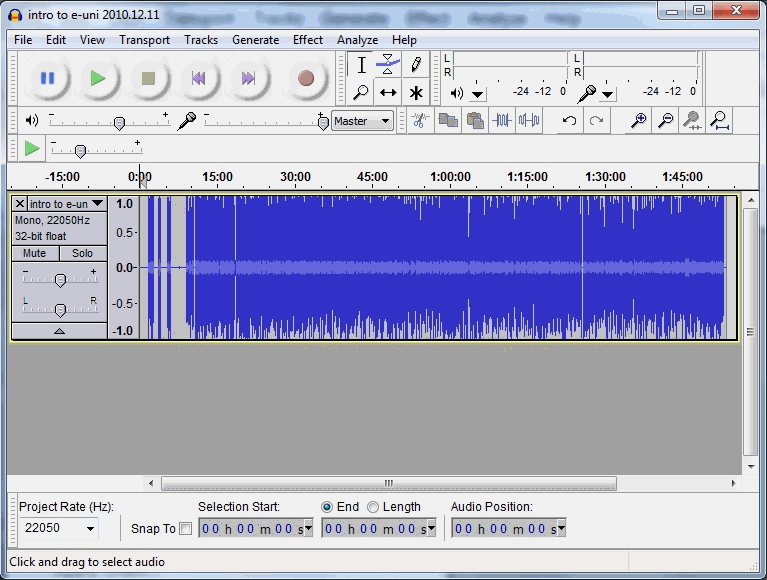
- This is how it looks when you open the file.
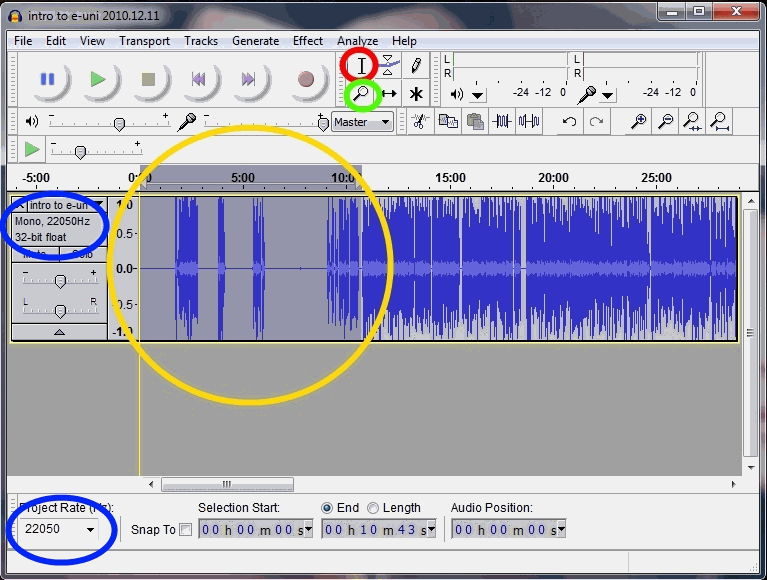
- Now it's time to edit the audio file. We may need to cut out some parts from the beginning if you started recorded earlier than class start. (and that's more preferable than missing some parts of the class, so whenever possible, you should start recording a bit early and then take these parts out) see the image below for the next step.
- Select: use this tool to select a part of the file. You can select a point to start playing from there, or you can select an area if you want to remove or move that selected area. If you want to remove a selection, just press Delete button on your keyboard or go to Edit > Delete from the menu panel. You cannot edit the file while it's Playing or Paused, so don't forget to stop it first. Please keep in mind that audacity can do more than simply deleting parts of the file, but these functions will not be covered in this guide.
- Zoom tool: you can use zoom tool to zoom in (left mouse click) or out (right mouse click) to more easily pinpoint a location.
- File format information
Encoding
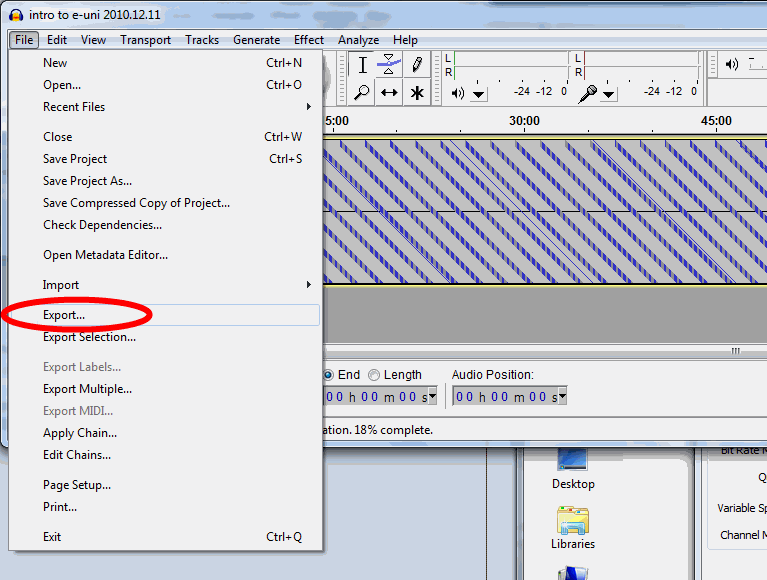
- When you're done editing the file, simply go to File > Export... from the menu panel to save the file in .mp3 format.
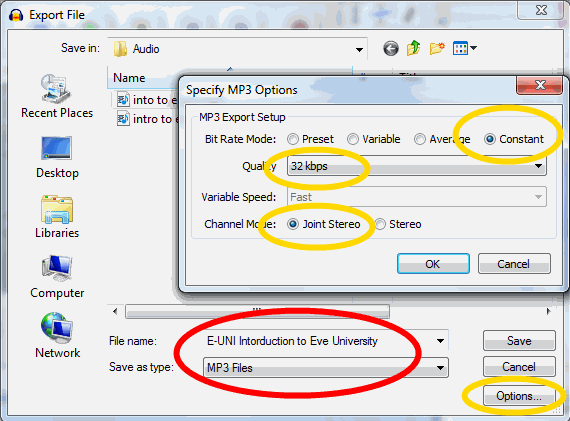
- Make sure you've selected filetype as MP3 and click options to specify encoding properties.
Bitrate Mode: Constant
Quality: 32kbps 22050Khz
Channel Mode: Joint Stereo
- We select Joint Stereo because it keeps the file Mono, like the original. Selecting Stereo might result with a stereo file (which is totally unnecessary) with bigger filesize.
- Please keep the filename in the following format
E-UNI <Class name>.mp3
- Ex: E-UNI Intorduction to EVE University.mp3 or E-UNI Drones 101.mp3
- Click Save
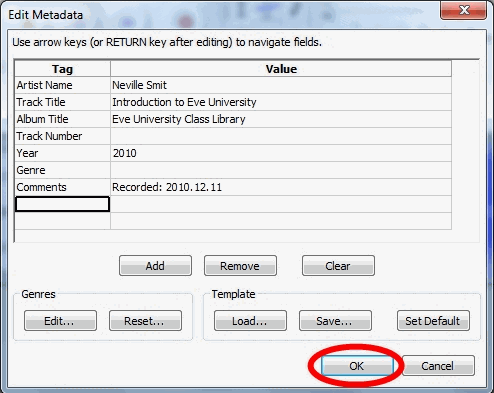
- You will be asked to edit the Metadata for the mp3 file. Please use the following format and don't add anything else. See the screnshot above.
Artist Name: <Instructor's name>
Track Title: <Class name>
Album Title: EVE University Class Library
Year: <year>
Comments: Recorded: <class date in YYYY.MM.DD format>

- Unfortunately, audacity can't add or edit Artwork attribute, but if you want to bother adding an artwork (because it's cool) with another software, you're more than welcome to use this one.
Congratulations, depending on your CPU, it may take a couple of minutes for Audacity to export the file. Now it's time to upload this file to internet.
Uploading
You can use Eve-Files to upload your EVE related files. When you're done uploading the file, please see this forum thread and scroll down to 4. Posting your files section for further instructions.
Uploading to Wiki Yourself
You can upload the file to UNIWIKI yourself, but there are some guidelines you must follow before you upload a class audio.
- Check if there's an older version of the file you're trying to upload. You do this either by checking the class library, or the list of the files uploaded
- If yes, then go to that File's page (ex: File:E-UNI Drones 101.mp3) and use the option Upload a new version of this file.
- When uploading a file, make sure file name is correct E-UNI_<Class_name>.mp3 (ex: "E-UNI_Drones_101.mp3")
- When uploading a file, please make sure you include the following information on the Comments section, in the following format:
- "File_Name - Instructor - Date (YYYY.MM.DD) - Length (MMM:SS) - Format (MP3 bitrate) - Filesize"
- Ex: E-UNI Drones 101 - Neville Smit - 2010.06.19 - 97:13 - MP3 32kbps 22Khz Mono - 22.2 MB