
Ellis Ofsol (talk | contribs) mNo edit summary |
Ellis Ofsol (talk | contribs) |
||
| Line 1: | Line 1: | ||
== Considerations: an enjoyable fleet experience == | |||
* Avoiding ship loss: checking fits when a new player joins, making sure nobody brings the wrong fit | * Avoiding ship loss: checking fits when a new player joins, making sure nobody brings the wrong fit | ||
* experienced pilots can help FC (example: navigation, finding new sites) | * experienced pilots can help FC (example: navigation, finding new sites) | ||
| Line 10: | Line 7: | ||
* Make your life easy with some basic MOTD info like Staging / Comms / Euni Overview link / Fits / Lifesaving rules / FAQ & Wiki links. You will get stuff asked about this frequently, kindly draw their attention to the MOTD. | * Make your life easy with some basic MOTD info like Staging / Comms / Euni Overview link / Fits / Lifesaving rules / FAQ & Wiki links. You will get stuff asked about this frequently, kindly draw their attention to the MOTD. | ||
* Set boundariesfor yourself: I will run x amount ofsites / I will run for 2 hrs / also communicate this to your fleetmembers ... if you know you will be folding soon it does not make sense to keep accepting people into a queue unless you have an FC waiting to take over. | * Set boundariesfor yourself: I will run x amount ofsites / I will run for 2 hrs / also communicate this to your fleetmembers ... if you know you will be folding soon it does not make sense to keep accepting people into a queue unless you have an FC waiting to take over. | ||
=== Example - Raid: Deserters Hideout === | |||
==== Starting a fleet ==== | ==== Starting a fleet ==== | ||
* Start by forming a fleet and selecting the Fleet Setup template you want to use. Store Fleet Setup function allows you to store MOTD / Wing & squad layout / Free-move settings & default squad. | * Start by forming a fleet and selecting the Fleet Setup template you want to use. Store Fleet Setup function allows you to store MOTD / Wing & squad layout / Free-move settings & default squad. | ||
| Line 21: | Line 19: | ||
[[File:Fleet MOTD example raids.png|center|thumb]] | [[File:Fleet MOTD example raids.png|center|thumb]] | ||
* Fleet hierarchy setup: helps you keep track of who is flying what role? The FC role allows you to drag & drop pilots into squads. howover if fleet has 'freemove' option checked, pilot's can drag themselves into the squad of their choice. Having a default squad (Lobby) helps you find new pilots easily when people join your fleet via the fleet advertisement. | |||
[[File:Fleet hierarchy & freemove.png|center|thumb|Fleet hierarchy & freemove]] | |||
* Queue management: Try limiting the queue to only 3 pilots. You can set your fleet size to 8 pilots via the "..." three vertical dot icon in the upper right part of the fleet window. | |||
[[File:Fleetsize window.png|center|thumb|Fleetsize window]] | [[File:Fleetsize window.png|center|thumb|Fleetsize window]] | ||
=== Recruiting players: === | ==== Recruiting players: ==== | ||
* Starting a fleet advertisement:[[File:Start a fleet advertisment 1.png|center|thumb|Start a fleet advertisment 1]] | |||
** Pay attention to settings: Fleetname / Description /My corp / My Alliance / Application requires approval / Auto update advert on Boss change[[File:Start a fleet advertisment 2.png|center|thumb|Start a fleet advertisment 2]] | |||
** Use the Agency window > Fleet Up! tab to find your advert. You can link your advert into corpchat from this location.[[File:Find your fleet advertisement.png|center|thumb|Find your fleet advertisement]] | |||
* Corp chat recruitment example: create a recruitment message with sufficient info should minimize resoponding to alot of interested questions like "where do I go? what do I train? what do I fly" . [[File:Corp chat recruitment example.png|center|thumb|corp chat recruitment example]]<br /> | |||
- Contact list: Adding people to you contact list / buddy list helps you keep track of people and may prove useful for future fleet recruitment. | - Contact list: Adding people to you contact list / buddy list helps you keep track of people and may prove useful for future fleet recruitment. | ||
[[File:Contact list.png|center|thumb|Contact list]] | |||
Meeting new players in your fleet? Add them to contact, keep track of who you fly with. | |||
[[File:Adding contacts 1.png|center|thumb|Adding contacts 1]] | |||
[[File:Adding contact 2.png|center|thumb|Adding contact 2]] | |||
Revision as of 10:12, 30 August 2025
Considerations: an enjoyable fleet experience
- Avoiding ship loss: checking fits when a new player joins, making sure nobody brings the wrong fit
- experienced pilots can help FC (example: navigation, finding new sites)
- Encourage everyone in fleet to join you on comms. People can lose ships due to bad communication.
- First timers should be encouraged to fly DPS caracals in most cases.
- Using a clear overview, and managing your squads. Helps efficiency and keeps track of who is flying what roles, who is in queue etc.
- Make your life easy with some basic MOTD info like Staging / Comms / Euni Overview link / Fits / Lifesaving rules / FAQ & Wiki links. You will get stuff asked about this frequently, kindly draw their attention to the MOTD.
- Set boundariesfor yourself: I will run x amount ofsites / I will run for 2 hrs / also communicate this to your fleetmembers ... if you know you will be folding soon it does not make sense to keep accepting people into a queue unless you have an FC waiting to take over.
Example - Raid: Deserters Hideout
Starting a fleet
- Start by forming a fleet and selecting the Fleet Setup template you want to use. Store Fleet Setup function allows you to store MOTD / Wing & squad layout / Free-move settings & default squad.


- Fleet MOTD: point attention to your fleet motd, especially to newer players, it helps you save time not having to explain everything every time.

- Fleet hierarchy setup: helps you keep track of who is flying what role? The FC role allows you to drag & drop pilots into squads. howover if fleet has 'freemove' option checked, pilot's can drag themselves into the squad of their choice. Having a default squad (Lobby) helps you find new pilots easily when people join your fleet via the fleet advertisement.

- Queue management: Try limiting the queue to only 3 pilots. You can set your fleet size to 8 pilots via the "..." three vertical dot icon in the upper right part of the fleet window.

Recruiting players:
- Starting a fleet advertisement:
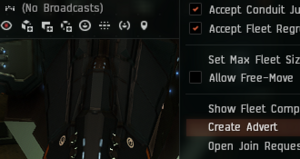
Start a fleet advertisment 1 - Pay attention to settings: Fleetname / Description /My corp / My Alliance / Application requires approval / Auto update advert on Boss change
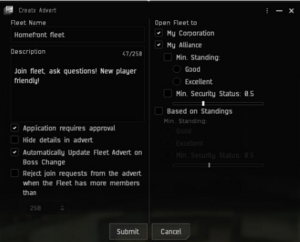
Start a fleet advertisment 2 - Use the Agency window > Fleet Up! tab to find your advert. You can link your advert into corpchat from this location.

Find your fleet advertisement
- Pay attention to settings: Fleetname / Description /My corp / My Alliance / Application requires approval / Auto update advert on Boss change


- Corp chat recruitment example: create a recruitment message with sufficient info should minimize resoponding to alot of interested questions like "where do I go? what do I train? what do I fly" .

corp chat recruitment example

- Contact list: Adding people to you contact list / buddy list helps you keep track of people and may prove useful for future fleet recruitment.

Meeting new players in your fleet? Add them to contact, keep track of who you fly with.

