
More actions
m Started divvying up the sections for this article, tidied up a bit and made some small changes to the wording. |
|||
| Line 2: | Line 2: | ||
Citadels are a new type of structure introduced during the Citadel expansion. They are intended to replace the functionality of Starbases and Outpost allowing players the same functionality of a station such as docking, storing of items, refitting and corporation offices while also being expanded with the use of new service modules to allow Clone Bay, Market and Reprocessing functionality. | Citadels are a new type of structure introduced during the Citadel expansion. They are intended to replace the functionality of Starbases and Outpost allowing players the same functionality of a station such as docking, storing of items, refitting and corporation offices while also being expanded with the use of new service modules to allow Clone Bay, Market and Reprocessing functionality. | ||
=Size= | = Size variants = | ||
There are currently three different sizes of citadels; the medium '''Astrahus''', the large '''Fortizar''' and the extra-large '''Keepstar'''. | |||
{| style="text-align:center;" | |||
| valign="top" | [[image:astrahus.png|thumb|212px|'''Astrahus''' (medium)]] | |||
| valign="top" | [[image:fortizar.png|thumb|212px|'''Fortizar''' (large)]] | |||
| valign="top" | [[image:keepstar.png|thumb|212px|'''Keepstar''' (extra-large)]] | |||
|} | |||
There's also the rare '''Upwell Palantine Keepstar'''. | |||
= Anchoring a citadel = | |||
Fortizar | In order to anchor a citadel you'll need a ship with an appropriately sized cargo hold or fleet hangar, the right roles and a suitable spot to anchor your citadel. | ||
Keepstar | == Ship restrictions == | ||
You'll need to ensure that your ship has enough cargo hold or room in its fleet hangar to carry the packaged citadel. | |||
* The medium '''Astrahus''' is 8k m3 packaged and fits in [[Blockade Runner]]s). | |||
* The large '''Fortizar''' is 80k m3 packaged and fits in cargo-fitted [[Orca]]s). | |||
* The extra-large '''Keepstar''' is 800k m3 packaged and fits in [[Freighter]]s). | |||
== Role restrictions == | |||
In order to anchor a citadel you'll need the role of '''Station Manager''', alternatively be a '''Director''' or '''CEO''' of your corporation. Additionally the role of '''Config Starbase Equipment''' is needed to manage citadels in the [[Structure Browser]]. | |||
= | == Placement restrictions == | ||
While you can anchor citadels mostly anywhere, there are a few restrictions both to which systems can have citadels in them and where (in space) you can place them. | |||
*Citadels cannot be anchored in shattered | * Citadels {{co|crimson|cannot}} be anchored in shattered wormhole systems (including [[Thera]]). | ||
*Citadels cannot be anchored in starter systems. | * Citadels {{co|crimson|cannot}} be anchored in [https://support.eveonline.com/hc/en-us/articles/203209712 starter systems]. | ||
*Citadels cannot be anchored in trade hubs (Jita, Amarr etc.). | * Citadels {{co|crimson|cannot}} be anchored in [[Trade Hubs|trade hubs]] (Jita, Amarr etc.). | ||
*Citadels cannot be anchored in deadspace pocket. | * Citadels {{co|crimson|cannot}} be anchored in deadspace pocket. | ||
*Citadels must be placed between 50-75km away from the anchoring ship dependent on citadel size. | * Citadels must be placed between 50-75km away from the anchoring ship dependent on citadel size. | ||
*Citadels must be anchored at least 1000km away from an existing station, citadel or asteroid belts. | * Citadels must be anchored at least 1000km away from an existing station, citadel or asteroid belts. | ||
*You can move the anchoring position on the x and z axis. To move the position on the Y-axis, move the anchoring ship. | * You can move the anchoring position on the x and z axis. To move the position on the Y-axis, move the anchoring ship. | ||
*Anchoring a | * Anchoring a citadel at a moon is possible but there is only a small area where it is considered valid placement (this is due to the old POS-anchoring mechanics as shown [http://imgur.com/ONsYLBP here]). | ||
Once a location is selected you can begin by selecting Launch for Corporation from the | == Placing the citadel == | ||
Once a location is selected you can begin by right-click the packaged citadel and selecting '''Launch for Corporation''' from the citadel's context menu. | |||
From the Deployment menu you can now move the outline of the citadel around and rotate it. As | From the Deployment menu you can now move the outline of the citadel around and rotate it. As citadels cannot be unanchored or repositioned care should be taken to ensure the citadel is in an optimal position, once finished proceed by pressing the '''Position''' button. | ||
{| | |||
In the final menu you are now asked to set the Structure Name, Profile and Vulnerability Hours. Profiles define the permissions allowed to different groups or individuals such as docking permissions however these are configured in the Structure Browser and new profiles can be assigned at anytime with the appropriate roles/permissions. | | valign="top" | [[image:structure_anchor_bad.png|thumb|300px|This is an example of a bad position for a citadel, where the {{button|Position}}-button is greyed out.]] | ||
| valign="top" | [[image:structure_anchor.png|thumb|250px|Once you've found the right spot, simply click the {{button|Position}}-button.]] | |||
|} | |||
== Setting up the profile and vulnerability timer == | |||
In the final menu you are now asked to set the '''Structure Name''', '''Profile''' and '''Vulnerability Hours'''. Profiles define the permissions allowed to different groups or individuals such as docking permissions however these are configured in the Structure Browser and new profiles can be assigned at anytime with the appropriate roles/permissions. | |||
Vulnerability Hours are the periods that the citadels can be attacked with each slot representing one hour, each size of citadel has a different amount of vulnerability slots that must be selected before it can be anchored this is also indicated in the bottom right corner of the menu. | Vulnerability Hours are the periods that the citadels can be attacked with each slot representing one hour, each size of citadel has a different amount of vulnerability slots that must be selected before it can be anchored this is also indicated in the bottom right corner of the menu. | ||
* Astrahus has 3 slots | |||
* Fortizar has 6 slots | |||
* Keepstar has 21 slots | |||
== Anchoring timer (a.k.a. time to build) == | |||
With that complete your citadel will begin a '''24 hour anchor timer''' that it is invulnerable throughout with the citadel slowly being constructed, while anchoring the citadel will not appear on the overview or directional scan unless you are on-grid. | |||
===== Initial repair of armour and shields ===== | |||
With that complete your citadel will begin a 24 hour anchor timer that it is invulnerable throughout with the citadel slowly being constructed, while anchoring the citadel will not appear on the overview or directional scan unless you are on-grid. | |||
After anchoring completes there will be a 15 minute repair window where the citadel has no shields or armor and can be destroyed. Until this finishes it is not possible to add any fittings to the citadel. Once completed the citadel will now be fully operational and begin to follow the vulnerability times that have been set at the time of deployment. | After anchoring completes there will be a 15 minute repair window where the citadel has no shields or armor and can be destroyed. Until this finishes it is not possible to add any fittings to the citadel. Once completed the citadel will now be fully operational and begin to follow the vulnerability times that have been set at the time of deployment. | ||
Revision as of 16:07, 5 November 2016
Template:Current Citadels are a new type of structure introduced during the Citadel expansion. They are intended to replace the functionality of Starbases and Outpost allowing players the same functionality of a station such as docking, storing of items, refitting and corporation offices while also being expanded with the use of new service modules to allow Clone Bay, Market and Reprocessing functionality.
Size variants
There are currently three different sizes of citadels; the medium Astrahus, the large Fortizar and the extra-large Keepstar.
There's also the rare Upwell Palantine Keepstar.
Anchoring a citadel
In order to anchor a citadel you'll need a ship with an appropriately sized cargo hold or fleet hangar, the right roles and a suitable spot to anchor your citadel.
Ship restrictions
You'll need to ensure that your ship has enough cargo hold or room in its fleet hangar to carry the packaged citadel.
- The medium Astrahus is 8k m3 packaged and fits in Blockade Runners).
- The large Fortizar is 80k m3 packaged and fits in cargo-fitted Orcas).
- The extra-large Keepstar is 800k m3 packaged and fits in Freighters).
Role restrictions
In order to anchor a citadel you'll need the role of Station Manager, alternatively be a Director or CEO of your corporation. Additionally the role of Config Starbase Equipment is needed to manage citadels in the Structure Browser.
Placement restrictions
While you can anchor citadels mostly anywhere, there are a few restrictions both to which systems can have citadels in them and where (in space) you can place them.
- Citadels cannot be anchored in shattered wormhole systems (including Thera).
- Citadels cannot be anchored in starter systems.
- Citadels cannot be anchored in trade hubs (Jita, Amarr etc.).
- Citadels cannot be anchored in deadspace pocket.
- Citadels must be placed between 50-75km away from the anchoring ship dependent on citadel size.
- Citadels must be anchored at least 1000km away from an existing station, citadel or asteroid belts.
- You can move the anchoring position on the x and z axis. To move the position on the Y-axis, move the anchoring ship.
- Anchoring a citadel at a moon is possible but there is only a small area where it is considered valid placement (this is due to the old POS-anchoring mechanics as shown here).
Placing the citadel
Once a location is selected you can begin by right-click the packaged citadel and selecting Launch for Corporation from the citadel's context menu.
From the Deployment menu you can now move the outline of the citadel around and rotate it. As citadels cannot be unanchored or repositioned care should be taken to ensure the citadel is in an optimal position, once finished proceed by pressing the Position button.
 |
 |
Setting up the profile and vulnerability timer
In the final menu you are now asked to set the Structure Name, Profile and Vulnerability Hours. Profiles define the permissions allowed to different groups or individuals such as docking permissions however these are configured in the Structure Browser and new profiles can be assigned at anytime with the appropriate roles/permissions.
Vulnerability Hours are the periods that the citadels can be attacked with each slot representing one hour, each size of citadel has a different amount of vulnerability slots that must be selected before it can be anchored this is also indicated in the bottom right corner of the menu.
- Astrahus has 3 slots
- Fortizar has 6 slots
- Keepstar has 21 slots
Anchoring timer (a.k.a. time to build)
With that complete your citadel will begin a 24 hour anchor timer that it is invulnerable throughout with the citadel slowly being constructed, while anchoring the citadel will not appear on the overview or directional scan unless you are on-grid.
Initial repair of armour and shields
After anchoring completes there will be a 15 minute repair window where the citadel has no shields or armor and can be destroyed. Until this finishes it is not possible to add any fittings to the citadel. Once completed the citadel will now be fully operational and begin to follow the vulnerability times that have been set at the time of deployment.
Online
With the Citadel anchored you will now see it listed in the overview and be able to warp to it if you are not already on grid it will also be displayed on the directional scanner. A number of lights will now have appeared around it. Most are for show with the exception of a ring of lights around the edge indicating the docking ring.
Upon docking you will be able to switch between an exterior view of the citadel or the ship hanger. In addition if permitted you will be able to take control of it loading the overview and allowing you to manage the citadels fittings.
As with a normal station you have a personal item and ship hanger along with corporation hangers if they have rented an office in the citadel. While in control of a citadel you will be able to access the Ammo Bay, Fuel Bay and Fighter Bay
Station Services such as Cloning can be accessed in the same method but will be locked and un-selectable if the appropriate service module is not fitted and online. These service modules consume fuel to maintain and when first onlined will immediately use 72 hours worth of fuel.
While in control of a citadel you are able to target objects that are not invulnerable, deploy fighters and activate offensive modules as you would if you were in control of a ship using the same safety settings.
- Fighter hangar is 100.000m³. It's possible to overload the fighter hangar i.e. you can switch between squadrons although the hangar and launch tubes are completely full.
- Jump Clones can be left in citadels located in wormhole space with the appropriate service module but you cannot jump to them while outside of that system
- Disabling a Cloning Centre does not destroy installed jump clones but prevents the activation of them.
- In addition attempting to clone to a Medical Clone at a Citadel with a disabled Cloning Centre you will be rerouted to your corporation HQ.
Tethering
Tethering grants players with docking permissions invulnerability mimicking the functionality of starbase forcefields with a number of additional changes. Tethering is activated upon undocking or entering a 10KM range from the citadel docking ring. You will not be tethered however while under the effect of a weapons timer or currently being aggressed. Tethering is also not applied to unmanned ships.
Tethering is indicated as an external effect on your ship along with a visual indicator of a faint blue line projecting towards your ship from the citadel.
- A faint blue line and a symbol above the HUD indicate whether you are tethered or not. Screenshots
While tethered you cannot be locked or affected by AoE based modules. But you can still move in space and use the directional scanner and will begin to have any Shield, Armor, Structure and heat damaged modules repaired (Modules that are burnt out will be repaired but will not be onlined) along with the rapid recharge of Capacitor. You are still able to move around in space and use the directional scanner while tethered.
Tethering however will prevent the activation of the following modules:
- Smartbombs
- Bomb Launchers
Tethering ends should you attempt to lock a target, move outside of the tethering range or activate any of the following types of modules.
- Burst Jammers
- Siege Modules
- Triage Modules
- Warfare Links
- Cynosural Field Generators
Vulnerability
Upon entering a predefined Vulnerability slot the citadel will now be attackable. Citadels cannot be affected by any form of Electronic Warfare and will limit the amount of damage it can take per second as defined by its size. This damage cap cannot be exceeded and will result in decreased damage or zero damage dependent on attacking force.
Once damage has been taken the Citadel will begin a 15 minute repair timer that upon completion will fully repair the Citadel this timer however is paused while taken sufficient damage and should the Citadel reach 0% Shield or Armor (dependent on current stage) it will enter a Reinforcement state.
Reinforcement ends at different times dependent on what stage the siege is at. When Shields are reduced to 0% a 24 Hour reinforcement cycle takes place during which the Citadel will be invulnerable. Should Armor be reduced to 0% a 6 Day Reinforcement occurs (The exception to this however are all Citadels located in a Wormhole. These timers will end after 24 hours)
Once the reinforcement state ends a new repair timer will begin where if successful will fully repair the Citadel and will no longer be attackable until the next vulnerability slot. Additionally a Citadel that has been forced into a reinforcement state will not follow the vulnerability timers until it has been successfully defended and a repair cycle completes.
- To pause the repair timer the Citadel must receive damage that is at least 10% of the damage cap.
- Standup Warp Scrambler can only function while a citadel is vulnerable.
While vulnerable the current status of the Citadel is shown on the damage indicator.
-
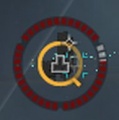 Citadel damage indicator


The outer grey/red circle shows the current damage. It has one section for shield (top), armor (lower left) and hull (lower right). In each section a dot represents 1/12th of full health. A grey dot means intact, a red dot means damaged. So in our example there are only 2 grey dots left on the lower right section, which means the Citadel has only about 17% (2 x 1/12 x 100%) hull left.
The inner yellow circle shows the repair timer. In our example it has about 2/3 of the 15 mins left. One can hover with the mouse over the Citadel damage indicator and it will display how much time is left on the repair timer and whether it is running or paused.
Citadel Destruction
Upon destruction of a Citadel it offlines, becoming a wreck and ejects all online players with their active ship. The wreck remains behind ejecting a Hanger Container that holds dropped loot from the Citadel.
Player and Corporation assets become recoverable via a new tab under Assets known as Saftey. From this menu you can see any assets that are being recovered from a destroyed Citadel. Assets can be manually delivered after a few days to another valid Citadel within the same system at no cost.
Otherwise you are required to wait for auto delivery to take place to an NPC station. This takes significantly longer then manual delivery. For Citadels anchored in 0.0 this defaults to a lowsec NPC station.
- Additional test needed for players that are offline when destroyed.
Difference in Citadels
Astrahus: Medium citadel, only allows subcapital ships to dock, Unable to fit Market Service Module, 20,000m3 Ammo Bay, Unable to use Guided Bomb Launcher, Point Defence, Doomsday, 3 vulnerable hours per week.
Fortizar: Large citadel, allows subcapital and capital ships to dock, unable to use Doomsday, 6 vulnerable hours per week.
Keepstar: Extra-Large citadel, allows all ships to dock, able to fit all citadel modules, 21 vulnerable hours per week.
Structure Browser/Groups
Groups and the Structure Browser: both are found in the Business menu of the neocom [1]
![[1]](http://i.imgur.com/eJrOpJE.png)
You start with a group called "my corp", and you cannot edit this group.
To start make a new Group with the button
[2]
[3]
![[2]](http://i.imgur.com/eIhsAsO.png)
![[3]](http://i.imgur.com/3YlxcKz.png)
The group will start with you in the admin role, and you can add more Character/corp/alliances by dragging them from people and places menu or any other place like chat or a linked name
[4]
![[4]](http://i.imgur.com/EBjQsLZ.png)
The roles in the group are in order Admin > Manager > Member > Blocked.
[5]
A character can be given any of the roles, while Corporation and Alliances can only be given the member and blocked roles.
![[5]](http://i.imgur.com/b4gFEKa.png)
You can add the "public"(the globe icon) to a group but it can only be given the member role. Admins can add remove any of the rolls including other admins, while managers can only add/remove people from the member and blocked roles
Blocked are on the black list even if they are a member of one of the corp with access
[6]
![[6]](http://i.imgur.com/0iUt2nJ.png)
Groups can be shared in chat by dragging them. These group are then Use by structure profiles in the Structure Browser [7]
![[7]](http://i.imgur.com/PFuZQJ2.png)
To start creating and editing profiles go to the 'My Structures' tab [8]
![[8]](http://i.imgur.com/dZEXJJB.png)
Click on the New profile Button [9]
![[9]](http://i.imgur.com/BljrH6X.png)
Before assigning any structures to this new profile I will add group to each roll on the profile setting tab
[10]
the different groups are in order Docking, Defense, Clone Bay, Corporation Office, Market and Reprocessing.
![[10]](http://i.imgur.com/rBD74JB.png)
Defense is taking control of a citadel and is the only way to get it to shoot.
You can add a group to a role by Clicking on the + sign.
[11]
![[11]](http://i.imgur.com/mCzRgTN.png)
Click save after adding the groups
To assign a structure a profile Click on the Any Profile Option and drag them to the one you want
[12]
[13]
changing cost station serves per group
![[12]](http://i.imgur.com/Ux9UiSI.png)
![[13]](http://i.imgur.com/jaOTlio.png)
It’s as easy as changing this value in the profile settings (isk for Clone bay and Corporation offices)(% for market tax and Refining tax) other galactic taxes may apply [14]
![[14]](http://i.imgur.com/BLJgVEz.png)
Fitting
Fitting a Citadel
Fitting a citadel is much like fitting a ship: if you have the roles required to take control of a citadel, you can just open up the fitting window and drop module in just like a ship. [15]
![[15]](http://i.imgur.com/JFqDtR9.png)
To 'online' the service you must have fuel in the fuel bay which only seems accessible while controlling the citadel. [16] This is the same with the fighter bay (which works like the carrier version, if not more buggy) and the ammo hold (if you want the Missile/bomb launcher to reload automatically the ammo must be place in there [17] [18]
![[16]](http://i.imgur.com/Gq4yjtc.png)
![[17]](http://i.imgur.com/etneky6.png)
![[18]](http://i.imgur.com/0vOxoVy.png)
Citadel fits can be saved and shared like ship fits, but currently fitting from a saved fit is bugged [19] [20]
![[19]](http://i.imgur.com/3Cy60Bv.png)
![[20]](http://i.imgur.com/uNDx3zh.png)
Misc/Bugs
- Don't warp to 0 while anchoring. You will get stuck. Smaller ships are typically not affected however.
- Anchored Astrahus at Data Site. Must be 500km off.
- You cannot jump clone into a wormhole system nor set it as your Medical Clone location.
- Micro Jump Field Generators will not move any ship that is tethered including the ship that activated the module.