
Considerations: an enjoyable fleet experience
- Avoiding ship loss: checking fits when a new player joins, making sure nobody brings the wrong fit
- experienced pilots can help FC (example: navigation, finding new sites)
- Encourage everyone in fleet to join you on comms. People can lose ships due to bad communication.
- First timers should be encouraged to fly DPS caracals in most cases.
- Using a clear overview, and managing your squads. Helps efficiency and keeps track of who is flying what roles, who is in queue etc.
- Make your life easy with some basic MOTD info like Staging / Comms / Euni Overview link / Fits / Lifesaving rules / FAQ & Wiki links. You will get stuff asked about this frequently, kindly draw their attention to the MOTD.
- Set boundariesfor yourself: I will run x amount ofsites / I will run for 2 hrs / also communicate this to your fleetmembers ... if you know you will be folding soon it does not make sense to keep accepting people into a queue unless you have an FC waiting to take over.
Example - Raid: Deserters Hideout
Starting a fleet
- Start by forming a fleet and selecting the Fleet Setup template you want to use. Store Fleet Setup function allows you to store MOTD / Wing & squad layout / Free-move settings & default squad.


- Fleet MOTD: point attention to your fleet motd, especially to newer players, it helps you save time not having to explain everything every time.

- Fleet hierarchy setup: helps you keep track of who is flying what role? The FC role allows you to drag & drop pilots into squads. howover if fleet has 'freemove' option checked, pilot's can drag themselves into the squad of their choice. Having a default squad (Lobby) helps you find new pilots easily when people join your fleet via the fleet advertisement.

- Queue management: Try limiting the queue to only 3 pilots. You can set your fleet size to 8 pilots via the "..." three vertical dot icon in the upper right part of the fleet window.

Recruiting players:
- Starting a fleet advertisement:
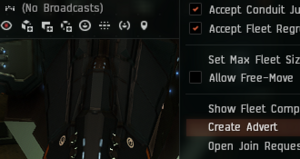
Start a fleet advertisment 1 - Pay attention to settings: Fleetname / Description /My corp / My Alliance / Application requires approval / Auto update advert on Boss change
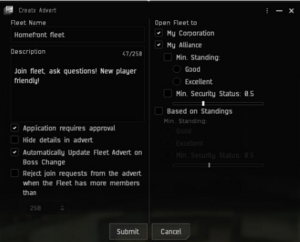
Start a fleet advertisment 2 - Use the Agency window > Fleet Up! tab to find your advert. You can link your advert into corpchat from this location.

Find your fleet advertisement
- Pay attention to settings: Fleetname / Description /My corp / My Alliance / Application requires approval / Auto update advert on Boss change


- Corp chat recruitment: create a recruitment message with sufficient info should minimize resoponding to alot of questions like "where do I go? what do I train? what do I fly" . It will draw people to your fleet advert and they can join you with you having to manually invite everyone (!timesaver!)

corp chat recruitment example

- Contact list: Adding people to you contact list / buddy list helps you keep track of people and may prove useful for future fleet recruitment.

- Meeting new players in your fleet? Add them to contact, keep track of who you fly with.


- Keeping notes helps you keep track of where you've met people, what they can fly, what timezone they're in.
