
Considerations: an enjoyable fleet experience
- Avoiding ship loss: checking fits when a new player joins, making sure nobody brings the wrong fit
- experienced pilots can help FC (example: navigation, finding new sites), ask if anyone want to help with the navigation to support FC
- Ask if players have flown homefronts or raids before, it will give you more insight into how much details you need to go over when you're flying with them. Maybe they still need to learn very basic concepts within the game (navigatio, overview settings, finding an acceleration gate, not autopilotting)
- Encourage everyone in fleet to join you on comms. People can lose ships due to bad communication.
- First timers should be encouraged to fly DPS caracals in most cases.
- Using a clear overview, and managing your squads. Helps efficiency and keeps track of who is flying what roles, who is in queue etc.
- Make your life easy with some basic MOTD info like Staging / Comms / Euni Overview link / Fits / Lifesaving rules / FAQ & Wiki links. You will get stuff asked about this frequently, kindly draw their attention to the MOTD.
- Set boundariesfor yourself: I will run x amount ofsites / I will run for 2 hrs / also communicate this to your fleetmembers ... if you know you will be folding soon it does not make sense to keep accepting people into a queue unless you have an FC waiting to take over.
Example - Raid: Deserters Hideout
Starting a fleet
- Start by forming a fleet and selecting the Fleet Setup template you want to use. The Store Fleet Setup function allows you to store MOTD / Wing & squad layout / Free-move settings & default squad.


- One benifit of having a comprehensive MOTD is that you can point pilots to it to find out more info, especially to newer players, it helps you save time not having to explain everything every time.

- Fleet hierarchy setup: helps you keep track of who is flying what role? The FC role allows you to drag & drop pilots into squads. howover if fleet has 'freemove' option checked, pilot's can drag themselves into the squad of their choice. Having a default squad (Lobby) helps you find new pilots easily when people join your fleet via the fleet advertisement.

- Queue management: Try limiting the queue to only 3 pilots. You can set your fleet size to 8 pilots via the "..." three vertical dot icon in the upper right part of the fleet window.

Recruiting for fleet
Fleet advertisement
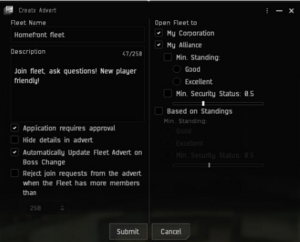
- Starting an advertisement is the first step to in-corp recruitment for your fleet
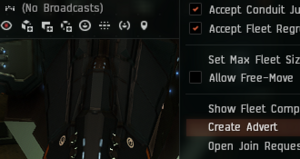
Start a fleet advertisment 1 - Pay attention to settings: Fleetname / Description /My corp / My Alliance / Application requires approval / Auto update advert on Boss change
Start a fleet advertisment 2 - Use the Agency window > Fleet Up! tab to find your advert. You can link your advert into corpchat from this location.

Find your fleet advertisement
- Pay attention to settings: Fleetname / Description /My corp / My Alliance / Application requires approval / Auto update advert on Boss change


Corporation callouts
- Create a recruitment message with sufficient info should minimize responsetime to alot of questions like "where do I go? what do I train? what do I fly" . It will draw people to your fleet advert and they can join you with you having to manually invite everyone (!timesaver!)

corp chat recruitment example

Contact list management
- Adding people to you contact list / buddy list helps you keep track of people and may prove useful for future fleet recruitment.

- Meeting new players in your fleet? Add them to contact, keep track of who you fly with.


- Keeping notes helps you keep track of where you've met people, what they can fly, what timezone they're in.

Alternate homefront channels
- if you struggle finding enough pilots to run a fleet you can try shouting into one of the following channels for extra pilots. Beware that some of these might need more time to travel to your staging area, they might not use comms, they might suffer from 'bitter vet' syndrome.
