
More actions
No edit summary |
Removed template and infobox. |
||
| (12 intermediate revisions by 3 users not shown) | |||
| Line 1: | Line 1: | ||
{{ | {{deprecated}} | ||
[[File:Teams mouseover.png|left]] | [[File:Teams mouseover.png|left]] | ||
'''Teams''' | '''Teams''' are a superior alternative to the NPC workforce provided when starting industry jobs, which help decrease the amount of materials needed for a job, or help decrease the time that said jobs take to complete, depending on which team you use to start a job. | ||
You don't need to use a team, a basic workforce is always provided by default. However highly skilled teams may be available for hire in your system, or if not you can bid on teams elsewhere in order to move them to your system. Note that teams in a system can be used by ''anyone'' in that system, not just you, even if you are the only one to bid on them. | You don't need to use a team, a basic workforce is always provided by default. However highly skilled teams may be available for hire in your system, or if not you can bid on teams elsewhere in order to move them to your system. Note that teams in a system can be used by ''anyone'' in that system, not just you, even if you are the only one to bid on them. | ||
| Line 28: | Line 27: | ||
{{note box|When you switch to the Teams tab whilst you have a blueprint active in the upper part of the Industry window, the drop-down boxes will be auto-selected, and the Filter box will be auto-filled, so that you will only see teams that can affect your current blueprint & activity. To see more teams, you will need to clear these selections.}} | {{note box|When you switch to the Teams tab whilst you have a blueprint active in the upper part of the Industry window, the drop-down boxes will be auto-selected, and the Filter box will be auto-filled, so that you will only see teams that can affect your current blueprint & activity. To see more teams, you will need to clear these selections.}} | ||
===Hiring a Team=== | |||
* Install a blueprint, then switch to the Teams tab (to ensure the only teams visible are the ones that affect your job). | |||
* Simply clicking on a Team will activate on your job (note the team image at the very top of window change). If the selected team is not in your system, you will not be able to start the job. | |||
* Click on the small red X at the top-right of the team image to remove a team from a job. | |||
===Team Type=== | ===Team Type=== | ||
| Line 53: | Line 57: | ||
|- | |- | ||
|''Equipment'' | |''Equipment'' | ||
|All starship modules | |All starship modules, rigs, implants and scripts | ||
|} | |} | ||
| Line 62: | Line 66: | ||
Each team member's specialty can be either ''broad'' or ''narrow''. ''Broad'' specialties affect an entire class of items, such as small, medium or large classes of ships and provide '''smaller''' bonuses. ''Narrow'' specialties affect a specific type of item, like industrial ships or frigates and provide '''larger''' bonuses. | Each team member's specialty can be either ''broad'' or ''narrow''. ''Broad'' specialties affect an entire class of items, such as small, medium or large classes of ships and provide '''smaller''' bonuses. ''Narrow'' specialties affect a specific type of item, like industrial ships or frigates and provide '''larger''' bonuses. | ||
Below is a list of all broad | Below is a list of all specialties (broad and narrow), sorted by type. | ||
{| class="wikitable" style="text-align: center;" | {|class="wikitable" style="text-align: center;" | ||
|'''Broad | |'''Type''' | ||
|''' | |'''Broad Specialties''' | ||
|'''Narrow Specialties''' | |||
|- | |||
|''Structure''||''Starbase''||Starbase Core, Starbase Weapons, Starbase Defense, Starbase Processing, Starbase Production, Starbase Storage | |||
|- | |||
|''Structure''||''Deployables''||Mobile Structures; Mobile Disruption | |||
|- | |||
|''Structure''||''Sovereignty''||I-HUBs, SBUs, TCUs | |||
|- | |||
|''Structure''||''Containers''||None. | |||
|- | |||
|''Components''||''Subsystem''||Defensive Systems, Electronic Systems, Engineering Systems, Offensive Systems, Propulsion Systems | |||
|- | |||
|''Components''||''Capital Construction''||None. | |||
|- | |||
|''Components''||''Construction Components''||None. | |||
|- | |||
|''Components''||''Outpost Components''||None. | |||
|- | |||
|''Components''||''Tools''||None. | |||
|- | |||
|''Components''||''Hybrid Components''||None. | |||
|- | |||
|''Components''||''Data Interfaces''||None. | |||
|- | |||
|''Consumables''||''Ammo''||Bombs, Crystals, Hybrid Ammo, Missiles & Rockets, Projectile Ammo | |||
|- | |||
|''Consumables''||''Capacitor Boosters''||None. | |||
|- | |||
|''Consumables''||''Fuel Blocks''||None. | |||
|- | |||
|''Consumables''||''Nanite Repair Paste''||None. | |||
|- | |||
|''Consumables''||''Neural Boosters''||None. | |||
|- | |||
|''Consumables''||''Interdiction Probe''||None. | |||
|- | |- | ||
|''Small Class'' | |''Ship''||''Small Class''||Assault Frigate, Covert Ops, Destroyer, Electronic Attack Ship, Frigate, Interceptor, Interdictor, Shuttle | ||
| | |||
|- | |- | ||
|''Medium Class'' | |''Ship''||''Medium Class''||Battlecruiser, Command Ship, Cruiser, Industrial Ship, Heavy Assault Cruiser, Heavy Interdiction Cruiser, Logistics, Mining Barge, Recon Ship, Strategic Cruiser | ||
| | |||
|- | |- | ||
|''Large Class'' | |''Ship''||''Large Class''||Battleship, Black Ops, Marauder | ||
| | |||
|- | |- | ||
|''Capital Class'' | |''Ship''||''Capital Class''||Capital Industrial Ship, Carrier, Dreadnought, Freighter, Supercarrier, Titan | ||
| | |||
|- | |- | ||
|'' | |''Mobile''||''Disruption Drones''||Cap Drain Drone, EW Drone, Stasis Webifying Drone | ||
| | |||
|- | |- | ||
|'' | |''Mobile''||''Warfare Drones''||Combat Drone | ||
| | |||
|- | |- | ||
|'' | |''Mobile''||''Fighters''||Fighter Bomber, Fighter Drone | ||
| | |||
|- | |- | ||
|'' | |''Mobile''||''Utility Drone''||Logistics Drone, Mining Drone, Salvage Drone | ||
| | |||
|- | |- | ||
|'' | |''Mobile''||''Scanner Probe''||None. | ||
| | |||
|- | |- | ||
|'' | |''Mobile''||''Survey Probe''||None. | ||
| | |||
|- | |- | ||
|'' | |''Equipment''||''Armor''||Armor Active Modules, Armor Passive Expanders, Armor Passive Resistance | ||
| | |||
|- | |- | ||
|'' | |''Equipment''||''Shields''||Shield Active Modules, Shield Passive Recharge, Shield Passive Extenders, Shield Passive Resistance | ||
| | |||
|- | |- | ||
|'' | |''Equipment''||''Electronics Warfare''||ECM & ECCM, Energy Drain Modules, Tracking Disruptor, Warp Scrambling Modules | ||
| | |||
|- | |- | ||
|'' | |''Equipment''||''Damage''||Damage Amplifiers, Energy Weapon, Hybrid Weapon, Missile Launchers, Projectile Weapon, Smart Bomb | ||
| | |||
|- | |- | ||
|'' | |''Equipment''||''Engineering''||Capacitor Active, Capacitor Passive, Capital Modules, Damage Control, Fitting Modules, Hull Modules | ||
| | |||
|- | |- | ||
|'' | |''Equipment''||''Navigation''||Cloaking Device, Jump Modules, Propulsion Modules, Stasis Web, Stabilizer Modules | ||
| | |||
|- | |- | ||
|'' | |''Equipment''||''Sensor & Targeting''||Fleet Coordinator, Remote Modules, Targeting Modules, Tracking Modules, Tractor Beam | ||
| | |||
|- | |- | ||
|'' | |''Equipment''||''Drone Modules''||Drone Operation Modules, Drone Effectiveness Modules | ||
| | |||
|- | |- | ||
|'' | |''Equipment''||''Scanner & Harvesting''||Harvesting Modules, Scanning Modules, Surveying Modules | ||
| | |||
|- | |- | ||
|'' | |''Equipment''||''Rigs''||None. | ||
| | |||
|- | |- | ||
|'' | |''Equipment''||''Implants''||None. | ||
| | |||
|- | |- | ||
|'' | |''Equipment''||''Scripts''||None. | ||
| | |||
|- | |- | ||
|} | |} | ||
The magnitude of the bonus generated from an individual team member's specialty is dependent on whether the specialty is ''narrow'' or ''broad'', as stated above, as well as if it affects material efficiency or manufacturing time. In addition, each team member has an efficiency level, which also affects how big the bonuses they give will be. | The magnitude of the bonus generated from an individual team member's specialty is dependent on whether the specialty is ''narrow'' or ''broad'', as stated above, as well as if it affects material efficiency or manufacturing time. In addition, each team member has an efficiency level, which also affects how big the bonuses they give will be. | ||
| Line 186: | Line 199: | ||
Note that a higher salary, like the one that a specialized team has will increase the overall job cost, as salary is a multiplier on the total job cost of a particular job. | Note that a higher salary, like the one that a specialized team has will increase the overall job cost, as salary is a multiplier on the total job cost of a particular job. | ||
[[File:Team salary.png|left]]It is very important to carefully inspect the available teams before you use them. Because the salary of a team is affected by all four of its specialties, the one specialty that affects your job may be present on teams with different salaries. Take the example to the left; all three teams affect the material level when building a ''Small class'' of ship, but the salary of each is entirely different, due to the other specialties of the team. In this image, do not make the mistake of picking team 1, when teams 2 and 3 both do the same thing for a smaller salary.{{clear}} | |||
===Restrictions=== | ===Restrictions=== | ||
| Line 193: | Line 208: | ||
You cannot use a team to help with a job outside of the team's current system. | You cannot use a team to help with a job outside of the team's current system. | ||
If you want to | ==Team Chartering== | ||
If you want to bid on a team, to bring it into your system, click the '''^^ Team Chartering ^^''' bar at the bottom of the Teams tab to go to the Teams currently in the auction stage. | |||
[[File:Team chartering.png]] | [[File:Team chartering.png]] | ||
| Line 205: | Line 221: | ||
Bids are placed on behalf of systems, not on behalf of players. You cannot see the names of players that have placed bids, only the systems. If you place a bid on behalf of a system that already has a bid, your bid will be added to the previous bid(s) to increase the total bid value on behalf of that system. | Bids are placed on behalf of systems, not on behalf of players. You cannot see the names of players that have placed bids, only the systems. If you place a bid on behalf of a system that already has a bid, your bid will be added to the previous bid(s) to increase the total bid value on behalf of that system. | ||
===How to bid on a team=== | |||
* Click the word '''Bid''' to bring up the bidding pop-up and type a partial name of the system to which you wish to hire the team. | * Click the word '''Bid''' to bring up the bidding pop-up and type a partial name of the system to which you wish to hire the team. | ||
* Press Enter, and a list of matching names will be displayed. [[File:Bid process 1.png|top]] | * Press Enter, and a list of matching names will be displayed. [[File:Bid process 1.png|top]] | ||
Latest revision as of 15:15, 29 March 2017

Teams are a superior alternative to the NPC workforce provided when starting industry jobs, which help decrease the amount of materials needed for a job, or help decrease the time that said jobs take to complete, depending on which team you use to start a job.
You don't need to use a team, a basic workforce is always provided by default. However highly skilled teams may be available for hire in your system, or if not you can bid on teams elsewhere in order to move them to your system. Note that teams in a system can be used by anyone in that system, not just you, even if you are the only one to bid on them.
How do teams work?

Life Cycle
Teams are seeded over time, and each new team's stats, name, home and activities are all randomized in order to provide a wider variety of teams for players to choose from.
Teams can either be active and usable by players to improve their jobs in the teams current system, or in auction and being bid on by players on behalf of a solar system.
A team's "life" starts when it is created. At that point, players can then make bids on teams during the auction or chartering period of 7 days. Should no one make a bid on a team by the time the auction period ends, that team will retire immediately, but this should be rare in practice (given that minimum bid values are very low) . After the auction period ends, the team will move to the system where the highest bid for it was made during the auction/chartering period. Players in that system can then use the team as the workforce for their jobs and enjoy the bonuses for a period of 4 weeks, after which the team will retire and become unusable.
Teams Tab

This is the Teams tab of the Industry window. The drop-down boxes are currently showing all active teams in the universe, sorted by number of Jumps away. You can see that currently there is a team in my system that can help with my current blueprint (a drone BPO), indicated by the highlighted 'Warfare Drones (ME) -2.0%' text. If I select that team, it will fill the Teams box of the job, and automatically adjust the amount of minerals required and the Total Job Cost.
The Activity column shows what activity the team will work on (there are currently no Invention teams), whilst the Salary column shows you how much extra ISK it will cost to install the job.
Click the ^^ Team Chartering ^^ bar to go to the Teams currently in the auction stage.
Hiring a Team
- Install a blueprint, then switch to the Teams tab (to ensure the only teams visible are the ones that affect your job).
- Simply clicking on a Team will activate on your job (note the team image at the very top of window change). If the selected team is not in your system, you will not be able to start the job.
- Click on the small red X at the top-right of the team image to remove a team from a job.
Team Type
Each team has a type, indicating what activities it can affect as a team. Each team only has one of six available types, which are listed below.
| Type | What does it affect? |
| Structure | Starbase and Sovereignty structures, containers and deployables |
| Components | Industrial components required in T2/T3 manufacturing (e.g.: capital ship and hybrid tech components) |
| Consumables | All consumable items (boosters, nanite paste, ammunition, fuel blocks, etc.) |
| Ship | All starships |
| Mobile | Drones & probes |
| Equipment | All starship modules, rigs, implants and scripts |
Specialties
All teams have four specialties, or bonuses that they can give, which come from its members - each team member contributes one specialty to the team.
Each team member's specialty can be either broad or narrow. Broad specialties affect an entire class of items, such as small, medium or large classes of ships and provide smaller bonuses. Narrow specialties affect a specific type of item, like industrial ships or frigates and provide larger bonuses.
Below is a list of all specialties (broad and narrow), sorted by type.
| Type | Broad Specialties | Narrow Specialties |
| Structure | Starbase | Starbase Core, Starbase Weapons, Starbase Defense, Starbase Processing, Starbase Production, Starbase Storage |
| Structure | Deployables | Mobile Structures; Mobile Disruption |
| Structure | Sovereignty | I-HUBs, SBUs, TCUs |
| Structure | Containers | None. |
| Components | Subsystem | Defensive Systems, Electronic Systems, Engineering Systems, Offensive Systems, Propulsion Systems |
| Components | Capital Construction | None. |
| Components | Construction Components | None. |
| Components | Outpost Components | None. |
| Components | Tools | None. |
| Components | Hybrid Components | None. |
| Components | Data Interfaces | None. |
| Consumables | Ammo | Bombs, Crystals, Hybrid Ammo, Missiles & Rockets, Projectile Ammo |
| Consumables | Capacitor Boosters | None. |
| Consumables | Fuel Blocks | None. |
| Consumables | Nanite Repair Paste | None. |
| Consumables | Neural Boosters | None. |
| Consumables | Interdiction Probe | None. |
| Ship | Small Class | Assault Frigate, Covert Ops, Destroyer, Electronic Attack Ship, Frigate, Interceptor, Interdictor, Shuttle |
| Ship | Medium Class | Battlecruiser, Command Ship, Cruiser, Industrial Ship, Heavy Assault Cruiser, Heavy Interdiction Cruiser, Logistics, Mining Barge, Recon Ship, Strategic Cruiser |
| Ship | Large Class | Battleship, Black Ops, Marauder |
| Ship | Capital Class | Capital Industrial Ship, Carrier, Dreadnought, Freighter, Supercarrier, Titan |
| Mobile | Disruption Drones | Cap Drain Drone, EW Drone, Stasis Webifying Drone |
| Mobile | Warfare Drones | Combat Drone |
| Mobile | Fighters | Fighter Bomber, Fighter Drone |
| Mobile | Utility Drone | Logistics Drone, Mining Drone, Salvage Drone |
| Mobile | Scanner Probe | None. |
| Mobile | Survey Probe | None. |
| Equipment | Armor | Armor Active Modules, Armor Passive Expanders, Armor Passive Resistance |
| Equipment | Shields | Shield Active Modules, Shield Passive Recharge, Shield Passive Extenders, Shield Passive Resistance |
| Equipment | Electronics Warfare | ECM & ECCM, Energy Drain Modules, Tracking Disruptor, Warp Scrambling Modules |
| Equipment | Damage | Damage Amplifiers, Energy Weapon, Hybrid Weapon, Missile Launchers, Projectile Weapon, Smart Bomb |
| Equipment | Engineering | Capacitor Active, Capacitor Passive, Capital Modules, Damage Control, Fitting Modules, Hull Modules |
| Equipment | Navigation | Cloaking Device, Jump Modules, Propulsion Modules, Stasis Web, Stabilizer Modules |
| Equipment | Sensor & Targeting | Fleet Coordinator, Remote Modules, Targeting Modules, Tracking Modules, Tractor Beam |
| Equipment | Drone Modules | Drone Operation Modules, Drone Effectiveness Modules |
| Equipment | Scanner & Harvesting | Harvesting Modules, Scanning Modules, Surveying Modules |
| Equipment | Rigs | None. |
| Equipment | Implants | None. |
| Equipment | Scripts | None. |
The magnitude of the bonus generated from an individual team member's specialty is dependent on whether the specialty is narrow or broad, as stated above, as well as if it affects material efficiency or manufacturing time. In addition, each team member has an efficiency level, which also affects how big the bonuses they give will be.
Below is a list that shows that correlates efficiency levels to bonuses for broad and narrow specialties:
| Efficiency Level | Material Reqd. | Manufacturing Time | ||
| Broad | Narrow | Broad | Narrow | |
| 1 | -0.5% | -1.0% | -1.0% | -2.0% |
| 2 | -1.0% | -2.0% | -2.0% | -4.0% |
| 3 | -1.5% | -3.0% | -3.0% | -6.0% |
| 4 | -2.0% | -4.0% | -4.0% | -8.0% |
| 5 | -2.5% | -5.0% | -5.0% | -10.0% |
Salary
Salary is essentially what you are required to pay your workforce so it can do its job. If you use the provided NPC workforce, you don't have to worry about salary at all, since it is part of the original cost of installing a job. However, if you use a specialized team to make your jobs quicker or more efficient, you will need to pay anywhere between 2% and 18% more than the NPC workforce salary depending on the efficiency level of your specialized team.
Note that a higher salary, like the one that a specialized team has will increase the overall job cost, as salary is a multiplier on the total job cost of a particular job.

It is very important to carefully inspect the available teams before you use them. Because the salary of a team is affected by all four of its specialties, the one specialty that affects your job may be present on teams with different salaries. Take the example to the left; all three teams affect the material level when building a Small class of ship, but the salary of each is entirely different, due to the other specialties of the team. In this image, do not make the mistake of picking team 1, when teams 2 and 3 both do the same thing for a smaller salary.
Restrictions
Teams cannot technically be owned by a particular entity, be it an individual, corporation or alliance, as they are tied to systems, and not structures in said system, like stations. However, members of a sovereignty-holding alliance could hire a team to a system containing only structures in which they forbid docking/entering rights to people outside their alliance, effectively limiting the team to the members of their own alliance.
You cannot use a team to help with a job outside of the team's current system.
Team Chartering
If you want to bid on a team, to bring it into your system, click the ^^ Team Chartering ^^ bar at the bottom of the Teams tab to go to the Teams currently in the auction stage.

You can easily see the details of each team, along with extra columns details when the auction ends and the current bid. Mouseover the current bid value to see the list of systems that have bids on the team.
Bids are placed on behalf of systems, not on behalf of players. You cannot see the names of players that have placed bids, only the systems. If you place a bid on behalf of a system that already has a bid, your bid will be added to the previous bid(s) to increase the total bid value on behalf of that system.
How to bid on a team
- Click the word Bid to bring up the bidding pop-up and type a partial name of the system to which you wish to hire the team.
- Press Enter, and a list of matching names will be displayed.
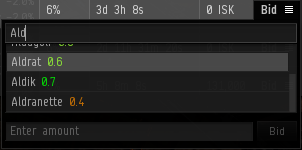
- Double-click the system you require to select it.
- Type in your bid value in the next box (it will tell you what the minimum bid is).
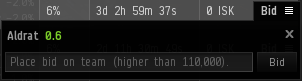
- Click the Bid button.
- Your bid is now active.
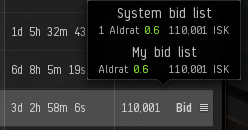


You cannot retract your bid once it is made. If your bid was not successful, you will receive the amount you bid back into your wallet. There is (currently) no way to easily view your bids, apart from looking for Industry Team Bids or Bid Reimbursements in your wallet journal.