More actions
m Update link. |
m Bot: Automated text replacement (-[[campuses +[[communities); cosmetic changes |
||
| Line 13: | Line 13: | ||
If you were invited to EVE by a friend (i.e. you have a [https://secure.eveonline.com/recruit/ referral link]), use it when creating your account, as you will get some free [[Skills and learning|skill points]] (equivalent to about 2 to 6 weeks of training time). Additionally, your friend will receive a reward. It's possible to invite yourself to create additional accounts. | If you were invited to EVE by a friend (i.e. you have a [https://secure.eveonline.com/recruit/ referral link]), use it when creating your account, as you will get some free [[Skills and learning|skill points]] (equivalent to about 2 to 6 weeks of training time). Additionally, your friend will receive a reward. It's possible to invite yourself to create additional accounts. | ||
Even if you were not invited, you can use a public invitation link. Those are often shared by streamers and YouTubers. Use a search engine to find them. | Even if you were not invited, you can use a public invitation link. Those are often shared by streamers and YouTubers. Use a search engine to find them. | ||
Sadly, sometimes accounts are hacked. Observe [https://www.eveonline.com/de/article/account-security basic security considerations] to prevent this. On top of that, you should use [https://support.eveonline.com/hc/en-us/articles/203465601-Authenticator Two-Factor Authentication]. | Sadly, sometimes accounts are hacked. Observe [https://www.eveonline.com/de/article/account-security basic security considerations] to prevent this. On top of that, you should use [https://support.eveonline.com/hc/en-us/articles/203465601-Authenticator Two-Factor Authentication]. | ||
| Line 53: | Line 53: | ||
{{Main|AIR New Player Experience|Tutorial}} | {{Main|AIR New Player Experience|Tutorial}} | ||
When you first start the game as a new character, you can go through the tutorial (also called the "New Player Experience"), a story-driven experience that gives you step-by-step instructions on the basic mechanics of playing EVE. Unless you've already played the game, it's highly recommended that you follow the tutorial, as there are many particular mechanics which you may not be used to. | When you first start the game as a new character, you can go through the tutorial (also called the "New Player Experience"), a story-driven experience that gives you step-by-step instructions on the basic mechanics of playing EVE. Unless you've already played the game, it's highly recommended that you follow the tutorial, as there are many particular mechanics which you may not be used to. | ||
=== Career Agents === | === Career Agents === | ||
{{main|Career Agents}} | {{main|Career Agents}} | ||
The next step in learning to play EVE (after the tutorial) is to visit the career agents and do the missions they offer to you, which expand on what you've learned in the tutorial and introduce you to some of the main [[PvE]] activities in EVE Online. The agents are not exclusive, and you can do as many of the agents' missions as you want. It's highly recommended that you do as many of them as interest you, as they not only explain many more game mechanics, but also offer some good rewards for new players. | The next step in learning to play EVE (after the tutorial) is to visit the career agents and do the missions they offer to you, which expand on what you've learned in the tutorial and introduce you to some of the main [[PvE]] activities in EVE Online. The agents are not exclusive, and you can do as many of the agents' missions as you want. It's highly recommended that you do as many of them as interest you, as they not only explain many more game mechanics, but also offer some good rewards for new players. | ||
However, keep in mind that they offer little training in [[PvP]], which makes up a very substantial part of the game. Additionally, EVE is a sandbox game, and much of the attraction of the game is forging your own path as opposed to following a pre-set path. | However, keep in mind that they offer little training in [[PvP]], which makes up a very substantial part of the game. Additionally, EVE is a sandbox game, and much of the attraction of the game is forging your own path as opposed to following a pre-set path. | ||
There are five career agents, each offering between 5 and 10 missions in a certain area: | There are five career agents, each offering between 5 and 10 missions in a certain area: | ||
* Industrialist - Producer | * Industrialist - Producer | ||
* Industrialist - Entrepreneur | * Industrialist - Entrepreneur | ||
| Line 70: | Line 70: | ||
If you've followed the tutorial, you will have flown to the station housing the nearest career agents; all five agents are always located in the same station. If you skipped the tutorial, you can locate the closest set of career agents (there are three sets of agents per faction, but they all offer the same missions): | If you've followed the tutorial, you will have flown to the station housing the nearest career agents; all five agents are always located in the same station. If you skipped the tutorial, you can locate the closest set of career agents (there are three sets of agents per faction, but they all offer the same missions): | ||
# Open the Help menu in-game ({{button|F12}}, or click on the "?" icon in your NeoCom) | # Open the Help menu in-game ({{button|F12}}, or click on the "?" icon in your NeoCom) | ||
# Look for the section called "Career Advancement" on the Support tab. | # Look for the section called "Career Advancement" on the Support tab. | ||
# Click on the button "Show Career Agents". This will open another window that will present you with the 5 closest Career agents to your current location. | # Click on the button "Show Career Agents". This will open another window that will present you with the 5 closest Career agents to your current location. | ||
# At the bottom right there will be a button labelled "Set Destination". Click it to plot a route to follow to get to the system and station where that agent is at. | # At the bottom right there will be a button labelled "Set Destination". Click it to plot a route to follow to get to the system and station where that agent is at. | ||
You can do the agents in any order you like (although you should do the Explorer agent before you do the Soldier of Fortune one). | You can do the agents in any order you like (although you should do the Explorer agent before you do the Soldier of Fortune one). | ||
| Line 81: | Line 81: | ||
{{LessonLearned|lesson=Be wary that many miscreant players and corporations hang around SoE systems to prey upon New Players.}} | {{LessonLearned|lesson=Be wary that many miscreant players and corporations hang around SoE systems to prey upon New Players.}} | ||
After you have completed the missions for the career agents, the EVE galaxy is yours to explore! Should you like to run a few more story-related missions, you can do the [[Servant Sisters of EVE|Sisters of EVE]] epic mission arc "The Blood-Stained Stars". The epic arc is a series of 50 connected missions which take you all over [[System security#High security|highsec]] and expose you to quite a bit of the background and lore of the game, particularly concerning the Rogue Drones and the secret Society of Conscious Thought. To start it you should go to the [https://evemaps.dotlan.net/map/Essence/Arnon#sec Arnon] system and talk to Sister Alitura at the Sisters of EVE Bureau. | After you have completed the missions for the career agents, the EVE galaxy is yours to explore! Should you like to run a few more story-related missions, you can do the [[Servant Sisters of EVE|Sisters of EVE]] epic mission arc "The Blood-Stained Stars". The epic arc is a series of 50 connected missions which take you all over [[System security#High security|highsec]] and expose you to quite a bit of the background and lore of the game, particularly concerning the Rogue Drones and the secret Society of Conscious Thought. To start it you should go to the [https://evemaps.dotlan.net/map/Essence/Arnon#sec Arnon] system and talk to Sister Alitura at the Sisters of EVE Bureau. | ||
While doing the epic arc, you should focus on continuing to train your combat skills. You can do most of the initial missions in a [[Frigates|Frigate]], but you should consider upgrading to a [[Destroyers|Destroyer]] or even a [[Cruisers|Cruiser]] towards the end. | While doing the epic arc, you should focus on continuing to train your combat skills. You can do most of the initial missions in a [[Frigates|Frigate]], but you should consider upgrading to a [[Destroyers|Destroyer]] or even a [[Cruisers|Cruiser]] towards the end. | ||
Most of the missions will be fairly easy, but some (particularly towards the end, like the infamous "[[Burning Down the Hive]]" or "[[Our Man Dagan]]") have a reputation for being very challenging for new players. If you find yourself struggling, don't be shy to ask for help in the [[EVE University Chat Channels#Public Channels|E-UNI chat channel]] as many EVE University players would be happy to help you. | Most of the missions will be fairly easy, but some (particularly towards the end, like the infamous "[[Burning Down the Hive]]" or "[[Our Man Dagan]]") have a reputation for being very challenging for new players. If you find yourself struggling, don't be shy to ask for help in the [[EVE University Chat Channels#Public Channels|E-UNI chat channel]] as many EVE University players would be happy to help you. | ||
| Line 95: | Line 95: | ||
You can queue up skills to be trained one after the other, up to a maximum of 24 hours into the future (for [[Clone states|Alpha characters]]) or nearly infinitely (for Omega characters). Skills have five levels (I through V), and while the benefits of each additional level scale linearly, the training time increases exponentially: it's usually not worth training skills beyond level IV in your first few days. Instead, focus on the skills which either improve whatever you're doing at the moment, or which unlock new ships or modules you want to try. | You can queue up skills to be trained one after the other, up to a maximum of 24 hours into the future (for [[Clone states|Alpha characters]]) or nearly infinitely (for Omega characters). Skills have five levels (I through V), and while the benefits of each additional level scale linearly, the training time increases exponentially: it's usually not worth training skills beyond level IV in your first few days. Instead, focus on the skills which either improve whatever you're doing at the moment, or which unlock new ships or modules you want to try. | ||
As you get a feel for what you enjoy doing in EVE you can focus your training in that particular area. Skills are cumulative, and a character (provided they have an [[Clone states|Omega clone]]) can potentially learn every skill in the game given enough time. It is even possible to "extract " spent skill points and apply them elsewhere, for a price. So don't worry too much about training "the wrong skill" at the start of the game. | As you get a feel for what you enjoy doing in EVE you can focus your training in that particular area. Skills are cumulative, and a character (provided they have an [[Clone states|Omega clone]]) can potentially learn every skill in the game given enough time. It is even possible to "extract " spent skill points and apply them elsewhere, for a price. So don't worry too much about training "the wrong skill" at the start of the game. | ||
You start the game with a [[Starting skills|number of skills]] already trained. To train additional skills, you must first acquire the appropriate skillbook. While you will receive a few skillbooks as rewards from the [[Getting Started in EVE Online#Career Agents|career agents]], the others must be bought on the [[trading|market]]; most of the basic skillbooks are reasonably cheap. EVE University provides certain [[Skillbook Program|skillbooks for free]] to its members. | You start the game with a [[Starting skills|number of skills]] already trained. To train additional skills, you must first acquire the appropriate skillbook. While you will receive a few skillbooks as rewards from the [[Getting Started in EVE Online#Career Agents|career agents]], the others must be bought on the [[trading|market]]; most of the basic skillbooks are reasonably cheap. EVE University provides certain [[Skillbook Program|skillbooks for free]] to its members. | ||
You can speed up your training time by installing [[implants]] in your character, specifically the basic attribute-enhancing implants, which add between +1 and +5 points to your character's attributes. While the better implants are extremely expensive, +1 implants are affordable even for new players. Members of EVE University can also buy [[The +3 Implants Program|+3 implants at a discount]]. | You can speed up your training time by installing [[implants]] in your character, specifically the basic attribute-enhancing implants, which add between +1 and +5 points to your character's attributes. While the better implants are extremely expensive, +1 implants are affordable even for new players. Members of EVE University can also buy [[The +3 Implants Program|+3 implants at a discount]]. | ||
== Fitting your Ship == | == Fitting your Ship == | ||
| Line 111: | Line 111: | ||
* [[ORE Basic Ship and Skill Overview]] | * [[ORE Basic Ship and Skill Overview]] | ||
Additionally, there is a [[Fitting Modules and Rigs Guide|complete list]] of all modules and rigs, and what they do. EVE University members can also ask for fitting advice in the [https://forum.eveuniversity.org/viewforum.php?f=124 EVE University PvP and PvE ship setup forums] or the <code>#fitting-chat</code> [[Discord]] channel. | Additionally, there is a [[Fitting Modules and Rigs Guide|complete list]] of all modules and rigs, and what they do. EVE University members can also ask for fitting advice in the [https://forum.eveuniversity.org/viewforum.php?f=124 EVE University PvP and PvE ship setup forums] or the <code>#fitting-chat</code> [[Discord]] channel. | ||
It's also a good idea to set up [[PYFA]], a popular tool that lets you build and simulate fittings out of game. PYFA will let you easily simulate fittings and see what skills you'll need to train to fly them. | It's also a good idea to set up [[PYFA]], a popular tool that lets you build and simulate fittings out of game. PYFA will let you easily simulate fittings and see what skills you'll need to train to fly them. | ||
| Line 117: | Line 117: | ||
== Joining a Corporation == | == Joining a Corporation == | ||
Corporations are EVE's version of player organisations, vaguely similar to guilds or clans in other games, but with more scope for influencing the game. EVE is, at its heart, a social game, and while it's perfectly possible to play the game by yourself, most long-time EVE players cite the sense of community in their corporation as one of the main attractions of the game. Additionally, a well-run corporation can offer many services to its members, such as free ships and modules, help moving assets around New Eden, missioning support, advice, a sense of banding together with other to achieve common goals, and of course, fun [[fleet]] operations. | Corporations are EVE's version of player organisations, vaguely similar to guilds or clans in other games, but with more scope for influencing the game. EVE is, at its heart, a social game, and while it's perfectly possible to play the game by yourself, most long-time EVE players cite the sense of community in their corporation as one of the main attractions of the game. Additionally, a well-run corporation can offer many services to its members, such as free ships and modules, help moving assets around New Eden, missioning support, advice, a sense of banding together with other to achieve common goals, and of course, fun [[fleet]] operations. | ||
[[Welcome to EVE University|EVE University]] is a corporation dedicated to teaching new players how to play and enjoy EVE. We provide a wide variety of services (beyond teaching and a very helpful community), such as [[Skillbook Program|free skillbooks]], [[The +3 Implants Program|subsidised implants]], [[Mentor Program|mentors]], and [[ | [[Welcome to EVE University|EVE University]] is a corporation dedicated to teaching new players how to play and enjoy EVE. We provide a wide variety of services (beyond teaching and a very helpful community), such as [[Skillbook Program|free skillbooks]], [[The +3 Implants Program|subsidised implants]], [[Mentor Program|mentors]], and [[communities]] to provide hands-on experience in a wide variety of locations and environments in EVE, not to mention the awesome wiki you're currently reading. We welcome [[Applying to EVE University|applications]] from all new players. | ||
However, there are other corporations (large or small, casual or formal, located in [[System security|all corners of space]]) in EVE who are very welcoming to new players, and every player should look around to see what best suits their interests and temperament. Corporations advertise in: | However, there are other corporations (large or small, casual or formal, located in [[System security|all corners of space]]) in EVE who are very welcoming to new players, and every player should look around to see what best suits their interests and temperament. Corporations advertise in: | ||
| Line 131: | Line 131: | ||
EVE is a sandbox game, which means it's up to each player to find what they enjoy doing most in the game; while CCP do foster some fiction about the game universe, there isn't a central story to follow). | EVE is a sandbox game, which means it's up to each player to find what they enjoy doing most in the game; while CCP do foster some fiction about the game universe, there isn't a central story to follow). | ||
Due to EVE's [[#Learning Skills|skill system]], it's usually easy to start doing a given activity, and to get to a decent skill level, but it takes a while to master it to its fullest. Therefore, as a new player, it's often a good idea to dabble in a few different activities to find out what suits you best. If you've found something that looks appealing, research it (e.g. by searching this wiki, attending a [[Classes|class]], or chatting to your corp-mates), start learning the appropriate skills, and get started. If you find it enjoyable, keep training your character's skills while honing your ''player'' skills and experience; should you grow bored, you can always switch up your character's training queue and try something else. | Due to EVE's [[#Learning Skills|skill system]], it's usually easy to start doing a given activity, and to get to a decent skill level, but it takes a while to master it to its fullest. Therefore, as a new player, it's often a good idea to dabble in a few different activities to find out what suits you best. If you've found something that looks appealing, research it (e.g. by searching this wiki, attending a [[Classes|class]], or chatting to your corp-mates), start learning the appropriate skills, and get started. If you find it enjoyable, keep training your character's skills while honing your ''player'' skills and experience; should you grow bored, you can always switch up your character's training queue and try something else. | ||
While playing the game, you may want to keep in mind: | While playing the game, you may want to keep in mind: | ||
| Line 139: | Line 139: | ||
== Getting help == | == Getting help == | ||
EVE is a very complex (and sometimes counterintuitive) game. Should you feel unsure or lost, then don't hesitate to ask for help. The EVE player community is very friendly and helpful towards new players. The easiest way to get direct help is through in-game chat channels. | EVE is a very complex (and sometimes counterintuitive) game. Should you feel unsure or lost, then don't hesitate to ask for help. The EVE player community is very friendly and helpful towards new players. The easiest way to get direct help is through in-game chat channels. | ||
=== Chat channels === | === Chat channels === | ||
[[File:Chat-channels-new-players.png|thumb|300px|Joining chat channels.]] | [[File:Chat-channels-new-players.png|thumb|300px|Joining chat channels.]] | ||
There are (at least) three chat channels dedicated to helping new players - you can ask questions here, and there are usually other experienced players and game masters around to help you. You can find these (and other) chat channels in tabs at (by default) the bottom-left of your screen. | There are (at least) three chat channels dedicated to helping new players - you can ask questions here, and there are usually other experienced players and game masters around to help you. You can find these (and other) chat channels in tabs at (by default) the bottom-left of your screen. | ||
* {{co|wheat|Rookie Help}} (dedicated to helping the newest players.) | * {{co|wheat|Rookie Help}} (dedicated to helping the newest players.) | ||
* {{co|wheat|English Help}} (general English help chat. There are also help chat channels in French, German, Japanese and Russian.) | * {{co|wheat|English Help}} (general English help chat. There are also help chat channels in French, German, Japanese and Russian.) | ||
* {{co|wheat|EVE University}} (EVE University's general help channel.) | * {{co|wheat|EVE University}} (EVE University's general help channel.) | ||
You automatically join the "Rookie Help" channel when you first start the game. Additional, you can join the "English help" or "EVE University" chat channels (as Rookie Help is often very busy, and characters older than 30 days no longer have access to "Rookie Help"): | You automatically join the "Rookie Help" channel when you first start the game. Additional, you can join the "English help" or "EVE University" chat channels (as Rookie Help is often very busy, and characters older than 30 days no longer have access to "Rookie Help"): | ||
# Click on the speech bubble below the chat channel. You will see a number of folders. | # Click on the speech bubble below the chat channel. You will see a number of folders. | ||
# Click on "{{co|wheat|Help}}" and look for channels named {{co|wheat|EVE University (E-UNI)}} and/or {{co|wheat|English Help (Help)}}. | # Click on "{{co|wheat|Help}}" and look for channels named {{co|wheat|EVE University (E-UNI)}} and/or {{co|wheat|English Help (Help)}}. | ||
# Click "Join". | # Click "Join". | ||
=== Videos === | === Videos === | ||
| Line 160: | Line 160: | ||
* [https://www.youtube.com/channel/UCczUeYqoS7d40bkeWmJHXGw EVE Online Flight Academy] video series by CCP, which explains basic gameplay. These videos are also available in-game from the Help menu ({{button|F12}}, or the "?" Icon on your NeoCom), on the "Tutorial Videos" tab.--> | * [https://www.youtube.com/channel/UCczUeYqoS7d40bkeWmJHXGw EVE Online Flight Academy] video series by CCP, which explains basic gameplay. These videos are also available in-game from the Help menu ({{button|F12}}, or the "?" Icon on your NeoCom), on the "Tutorial Videos" tab.--> | ||
* [https://t.co/4gP3uEDyAI?amp=1 EVE tutorial] - Full career agents/SOE Epic arc tutorial videos mission by mission | * [https://t.co/4gP3uEDyAI?amp=1 EVE tutorial] - Full career agents/SOE Epic arc tutorial videos mission by mission | ||
* [https://www.youtube.com/playlist?list=PLEauSTU1fPwlePk0Y018g22MOPrsFEEHS How to Survive EVE Online] video series by Seamus Donohue, which goes from character creation to the end of the [[career agents]], with helpful commentary along the way. | * [https://www.youtube.com/playlist?list=PLEauSTU1fPwlePk0Y018g22MOPrsFEEHS How to Survive EVE Online] video series by Seamus Donohue, which goes from character creation to the end of the [[career agents]], with helpful commentary along the way. | ||
=== Deeper knowledge === | === Deeper knowledge === | ||
| Line 166: | Line 166: | ||
Beyond simple questions which can be answered in a chat channel, there is an enormous amount of knowledge about the game that the player base has documented. The [[Main Page|EVE University wiki]] that you're reading right now is one of the most comprehensive resources for newer players, but there are many others, often dedicated to a particular activity in the game. | Beyond simple questions which can be answered in a chat channel, there is an enormous amount of knowledge about the game that the player base has documented. The [[Main Page|EVE University wiki]] that you're reading right now is one of the most comprehensive resources for newer players, but there are many others, often dedicated to a particular activity in the game. | ||
Using your favourite internet search engine is usually a good starting point, but keep in mind that EVE is constantly evolving, so check whether the information you find is current. Additionally, the official [https://support.eveonline.com/hc/en-us EVE help centre] is a good place to find information relating to your subscription, account services, and basic gameplay. | Using your favourite internet search engine is usually a good starting point, but keep in mind that EVE is constantly evolving, so check whether the information you find is current. Additionally, the official [https://support.eveonline.com/hc/en-us EVE help centre] is a good place to find information relating to your subscription, account services, and basic gameplay. | ||
== Related Links == | == Related Links == | ||
*[[:Category:Getting Started|All pages on this wiki aimed at new players]]. | * [[:Category:Getting Started|All pages on this wiki aimed at new players]]. | ||
*The [[EVE University Class Library]], contains recorded classes that cover a wide variety of subjects. | * The [[EVE University Class Library]], contains recorded classes that cover a wide variety of subjects. | ||
*[http://www.isktheguide.com/ ISK The Guide], an industrial-sized knowledgebase that covers almost all aspects of EVE. | * [http://www.isktheguide.com/ ISK The Guide], an industrial-sized knowledgebase that covers almost all aspects of EVE. | ||
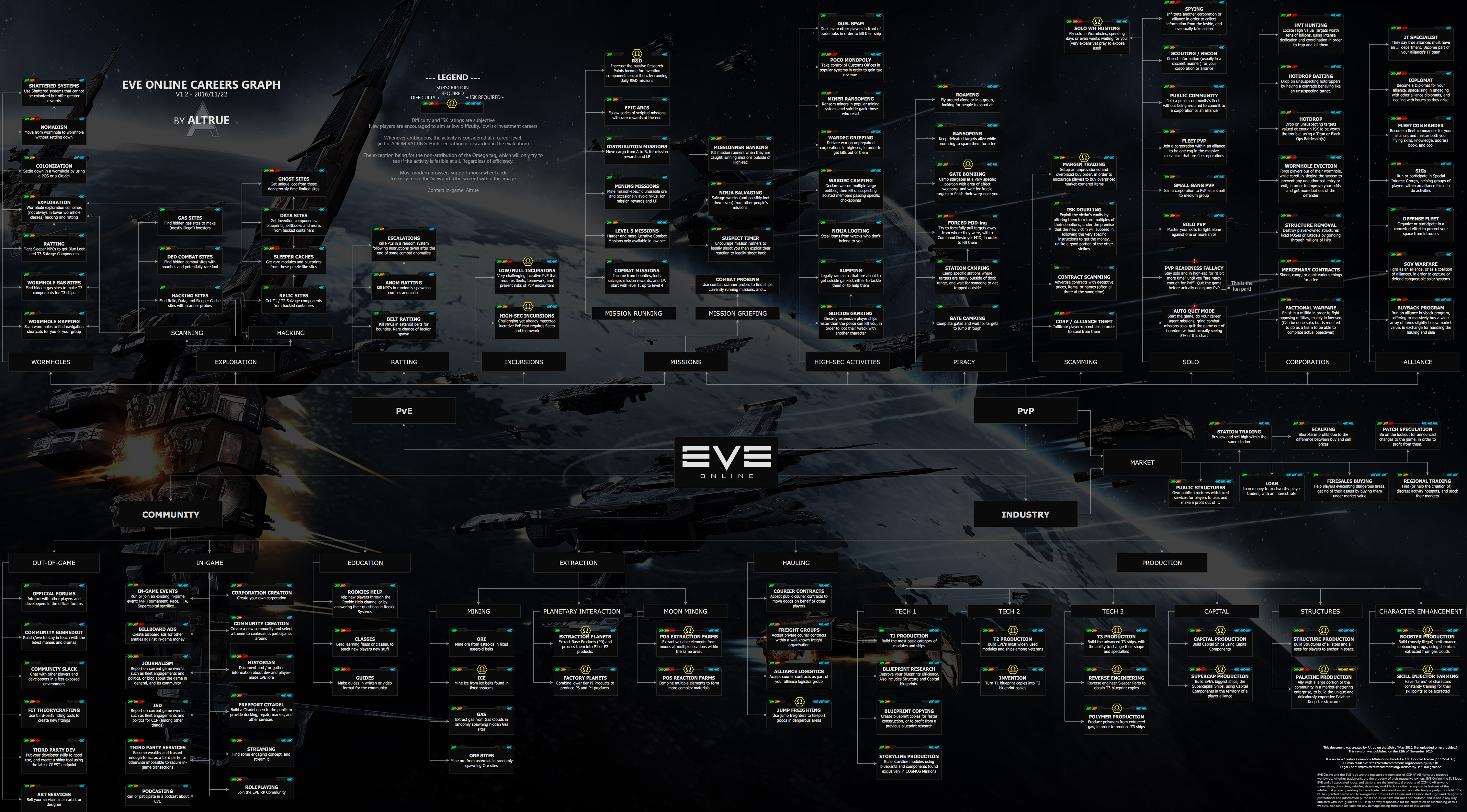
*The [https://english.eve-guides.fr/images/wtd.jpg EVE careers chart], showing (almost) all the things you can do in EVE. | * The [https://english.eve-guides.fr/images/wtd.jpg EVE careers chart], showing (almost) all the things you can do in EVE. | ||
<!-- The requested topic does not exist | <!-- The requested topic does not exist | ||
*A two-page [https://forum.eveuniversity.org/viewtopic.php?f=29&t=40766 EVE cheat sheet] by Korgan Nailo. --> | *A two-page [https://forum.eveuniversity.org/viewtopic.php?f=29&t=40766 EVE cheat sheet] by Korgan Nailo. --> | ||
*The [https://www.thealphasguide.com/start/ Alpha's Guide to the Galaxy], an excellent starting point for Alpha clone characters. | * The [https://www.thealphasguide.com/start/ Alpha's Guide to the Galaxy], an excellent starting point for Alpha clone characters. | ||
{{GettingStartedNav}} | {{GettingStartedNav}} | ||
Revision as of 09:54, 7 June 2022
Welcome to EVE Online! You are now a citizen of New Eden, an exciting and dangerous virtual world. This guide will lead you through your first few days in EVE. For a more general list of topics new players should know about, see the New Player Index.
Introduction to EVE
EVE is a game unlike many other MMOs. It doesn't just have unique mechanics, it also doesn't follow many of the conventions of other games. It may therefore be a good idea to familiarize yourself with some of the core aspects of the game, in order to have a better idea of what to expect:
Accounts
- Main article: Accounts
To play EVE you must first create an account. Your account name doesn't show up anywhere in game, and you can have up to three characters per account. You can have as many accounts as you like.
If you were invited to EVE by a friend (i.e. you have a referral link), use it when creating your account, as you will get some free skill points (equivalent to about 2 to 6 weeks of training time). Additionally, your friend will receive a reward. It's possible to invite yourself to create additional accounts.
Even if you were not invited, you can use a public invitation link. Those are often shared by streamers and YouTubers. Use a search engine to find them.
Sadly, sometimes accounts are hacked. Observe basic security considerations to prevent this. On top of that, you should use Two-Factor Authentication.
Character Creation
- Main article: Character Creator
Race
The first decision you have to make is to choose a race for your character. There are 4 major factions in the game: Amarr, Caldari, Gallente, and Minmatar. Generally speaking, your choice of race is purely an aesthetic choice, as every character can potentially learn every skill. That means that even as Amarr you can fly Minmatar ships when you get the appropriate skills. Your choice of race therefore mainly determines the look of your character and (if you choose) your role-playing opportunities. You will receive a few initial skills in your chosen race--regardless of whether you are a paying subscriber ("Omega") or playing for free ("Alpha")--but you can quickly "cross-train" to try out other races' ship and weapon types.
Bloodline
A bloodline in EVE is a character's familial ancestry. There are three different bloodlines for every race to choose from during character creation.
The bloodline you choose determines which NPC corporation your character will automatically join when no longer being part of a Player Corporation or Starter Corporation. However, there is absolutely no practical difference between any of the corporations, so the choice is purely aesthetic.
School
The School you choose will only determine which starter solar system you begin in, and which Starter Corporation you will be part of. There are absolutely no differences between any of them. They will give your character a permanent list of stations spread across all of New Eden belonging to that school where you can set your Home Station independently from any corporation you might have joined and independently of the location you are setting your clone from.
Portrait and Appearance
Next, you have to design your character's appearance and take a portrait. Your looks depend in part on which race and bloodline you chose, but the tool also gives you a lot of flexibility. Do spend some time crafting your character and taking your portrait, but keep in mind that 99% of the time other players will only ever see your portrait and not your entire character model, and so will you.
You can change your character's clothing and re-take your portraits at any point later, but changing your character's physical appearance can only be done by paying for "Character Remodeling" with PLEX (through the New Eden Store).
Name
Pick your character's name carefully, as you can never change it later. Your name is part of your identity, and it will influence how your corpmates think of you.
In EVE Online, most corporations make use of voice communication (e.g. Mumble) during fleet operations, and also use their voice server available for casual chatter. You will sometimes need to identify yourself with your name while using voice comms, and other fleetmates will use your name to give you intel or instructions. Having a name that is simple and easily pronounceable will make things easier for everyone.
Pick your name carefully, especially your first name, as that will often be used as your callsign during fleet operations. If you pick a stupid name for yourself, you should prepare for some people to not take you seriously.
You can pick a first and last name (although the last name is optional). Character names are unique, and the game will check whether your chosen name is available before letting you proceed.
Starting the game
Tutorial
- Main article: Tutorial
When you first start the game as a new character, you can go through the tutorial (also called the "New Player Experience"), a story-driven experience that gives you step-by-step instructions on the basic mechanics of playing EVE. Unless you've already played the game, it's highly recommended that you follow the tutorial, as there are many particular mechanics which you may not be used to.
Career Agents
- Main article: Career Agents
The next step in learning to play EVE (after the tutorial) is to visit the career agents and do the missions they offer to you, which expand on what you've learned in the tutorial and introduce you to some of the main PvE activities in EVE Online. The agents are not exclusive, and you can do as many of the agents' missions as you want. It's highly recommended that you do as many of them as interest you, as they not only explain many more game mechanics, but also offer some good rewards for new players.
However, keep in mind that they offer little training in PvP, which makes up a very substantial part of the game. Additionally, EVE is a sandbox game, and much of the attraction of the game is forging your own path as opposed to following a pre-set path.
There are five career agents, each offering between 5 and 10 missions in a certain area:
- Industrialist - Producer
- Industrialist - Entrepreneur
- Explorer
- Enforcer
- Soldier of Fortune
If you've followed the tutorial, you will have flown to the station housing the nearest career agents; all five agents are always located in the same station. If you skipped the tutorial, you can locate the closest set of career agents (there are three sets of agents per faction, but they all offer the same missions):
- Open the Help menu in-game (F12, or click on the "?" icon in your NeoCom)
- Look for the section called "Career Advancement" on the Support tab.
- Click on the button "Show Career Agents". This will open another window that will present you with the 5 closest Career agents to your current location.
- At the bottom right there will be a button labelled "Set Destination". Click it to plot a route to follow to get to the system and station where that agent is at.
You can do the agents in any order you like (although you should do the Explorer agent before you do the Soldier of Fortune one).
The Sisters of EVE Epic Arc: Blood-Stained Stars
- Main article: The Blood-Stained Stars
| Lesson Learned |
|---|
 Be wary that many miscreant players and corporations hang around SoE systems to prey upon New Players. |
After you have completed the missions for the career agents, the EVE galaxy is yours to explore! Should you like to run a few more story-related missions, you can do the Sisters of EVE epic mission arc "The Blood-Stained Stars". The epic arc is a series of 50 connected missions which take you all over highsec and expose you to quite a bit of the background and lore of the game, particularly concerning the Rogue Drones and the secret Society of Conscious Thought. To start it you should go to the Arnon system and talk to Sister Alitura at the Sisters of EVE Bureau.
While doing the epic arc, you should focus on continuing to train your combat skills. You can do most of the initial missions in a Frigate, but you should consider upgrading to a Destroyer or even a Cruiser towards the end.
Most of the missions will be fairly easy, but some (particularly towards the end, like the infamous "Burning Down the Hive" or "Our Man Dagan") have a reputation for being very challenging for new players. If you find yourself struggling, don't be shy to ask for help in the E-UNI chat channel as many EVE University players would be happy to help you.
By contrast, be careful about accepting or asking for help in the Local chat channel, as some unscrupulous players who might hijack your mission objective, or bait you and destroy your ship (see also: scams in EVE Online).
Learning Skills
- Main article: Skills and learning
Unlike in many other MMOs, in EVE your character advances (gains new abilities, can use additional modules and ships, etc) through training skills, which are trained in real time, even when you are logged off. Therefore, you should always have a skill actively training.
You can queue up skills to be trained one after the other, up to a maximum of 24 hours into the future (for Alpha characters) or nearly infinitely (for Omega characters). Skills have five levels (I through V), and while the benefits of each additional level scale linearly, the training time increases exponentially: it's usually not worth training skills beyond level IV in your first few days. Instead, focus on the skills which either improve whatever you're doing at the moment, or which unlock new ships or modules you want to try.
As you get a feel for what you enjoy doing in EVE you can focus your training in that particular area. Skills are cumulative, and a character (provided they have an Omega clone) can potentially learn every skill in the game given enough time. It is even possible to "extract " spent skill points and apply them elsewhere, for a price. So don't worry too much about training "the wrong skill" at the start of the game.
You start the game with a number of skills already trained. To train additional skills, you must first acquire the appropriate skillbook. While you will receive a few skillbooks as rewards from the career agents, the others must be bought on the market; most of the basic skillbooks are reasonably cheap. EVE University provides certain skillbooks for free to its members.
You can speed up your training time by installing implants in your character, specifically the basic attribute-enhancing implants, which add between +1 and +5 points to your character's attributes. While the better implants are extremely expensive, +1 implants are affordable even for new players. Members of EVE University can also buy +3 implants at a discount.
Fitting your Ship
- Main article: Fitting ships
Ships in EVE can be fitted with a wide variety of modules that grant the ship additional abilities (e.g. weapons, which allow you to fire at enemy ships) or enhance its statistics (e.g. armor plates, which increase the amount of damage your ship can take before exploding). Learning which modules work well on which ship (and in combination with which other modules) is a potentially very deep topic, so you should approach it step by step. Basic guidelines to each of the four factions' core ships can be found on the following pages:
- Amarr Basic Ship and Skill Overview
- Caldari Basic Ship and Skill Overview
- Gallente Basic Ship and Skill Overview
- Minmatar Basic Ship and Skill Overview
- ORE Basic Ship and Skill Overview
Additionally, there is a complete list of all modules and rigs, and what they do. EVE University members can also ask for fitting advice in the EVE University PvP and PvE ship setup forums or the #fitting-chat Discord channel.
It's also a good idea to set up PYFA, a popular tool that lets you build and simulate fittings out of game. PYFA will let you easily simulate fittings and see what skills you'll need to train to fly them.
Joining a Corporation
Corporations are EVE's version of player organisations, vaguely similar to guilds or clans in other games, but with more scope for influencing the game. EVE is, at its heart, a social game, and while it's perfectly possible to play the game by yourself, most long-time EVE players cite the sense of community in their corporation as one of the main attractions of the game. Additionally, a well-run corporation can offer many services to its members, such as free ships and modules, help moving assets around New Eden, missioning support, advice, a sense of banding together with other to achieve common goals, and of course, fun fleet operations.
EVE University is a corporation dedicated to teaching new players how to play and enjoy EVE. We provide a wide variety of services (beyond teaching and a very helpful community), such as free skillbooks, subsidised implants, mentors, and communities to provide hands-on experience in a wide variety of locations and environments in EVE, not to mention the awesome wiki you're currently reading. We welcome applications from all new players.
However, there are other corporations (large or small, casual or formal, located in all corners of space) in EVE who are very welcoming to new players, and every player should look around to see what best suits their interests and temperament. Corporations advertise in:
- The in-game corporation finder
- The official corporation recruitment forum
- EVE University's work fair forum
- /r/evejobs on Reddit
Next steps
- Main article: Careers
EVE is a sandbox game, which means it's up to each player to find what they enjoy doing most in the game; while CCP do foster some fiction about the game universe, there isn't a central story to follow).
Due to EVE's skill system, it's usually easy to start doing a given activity, and to get to a decent skill level, but it takes a while to master it to its fullest. Therefore, as a new player, it's often a good idea to dabble in a few different activities to find out what suits you best. If you've found something that looks appealing, research it (e.g. by searching this wiki, attending a class, or chatting to your corp-mates), start learning the appropriate skills, and get started. If you find it enjoyable, keep training your character's skills while honing your player skills and experience; should you grow bored, you can always switch up your character's training queue and try something else.
While playing the game, you may want to keep in mind:
- Tips for New Players, a list of some common mistakes new players make and how best to avoid them
- Golden Rules of EVE Online
Getting help
EVE is a very complex (and sometimes counterintuitive) game. Should you feel unsure or lost, then don't hesitate to ask for help. The EVE player community is very friendly and helpful towards new players. The easiest way to get direct help is through in-game chat channels.
Chat channels

There are (at least) three chat channels dedicated to helping new players - you can ask questions here, and there are usually other experienced players and game masters around to help you. You can find these (and other) chat channels in tabs at (by default) the bottom-left of your screen.
- Rookie Help (dedicated to helping the newest players.)
- English Help (general English help chat. There are also help chat channels in French, German, Japanese and Russian.)
- EVE University (EVE University's general help channel.)
You automatically join the "Rookie Help" channel when you first start the game. Additional, you can join the "English help" or "EVE University" chat channels (as Rookie Help is often very busy, and characters older than 30 days no longer have access to "Rookie Help"):
- Click on the speech bubble below the chat channel. You will see a number of folders.
- Click on "Help" and look for channels named EVE University (E-UNI) and/or English Help (Help).
- Click "Join".
Videos
Some things are just more easily explained in a video than through text.
- EVE tutorial - Full career agents/SOE Epic arc tutorial videos mission by mission
- How to Survive EVE Online video series by Seamus Donohue, which goes from character creation to the end of the career agents, with helpful commentary along the way.
Deeper knowledge
Beyond simple questions which can be answered in a chat channel, there is an enormous amount of knowledge about the game that the player base has documented. The EVE University wiki that you're reading right now is one of the most comprehensive resources for newer players, but there are many others, often dedicated to a particular activity in the game.
Using your favourite internet search engine is usually a good starting point, but keep in mind that EVE is constantly evolving, so check whether the information you find is current. Additionally, the official EVE help centre is a good place to find information relating to your subscription, account services, and basic gameplay.
Related Links
- All pages on this wiki aimed at new players.
- The EVE University Class Library, contains recorded classes that cover a wide variety of subjects.
- ISK The Guide, an industrial-sized knowledgebase that covers almost all aspects of EVE.
- The EVE careers chart, showing (almost) all the things you can do in EVE.
- The Alpha's Guide to the Galaxy, an excellent starting point for Alpha clone characters.