
More actions
m Change link to automatically go to the services page of the portal. |
Updating page |
||
| Line 1: | Line 1: | ||
{{eunispecific}} | {{eunispecific}} | ||
The EVE University Forum is located at https://forum.eveuniversity.org/. | {{Important note box|Important note: The forum is being phased out in favour of Discord as our main method of communication|<width= percentage>|<italics= no>}} | ||
The EVE University Forum is located at https://forum.eveuniversity.org/. Most of the forum is used for member-only information. However, some sections of our forum are accessible by the public and anyone is welcome to create an EVE University account to enable them to post in the public sections of the forum. There is no need to be a current or former EVE University member to contribute to our community.<br /> | |||
[[File:EVE Uni Forum.png|thumb|490px|Forum Header]] | [[File:EVE Uni Forum.png|thumb|490px|Forum Header]] | ||
| Line 6: | Line 8: | ||
== Registering on the forum == | == Registering on the forum == | ||
Anyone can register for an EVE University account to post on the public sections of our forum | Anyone can register for an EVE University account to post on the public sections of our forum. In order to register for an EVE University account to post on our forum follow the steps on this page: [[Applying_to_EVE_University#Creating_an_account_on_our_Portal|Creating an account on our Portal]] ''(This will involve logging in with EVE SSO to connect your in-game character with your login credentials).'' | ||
Once you have registered, you can log in to the forum with the name of your EVE character as the username, and with the password you set up during the registration process. | Once you have registered, you can log in to the forum with the name of your EVE character as the username, and with the password you set up during the registration process. | ||
| Line 16: | Line 18: | ||
The index page is divided up into several forum sections, each containing several subforums. The current forum sections are as follows (although some of them have restricted access): | The index page is divided up into several forum sections, each containing several subforums. The current forum sections are as follows (although some of them have restricted access): | ||
* Events and Education | * Events and Education | ||
* Public EVE Discussion | * Public EVE Discussion | ||
* EVE University | * EVE University | ||
* | * Communities | ||
* PVP | * PVP | ||
* | * Special | ||
* Staff Offices | * Staff Offices | ||
* Staff and Management | * Staff and Management | ||
* Records Department | * Records Department | ||
* | * Archive | ||
=== The Archive === | === The Archive === | ||
The forum is set up to automatically move threads to | The forum is set up to automatically move threads to the Archive section after a certain amount of time with no new posts. The time is set individually for each subforum, as some subforums see higher activity than others. Most people cannot access the Archive, but threads can still be viewed and moved back to the main forum by Directors. Most threads stay in the Archive until they are deleted after a certain amount of time. | ||
Most people cannot access | |||
Most threads stay in | |||
=== User Control Panel (UCP) === | === User Control Panel (UCP) === | ||
The User Control Panel (UCP) can be accessed at the top right of the forum once a member is logged in. It enables members to view activity on forum threads they are subscribed to, view and edit their saved drafts, edit their profile, account settings, signature, preferences and user groups. | The User Control Panel (UCP) can be accessed at the top right of the forum once a member is logged in. It enables members to view activity on forum threads they are subscribed to, view and edit their saved drafts, edit their profile, account settings, signature, preferences and user groups. | ||
=== Search === | === Search === | ||
| Line 64: | Line 58: | ||
! Description | ! Description | ||
! Icon | ! Icon | ||
|- | |- | ||
| Public | | Public | ||
| Line 96: | Line 78: | ||
| style="background:#333333;" | The subforum has new posts since the member last viewed it | | style="background:#333333;" | The subforum has new posts since the member last viewed it | ||
| [[File:Forum New Posts.png]] | | [[File:Forum New Posts.png]] | ||
|- | |- | ||
| No New Posts (Thread) | | No New Posts (Thread) | ||
| Line 133: | Line 111: | ||
* Split a post from a thread | * Split a post from a thread | ||
Moderators should move threads/posts to | Moderators should move threads/posts to the Archive rather than deleting them, in case a record is needed later on. | ||
Moderators may also have access to the Moderator Control Panel (MCP) which allows them to view and close reports on posts or PMs and view moderator logs. | Moderators may also have access to the Moderator Control Panel (MCP) which allows them to view and close reports on posts or PMs and view moderator logs. | ||
Revision as of 18:19, 3 November 2024

For a summary of EVE University's rules and code of conduct, see EVE University Rules.
The EVE University Forum is located at https://forum.eveuniversity.org/. Most of the forum is used for member-only information. However, some sections of our forum are accessible by the public and anyone is welcome to create an EVE University account to enable them to post in the public sections of the forum. There is no need to be a current or former EVE University member to contribute to our community.

Registering on the forum
Anyone can register for an EVE University account to post on the public sections of our forum. In order to register for an EVE University account to post on our forum follow the steps on this page: Creating an account on our Portal (This will involve logging in with EVE SSO to connect your in-game character with your login credentials).
Once you have registered, you can log in to the forum with the name of your EVE character as the username, and with the password you set up during the registration process.
Forum sections
The index page is divided up into several forum sections, each containing several subforums. The current forum sections are as follows (although some of them have restricted access):
- Events and Education
- Public EVE Discussion
- EVE University
- Communities
- PVP
- Special
- Staff Offices
- Staff and Management
- Records Department
- Archive
The Archive
The forum is set up to automatically move threads to the Archive section after a certain amount of time with no new posts. The time is set individually for each subforum, as some subforums see higher activity than others. Most people cannot access the Archive, but threads can still be viewed and moved back to the main forum by Directors. Most threads stay in the Archive until they are deleted after a certain amount of time.
User Control Panel (UCP)
The User Control Panel (UCP) can be accessed at the top right of the forum once a member is logged in. It enables members to view activity on forum threads they are subscribed to, view and edit their saved drafts, edit their profile, account settings, signature, preferences and user groups.
Search
The forum has a search function which can be accessed at the top right of the forum. It enables members to search for either keywords or posts by author. It also has the option to search within selected subforums.
In addition, each subforum has a search box to the top of the subforum allowing members to search posts within that subforum only.
Private Messages
The forum allows members to send Private Messages (PMs) to other members. This can be accessed at the top right of the forum, once members are logged in.
Each member gets a limited inbox and sent items folder, and can mark messages as important. Directors have a slightly larger mailbox.
Icons used
Resetting a forum passwordIf a member forgets their password for the forum or mumble, they can create a new one by logging into the portal with their EVE SSO credentials and setting up a new password by clicking on the yellow pencil icon on the "Services" part of the portal.
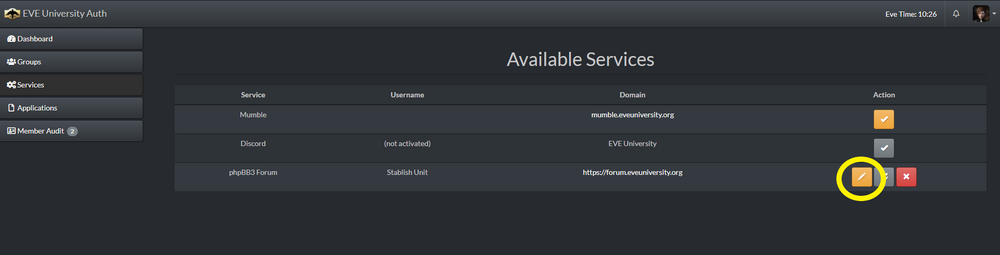
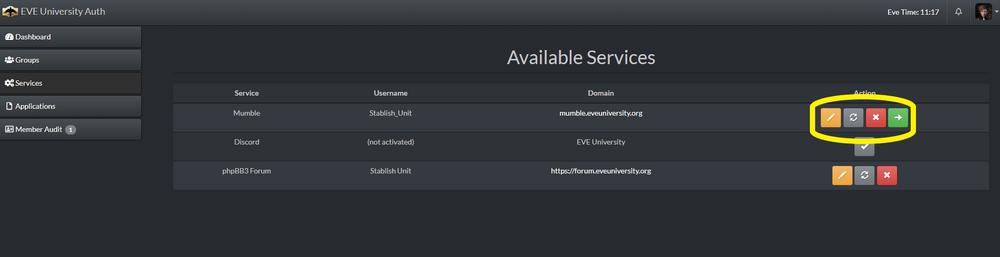 Forum ModeratorsSome staff positions carry with them moderation powers in their subforum. This allows them to do the following:
Moderators should move threads/posts to the Archive rather than deleting them, in case a record is needed later on. Moderators may also have access to the Moderator Control Panel (MCP) which allows them to view and close reports on posts or PMs and view moderator logs. Forum AdministratorsOnly Directors have administrator access on the forum. This allows them access to the Administrator Control Panel (ACP). This requires an additional login to access. The Administrator Control Panel can be used to manage members (including their registration details and usergroups), usergroups, forums and alter forum settings and permissions.
|
||||||||||||||||||||||||||||||||||||||||||||||||||||||||||||||||||||||||||||||


