
More actions
| Line 709: | Line 709: | ||
} | } | ||
}} | }} | ||
You need the '''CSS''' script to handle both normal browsers supporting CSS3 and the ingame browser which do not, but apparently has some old webkit support. | |||
{| cellpadding="5" cellspacing="5" | {| cellpadding="5" cellspacing="5" | ||
| valign="top" | '''Linear'''<br>(vertical) | | valign="top" | '''Linear'''<br>(vertical) | ||
Revision as of 13:52, 20 July 2015
New icons
| Warp scrambling | Warp disrupting | Energy neutralizing | Target painting | Webbing | Jamming | Hacking |
|---|---|---|---|---|---|---|
|
|
|
|
|
|
|


| Scripts | Utility modules | Ammo |
|---|---|---|
|
|
|


| Defence | Offence | New icons |
|---|---|---|
|
|
|
|


| Hardeners & Extender | DC | Rigs |
|---|---|---|
|
|
|
|


| white | green |
|---|---|
|
|
|


More icons


 |


Sansha's Manual
| Eystur Rhomben | Defensive Data | Offensive Data | ||||||||||||||||||||||||||||||||||||||||||||||||||||||||||||||||||||||
|---|---|---|---|---|---|---|---|---|---|---|---|---|---|---|---|---|---|---|---|---|---|---|---|---|---|---|---|---|---|---|---|---|---|---|---|---|---|---|---|---|---|---|---|---|---|---|---|---|---|---|---|---|---|---|---|---|---|---|---|---|---|---|---|---|---|---|---|---|---|---|---|---|
|
|
| ||||||||||||||||||||||||||||||||||||||||||||||||||||||||||||||||||||||
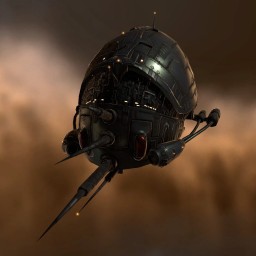
Eystur Rhomben:
Subject: Prototype Nation Vessel (ID: Eystur Rhomben)
Military Specifications: Frigate-class vessel. Significant microwarp velocity. Enhanced weapons systems.
Additional Intelligence: There were no reported civilian abductions from the Eystur VI invasion. The Eystur identifier suggests a small number of captives may have been initially unaccounted for. The Rhomben identifier suggests an overarching position within the lowest tier of the new Nation hierarchy, or alternatively, that it was created during the first phase of development.
Synopsis from ISHAEKA-0041. DED Special Operations.
Authorized for Capsuleer dissemination.
Electronic warfare:
| Jamming Jamming |
 Warp scrambling Warp scrambling
|
 Energy neutralizing Energy neutralizing
|
 Target painting Target painting
|
 Webbing Webbing
|
Burner NPCs
| Name | Sig | Speed [1] | Orbit / Speed | Damage | Range [2] | Effective HP | |
|---|---|---|---|---|---|---|---|
 |
Angel Cartel Burner  |
 11 meters 11 meters |
 2,900 m/s 2,900 m/s |
1 km  2,100 m/s 2,100 m/s |
115 dps  230 hp 230 hp 21 km 21 km |
55 dps  165 hp10 km 165 hp10 km |
8k ehp  |
|
Guristas Burner  |
70 meters |
3,600 m/s |
38 km 3,600 m/s |
(no turrets) | 228 dps 2,277 hp141 km |
15k ehp |
|
Serpentis Burner  |
18 meters |
2,600 m/s |
11 km 1,200 m/s |
264 dps 792 hp42 km |
(no launchers) | 9k ehp |
|
Blood Raiders Burner |
18 meters |
1,800 m/s |
3 km 900 m/s |
180 dps 539 hp15 km |
(no launchers) | 38k ehp |
|
Sansha's Nation Burner |
30 meters |
3,200 m/s |
14 km 4,750 m/s |
165 dps 330 hp23 km |
(no launchers) | 10k ehp |
- ^ This is the speed of the ship while they try to get within orbit or as they try to chase after you. They will turn off any propulsion modules once they get close to their preferred orbit.
- ^ This is the effective range of this ship, limited by effective weapon range and locking range. Some ships may lock before the range indicated here, but in those cases the range is their effective weapon range, before that their weapons will be ineffective.
Progression template
For resists:
Resist-table
| Ship Stats | 
|

|

|

| |||||
|---|---|---|---|---|---|---|---|---|---|
|
|
2,500 HP | 60 % |
60 % |
60 % |
60 % | ||||

|
1,250 HP | 43 % |
43 % |
43 % |
43 % | ||||
|
|
625 HP | 0 % |
0 % |
0 % |
0 % | ||||
Warp speeds and align times
This is just to illustrate the differences in warp speeds including potential align times.
Acceleration gates
When you use an acceleration gate, be that in missions, incursions or complexes, it sends your ship into a pocket of space roughly 10,000 km in front of the gate.
Base warp and align times
These are the base warp and align times for taking a gate unaligned or pre-aligned.
| Ship class | Warp speed (including align time) |
|---|---|
| Large ship Battleships | 25s (32-41s) |
 Battlecruisers Battlecruisers
|
20s (28-30s) |
| Command Ships
|
19s (28-30s) |
| Cruisers
|
17s (23-24s) |
| Logistics
|
16s (22-23s) |
 Frigates Frigates
|
7s (11-13s) |
Legend: █ Warp speed █ Fast align (max skill, agile hulls) █ Slow align (low skills, less agile hulls)
Alternative methods
Now let's see the different alternatives for aligning, how they match up with the battleships.
| Ship class (variants) | Warp speed (including align time) |
|---|---|
| Large ship Battleships | 25s (32-41s) |
| Logistics (normal)
|
16s (22-23s) |
| Logistics (afterburner on)
|
16s (24-26s) |
| Logistics (aligning backwards)
|
16s (25-27s) |
Overshooting times
Below are some numbers for how long it takes to overshoot a gate, or otherwise end out outside activation range. These times will account for the extremes, taking into account the worst possible spot to land on grid in relation to the gate (which can make you lose or gain up to 10 seconds worth of align time).
- It can takes a logistics ship as little as 30 seconds to overshoot a gate leading into an Override Transfer Array site.
- It can take less than 10 seconds for a logistics to be out of range from a gate trying to align away from it, if you land furthest away from the gate.
Warping longer distances
Rubicon changes things up a bit when it came to warp speeds, these are some example-times of the new warps for various distances:
| Warp distance | Ship class | Warp time |
|---|---|---|
| Short warps (20 AU) |
Large ship Battleships | 54 sec
|
| Battlecruisers
|
44 sec
| |
| Command Ships
|
40 sec
| |
| Cruisers
|
37 sec
| |
| Logistics
|
33 sec
| |
| Frigates
|
22 sec
| |
| Medium warps (50 AU) |
Large ship Battleships | 69 sec (1 minute and 9 seconds)
|
| Battlecruisers
|
56 sec
| |
| Command Ships
|
51 sec
| |
| Cruisers
|
47 sec
| |
| Logistics
|
43 sec
| |
| Frigates
|
28 sec
| |
| Long warps (100 AU) |
Large ship Battleships | 94 sec (1 minute and 34 seconds)
|
| Battlecruisers
|
76 sec (1 minute and 16 seconds)
| |
| Command Ships
|
69 sec (1 minute and 9 seconds)
| |
| Cruisers
|
63 sec (1 minute and 3 seconds)
| |
| Logistics
|
58 sec
| |
| Frigates
|
38 sec
| |
| Extreme warps (200 AU) |
Large ship Battleships | 144 sec (2 minutes and 24 seconds)
|
| Battlecruisers
|
116 sec (1 minute and 56 seconds)
| |
| Command Ships
|
105 sec (1 minute and 45 seconds)
| |
| Cruisers
|
97 sec (1 minute and 37 seconds)
| |
| Logistics
|
88 sec (1 minute and 28 seconds)
| |
| Frigates
|
58 sec
|
What happens when you disconnect from the game?
a) You only try to warp out once, if for some reason you can't warp right then and there, there will be no more attempts to emergency warp.
b) Modules will continue to cycle while you have cap, hardeners will stay on, guns will continue to fire etc.
c) Skills will continue to have an effect, modules like EANMs will continue to function at the same level even if you're disconnected.
d) If they stop shooting you at some point, you'll automatically log out of the game for real as soon as the timers run out, regardless how many times they've been refreshed (this was obvious but still thought I'd double-check it).
Security status colours
These are the colours used for colour-coding the different security systems.
| █ 1.0 - #2FEFEF |
| █ 0.9 - #48F0C0 |
| █ 0.8 - #00EF47 |
| █ 0.7 - #00F000 |
| █ 0.6 - #8FEF2F |
| █ 0.5 - #EFEF00 |
| █ 0.4 - #D77700 |
| █ 0.3 - #F06000 |
| █ 0.2 - #F04800 |
| █ 0.1 - #D73000 |
| █ 0.0 - #F00000 |
Layered images
Sometimes it makes sense to manually build up an image comprised of an image and a tag, or simply two images.
|
| ||||||||||||


|
|
|


|
|
|





Gradients
You need the CSS script to handle both normal browsers supporting CSS3 and the ingame browser which do not, but apparently has some old webkit support.
| Linear (vertical)
|
Linear (horizontal)
|
Radial
| ||||||||||||||||||||||||||
Tooltips
Normal tooptip: ExampleLorem ipsum dolor sit amet, consectetur adipiscing elit. Vivamus eu hendrerit nisi. Nulla ornare, dolor eu pulvinar faucibus, magna purus tempor orci, sed malesuada urna ligula sit amet mauris.
Let's see what the tooltip upLorem ipsum dolor sit amet, consectetur adipiscing elit. Vivamus eu hendrerit nisi. Nulla ornare, dolor eu pulvinar faucibus, magna purus tempor orci, sed malesuada urna ligula sit amet mauris. does compared to tooltip rightLorem ipsum dolor sit amet, consectetur adipiscing elit. Vivamus eu hendrerit nisi. Nulla ornare, dolor eu pulvinar faucibus, magna purus tempor orci, sed malesuada urna ligula sit amet mauris. as well as how tooltip leftLorem ipsum dolor sit amet, consectetur adipiscing elit. Vivamus eu hendrerit nisi. Nulla ornare, dolor eu pulvinar faucibus, magna purus tempor orci, sed malesuada urna ligula sit amet mauris. differ from tooltip downLorem ipsum dolor sit amet, consectetur adipiscing elit. Vivamus eu hendrerit nisi. Nulla ornare, dolor eu pulvinar faucibus, magna purus tempor orci, sed malesuada urna ligula sit amet mauris. when put in the end. Does this normal tooltipLorem ipsum dolor sit amet, consectetur adipiscing elit. Vivamus eu hendrerit nisi. Nulla ornare, dolor eu pulvinar faucibus, magna purus tempor orci, sed malesuada urna ligula sit amet mauris. change?
Now how about an image like this? 
 -60% speed reduction at 30 km. or a larger one like
  Lorem ipsum dolor sit amet, consectetur adipiscing elit. Vivamus eu hendrerit nisi. Nulla ornare, dolor eu pulvinar faucibus, magna purus tempor orci, sed malesuada urna ligula sit amet mauris.