
More actions
m changed link |
|||
| Line 31: | Line 31: | ||
== Public Mumble == | == Public Mumble == | ||
The vast majority of our classes take place on our public Mumble channel. We have a comprehensive guide to [[Mumble]] for E-UNI members, but here's the cliff notes version: | |||
* Download & install the latest version of Mumble from the [http://mumble.sourceforge.net/ developer's website]. | |||
* During the set-up wizard on first launch, make sure to set a push-to-talk key. Do not use voice activation. | |||
* Open your new Mumble, click Server -> Connect, click the Add New... button at the bottom. | |||
* Add a connection that looks like this (note that the port number is ''not'' the default): | |||
[[File:Mumble_Server_Connect.png]] | |||
* Congratulations you are now on our public Mumble server. | |||
== In-game Channels == | == In-game Channels == | ||
Revision as of 01:08, 2 November 2013

The primary purpose of EVE University is to teach new (and old) players about the basics of life in EVE and various aspects of game play. To that end we hold regular classes, both theoretical and practical, in order to accomplish this goal. This page contains information on how to attend our classes, or, if you are unable to attend a live class due to time zone differences, how to find recordings and transcripts of our previous classes.
Please note that most of our classes are public! You do not need to be a member of EVE University to join!
If you are interested in giving a class or lecture yourself, then you can find out about Joining the Faculty as either a teacher or a guest lecturer. Alternatively, if your skills lie primarily in the practical fleet command area, we have a Guest FC program.
Class Library
Recorded Classes
You can find a large number of previously recorded classes at our Class Library page, available for download in MP3 format and listening to in your own time on your own MP3 player of choice.
Class Syllabi
If you prefer reading, rather than writing, you can find the transcripts - intended primarily for teachers, but useful for students too - for all our classes on the wiki, at the Syllabus Library. You should bear in mind that different teachers construct classes in different ways, so some syllabus pages can be hard to follow.
Visual Aids
Many of our teachers create slideshows in PDF formats as highly useful teaching aids. You can find all of these at the relevant wiki page of EVE Reference Sheets ***currently NYI***. Please note that these do not necessarily contain all of the information that you would otherwise find in the class recording or syllabus.

Class Schedule
Calendar
So you want to attend a real live class? The first step is finding out when our classes take place. You can find all this information on our Calendar page. Note the links at the bottom of the page, which will allow you to import the information into your calendar application of choice, be it Outlook or iPad or whatever.
In-game Mailing List
We also have an in-game mailing list - please open in the EVE Mail application in-game, click the Add Mailing List in the bottom left hand corner of the EVE Mail window, and add the mailing list Classes.E-UNI (see image to right). Messages are generally sent out once per week to advise of upcoming classes and events.
EVE University forum
All upcoming classes are posted on the Scheduled Classes section of the EVE University forum - announcements of new classes, and any changes or cancellations, will be posted there.
Public Mumble
The vast majority of our classes take place on our public Mumble channel. We have a comprehensive guide to Mumble for E-UNI members, but here's the cliff notes version:
- Download & install the latest version of Mumble from the developer's website.
- During the set-up wizard on first launch, make sure to set a push-to-talk key. Do not use voice activation.
- Open your new Mumble, click Server -> Connect, click the Add New... button at the bottom.
- Add a connection that looks like this (note that the port number is not the default):
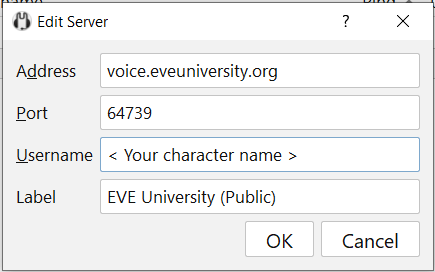

- Congratulations you are now on our public Mumble server.
In-game Channels
Lecture.E-UNI
Q&A.E-UNI
and how to join them with images
Other Class Channels
twitch.tv ?
FAQ
are there any pre-requisistes?
usually none
Do I need to be anywhere in particular?
usually not
What if I have questions?
ask during class or after
I have more questions now!
ask these people...