
New icons
| Warp scrambling | Warp disrupting | Energy neutralizing | Target painting | Webbing | Jamming | Hacking |
|---|---|---|---|---|---|---|
|
|
|
|
|
|
|


| Scripts | Sensor Boosters | Ammo |
|---|---|---|
|
|
- |
|


| Hull | Resists | Damage |
|---|---|---|
|
|
|
|


| Hardeners | DC | Rigs |
|---|---|---|
|
|
|
|


Template
| Enemy | Description |
|---|---|
Jamming           Something Something
|
Textaboutsomething |
More icons


 |
Sansha's Manual
| Enemy | Defensive Data | Offensive Data | |||||||||||||||||||||||||||||||||||||||||||||||||||||||||||||||||||||||
|---|---|---|---|---|---|---|---|---|---|---|---|---|---|---|---|---|---|---|---|---|---|---|---|---|---|---|---|---|---|---|---|---|---|---|---|---|---|---|---|---|---|---|---|---|---|---|---|---|---|---|---|---|---|---|---|---|---|---|---|---|---|---|---|---|---|---|---|---|---|---|---|---|---|
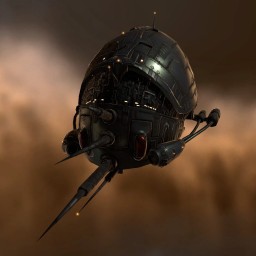
|
Eystur Rhomben |
|
| ||||||||||||||||||||||||||||||||||||||||||||||||||||||||||||||||||||||


Progression template
For resists:
Resists


Resist-table
| Ship Stats |
|
|
|
| |||||
|---|---|---|---|---|---|---|---|---|---|

|
2,500 HP | 60 % |
60 % |
60 % |
60 % | ||||

|
1,250 HP | 43 % |
43 % |
43 % |
43 % | ||||

|
625 HP | 0 % |
0 % |
0 % |
0 % | ||||
Know your safeties and timers
Safeties
There are three safety settings:
- Disable safety - Disable safety to allow actions which give suspect or criminal status.
- Partial safety - Partial safety prevents actions that give criminal status, while allowing those that give suspect status.
- Enable safety - Enable safety to prevent all actions that would give you suspect or criminal status.
Your safeties should normally be set to enable safety, which we call green safeties for short. That way you will not go suspect without getting a warning first. Under no circumstances would you ever need to go red safeties, as in disable safety, in incursions.
 |
 |
Timers
Legality and timers are also very important to have a good grasp on. Knowing what it means when you get the different timers is necessary so you can see when there's a potential problem. See Crimewatch for more details on the more intricate mechanics of legal timers.
| Flag | Description |
|---|---|

|
Non-Capsuleer Log-Off Timer Cause: Combat with a non-capsuleer [1] Consequence: Ship will remain in space on log-off until timer expires (15 minutes) [2]. |

|
Capsuleer Log-Off Timer Cause: Combat with another capsuleer[1]. Consequence: Ship will remain in space on log-off until timer expires[2] (see While at war below). |

|
Weapons Timer Cause: Aggression against another capsuleer [3]. Consequence: Unable to dock or use stargates [4]. |

|
Suspect Timer Cause: Committed a "suspect"-level offense. Consequence: Capsuleers may freely engage [5]. |

|
Criminal Timer Cause: Committed a "criminal"-level offense. Consequence: Capsuleers may freely engate. CONCORD will engage in high-sec space [5]. |

|
Timer Cause: Involved in a limited engagement with 1 pilot (or any number of pilots) [6]. Consequence: These pilots may freely engage you while timer is active (lists pilots and time remaining). [7] . |
- ^ a b The Non-Capsuleer and Capsuleer log-off timers are created when you either shoot or get shot by an NPC or a fellow capsuleer.
- ^ a b This means you will remain in space if you disconnect or close the client, until the timer runs out. The NPC timer will not be renewed if you are shot while already having disconnected or logged off, but the PvP timer will. So if someone finds you after you logged out they can keep your ship in space indefinitely.
- ^ You get the Weapon-flag whenever you activate an offensive module against another player (including webs, painters, damps, scrams, points, turrets, missiles, drones etc). Unlike the PvP-flag, you do not get this flag simply by being shot by another player.
- ^ This means you cannot change sessions, which means you cannot jump, dock or eject from, store or switch ships while this flag is active.
- ^ a b Both the Suspect and Criminal timer means that anyone can freely attack you without CONCORD interfering. If someone engages you, a Limited Engagement-timer is created between both of you, to allow you to shoot back at the aggressor. This causes issues with assistance however, our logistics would need to go Suspect (yellow safeties) in order to assist you (due to interfering with a limited engagement). In the case of being criminally flagged, CONCORD will engage and kill you in high security space. The response-time of CONCORD depends on the security of space, anything between a few seconds up to half a minute.
- ^ A Limited Engagement is basically created whenever two capsuleers are involved in combat where both parties cannot legally shoot each other. So to ensure that you can always shoot back when aggressed, the limited engagement is created when legality isn't enough.
- ^ Being involved in a Limited Engagement means that any outside assistance will flag that person as a suspect, unless you can both legally attack each other. Simply being attackable doesn't count, you actually have to have the right already, through mutual wars or your very own limited engagement.
While at war

|
When your corporation or alliance is at war, the capsuleer log-off timer becomes deceptively dangerous because in order to assisting anyone with a capsuleer log-off timer who is at war will require you to turn your safety to yellow and go suspect. As such, it's important to avoid accidentally shooting corporation members, since that is a legal action in and by itself, but it will give you both capsuleer log-off timers that will be spread to the logistics and anyone else who's offering remote assistance. |
During peace
|
|
Even when you're at peace there is a chance that flags might come into play. If someone enters a limited engagement, like if you suffer an unprovoked attack by someone, then any assistance to the person involved with a limited engagement would require logistics to turn their safety to yellow and go suspect. Once someone goes suspect, then it would force the other logi to go suspect as well, or be unable to help. |