
More actions
Removing WIP as page not actively being worked on |
m Disentangle Category from Template; cosmetic changes |
||
| Line 1: | Line 1: | ||
{{NullSec Campus links}} | {{NullSec Campus links}} | ||
== NSC Rebuy Program == | |||
==NSC Rebuy Program== | |||
* Any <span style="color: #fc0;">faction, deadspace, officer, or otherwise shiny module/item</span> dropped in donations is available for sale to campus members at a discounted price. | * Any <span style="color: #fc0;">faction, deadspace, officer, or otherwise shiny module/item</span> dropped in donations is available for sale to campus members at a discounted price. | ||
* The contract price is equal to '''the best Jita sale price minus 10%''' at the time the contract was made. | * The contract price is equal to '''the best Jita sale price minus 10%''' at the time the contract was made. | ||
* Each item will be put up in a contract good for the maximum contract time (2 weeks). | * Each item will be put up in a contract good for the maximum contract time (2 weeks). If the item is not sold and the contract expires the item will be sold for the NSC to fund other campus services. | ||
You may not buy modules for the purpose of simply reselling them. Modules we sell are intended to be used on fits you actually plan to fly somewhere, even if it's not in the NSC (or even EVE University). | You may not buy modules for the purpose of simply reselling them. Modules we sell are intended to be used on fits you actually plan to fly somewhere, even if it's not in the NSC (or even EVE University). | ||
===Instructions for campus members=== | === Instructions for campus members === | ||
* Open your contracts menu from the neocom and go to the available contracts tab. | * Open your contracts menu from the neocom and go to the available contracts tab. | ||
| Line 17: | Line 16: | ||
* [[Media:Nscrebuycontractssearch.png|Here]] is a screenshot with the contract settings to see the contracts | * [[Media:Nscrebuycontractssearch.png|Here]] is a screenshot with the contract settings to see the contracts | ||
===Instructions for hangar officers=== | === Instructions for hangar officers === | ||
Make a filter called "NSC For Sale Hangar". | Make a filter called "NSC For Sale Hangar". | ||
| Line 25: | Line 24: | ||
Use this filter to filter items in donations that should be put up for sale in contracts. | Use this filter to filter items in donations that should be put up for sale in contracts. | ||
[[Category:NSC]] | |||
Revision as of 06:42, 7 June 2022
|
| Null Security Staging |
|---|
| General |
| NSC Activities |
| Preparations |
| Campus Services |
| Guides |
| NSC Activities |
NSC Rebuy Program
- Any faction, deadspace, officer, or otherwise shiny module/item dropped in donations is available for sale to campus members at a discounted price.
- The contract price is equal to the best Jita sale price minus 10% at the time the contract was made.
- Each item will be put up in a contract good for the maximum contract time (2 weeks). If the item is not sold and the contract expires the item will be sold for the NSC to fund other campus services.
You may not buy modules for the purpose of simply reselling them. Modules we sell are intended to be used on fits you actually plan to fly somewhere, even if it's not in the NSC (or even EVE University).
Instructions for campus members
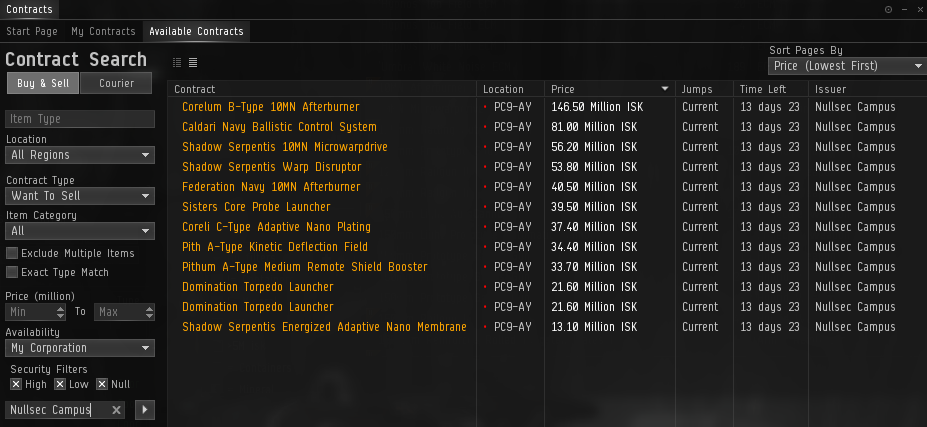
- Open your contracts menu from the neocom and go to the available contracts tab.
- Leave the item type field blank, the location to all regions, the contract type to want to sell, the item category to all, the availability to my corporation, all security filters checked, and the issuer to 'Nullsec Campus'
- After you click search you should see all the items on contract available for purchase.
- Feel free to purchase any of them. Keep in mind that all items will be dropped in the NSC home station in PC9-AY upon purchase.
- Here is a screenshot with the contract settings to see the contracts
Instructions for hangar officers
Make a filter called "NSC For Sale Hangar".
- Add criterion: "[Estimated unit price] [>] [12,000,000]".
- Save the filter.
Use this filter to filter items in donations that should be put up for sale in contracts.