m →Cosmic Anomalies (1 of 5): Fixed typo and removed the instruction to move the documents into the item hanger, as it is not required to complete the mission.
'''{{co|#9ef37c|Objective:}}''' Retrieve an object from a [[Cosmic Anomaly]].
'''{{co|#9ef37c|Objective:}}''' Retrieve an object from a [[Cosmic Anomaly]].
Cosmic Anomalies are a class of relatively easy to find exploration sites. They are scattered all over the EVE universe and can contain hostile NPC ships, asteroids, and more. This particular mission requires that you find an "Anomaly Training Site". There are two ways of doing this:
Cosmic Anomalies are a class of relatively easy-to-find exploration sites. They are scattered all over the EVE universe and can contain hostile NPC ships, asteroids, and more. This particular mission requires that you find an "Anomaly Training Site". There are two ways of doing this:
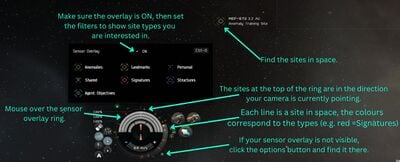
* [[File:Sensor-overlay.jpg|thumb|right|400px|Find sites using the sensor overlay.]] Using the sensor overlay
* [[File:Sensor-overlay.jpg|thumb|right|400px|Find sites using the sensor overlay.]] Using the sensor overlay
** After undocking, fly to somewhere in the star system away from large structures (e.g. to an asteroid belt) - while this isn't strictly necessary, it makes things a bit easier.
** After undocking, fly to somewhere in the star system away from large structures (e.g. to an asteroid belt) - while this isn't strictly necessary, it makes things a bit easier.
** Check that your sensor sensor overlay is active ({{button|CTRL}}+{{button|O}}, or hover your mouse over the sensor ring around your capacitor), and set the filters to just show Cosmic Anomalies (hide Cosmic Signatures, Landmarks etc).
** Check that your sensor overlay is active ({{button|CTRL}}+{{button|O}}, or hover your mouse over the sensor ring around your capacitor), and set the filters to just show Cosmic Anomalies (hide Cosmic Signatures, Landmarks, etc.).
** The green lines on the sensor ring around your capacitor indicate where Cosmic Anomalies are in relation to where your camera is pointing. Rotate your camera until one of the green lines is at the top (12 o'clock) of the sensor ring. Then move your camera up and down until you find the anomaly in space. Repeat these steps until you find an "Anomaly Training Site".
** The green lines on the sensor ring around your capacitor indicate where Cosmic Anomalies are in relation to where your camera is pointing. Rotate your camera until one of the green lines is at the top (12 o'clock) of the sensor ring. Then move your camera up and down until you find the anomaly in space. Repeat these steps until you find an "Anomaly Training Site".
** When you've found an Anomaly Training Site, right-click on it in space and select "Warp To" (or hold the left mouse button and use the radial menu).
** When you've found an Anomaly Training Site, right-click on it in space and select "Warp To" (or hold the left mouse button and use the radial menu).
Line 15:
Line 15:
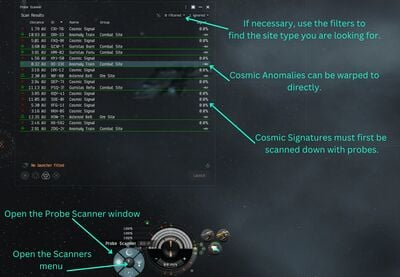
** Look for an Anomaly Training Site in the list of anomalies, right-click on it, and select "Warp To".
** Look for an Anomaly Training Site in the list of anomalies, right-click on it, and select "Warp To".
While the first method gives you a good feeling of where everything is in space, the second method is usually the easier one. Once you get to the anomaly site, look for a training container, approach it, and loot the "proof of discovery" documents. Return to your agent's station, move the documents into your Item Hangar in the station, and complete the mission.
While the first method gives you a good feeling of where everything is in space, the second method is usually the easier one. Once you get to the anomaly site, look for a training container, approach it, and loot the "proof of discovery" documents. Return to your agent's station and complete the mission.
== An Introduction to Cosmic Signatures (2 of 5) ==
== An Introduction to Cosmic Signatures (2 of 5) ==
Revision as of 21:41, 9 November 2020
The Exploration Career Agent is one of the five career agents in the game, which show new players different types of PvE activities in EVE. The exploration career agent missions teach you about exploration, scanning, hacking, and gas cloud mining. In total these missions pay about 900k ISK in rewards.
Cosmic Anomalies are a class of relatively easy-to-find exploration sites. They are scattered all over the EVE universe and can contain hostile NPC ships, asteroids, and more. This particular mission requires that you find an "Anomaly Training Site". There are two ways of doing this:
Find sites using the sensor overlay. Using the sensor overlay
After undocking, fly to somewhere in the star system away from large structures (e.g. to an asteroid belt) - while this isn't strictly necessary, it makes things a bit easier.
Check that your sensor overlay is active (CTRL+O, or hover your mouse over the sensor ring around your capacitor), and set the filters to just show Cosmic Anomalies (hide Cosmic Signatures, Landmarks, etc.).
The green lines on the sensor ring around your capacitor indicate where Cosmic Anomalies are in relation to where your camera is pointing. Rotate your camera until one of the green lines is at the top (12 o'clock) of the sensor ring. Then move your camera up and down until you find the anomaly in space. Repeat these steps until you find an "Anomaly Training Site".
When you've found an Anomaly Training Site, right-click on it in space and select "Warp To" (or hold the left mouse button and use the radial menu).
Find sites using the probe scanner window. Using the probe window
After undocking, open the Probe Scanner window (ALT+P, or through the Scanners button to the left of your capacitor display).
Check the filters to display Cosmic Anomalies (you can hide the other types of signatures if you want).
Look for an Anomaly Training Site in the list of anomalies, right-click on it, and select "Warp To".
While the first method gives you a good feeling of where everything is in space, the second method is usually the easier one. Once you get to the anomaly site, look for a training container, approach it, and loot the "proof of discovery" documents. Return to your agent's station and complete the mission.
Your agent gives you a Frigate (although, strangely enough, not an exploration Frigate); undock in it (or in any other ship, for that matter). The tour starts in a deadspace area, warp to the it (right-click in space or on the drop-down menu from the Info Panel). When you get there, another NPC agent will warp in and give you a guided tour (via text boxes - read them!):
Approach and activate the first acceleration gate, which will fling your ship into the first "deadspace pocket".
Activate the acceleration gate there to get to the second pocket. There will be a container with exploration supplies and modules (a Probe Launcher with Core Scanner Probes, and Civilian Data and Relic Analysers). Loot them; note that you can't fit modules onto your ship in space (you can only do that in a station or near certain special ships with a fitting service).
Activate the acceleration gate to get to the third pocket. This is an example of a Data Site; normally you would use a Data Analyzer module to hack the structures and thus attemt to find valuable loot, but for this mission you're just sightseeing. Feel free to take a closer look at some of the structures in space (right-click on them and select "Look At", or ALT-click), as they are quite pretty.
Activate the acceleration gate to get to the fourth pocket. This is an example of a Relic Site, which normally needs a Relic Analyzer module to hack the structures.
Activate the acceleration gate to get to the fifth pocket. This is an example of a gas site, which normally needs Gas Cloud Harvesting modules (similar to ore mining modules) to harvest gas, which can then be turned into boosters.
Return to your agent's station.
Data Site Scanning (3 of 5)
Objective: Scan down and hack a Data Site.
Fit a ship (e.g. your shiny new frigate) with a Core Probe Launcher and a Civilian Data Analyzer, and load Core Scanner Probes into your probe launcher (drag them onto the fitted probe launcher in the fitting window). Normally it's a better idea to use an exploration frigate for, well, exploration, but for the purposes of this tutorial any ship will do.
Undock and launch your probes (click on the probe launcher), then open the Probe Scanner window and the Star Map (CTRL+F10, or use the "Map" button on the NeoCom), and resize the windows so that you can see both at the same time. Don't forget to reset the filter on your Probe Scanner window to show Cosmic Signatures. Next, position your probes around the solar system and scan (this is probably best explained in a video, such as this one from Wingspan) until you find a Data Training Site. Once you've resolved the signature to 100%, warp to it (by right-clicking on the signature in the Probe Scanner window).
Once inside the site, look for a "Training Container", approach and target it, and activate your Civilian Data Analyzer module. This will start the hacking minigame: explore the board by clicking on the green circles until you find the System Core. Once you've disabled the System Core, you can open the container and loot its contents. Recover your probes (there's a button for it in the Probe Scanner window) and return to your agent's station - even though this happens automatically when you dock, it's still a good habit to get into.
Relic Site Scanning (4 of 5)
Objective: Scan down and hack a Relic Site.
This is a very similar mission to mission 3, except that you're looking for a Relic Training Site instead of a Data Site, so make sure you have a Civilian Relic Analyzer fitted to your ship before undocking. Remember to reload your probe scanner module (either through the ship fitting window in the station, or by right-clicking on the module once in space, assuming your scanner probes are in your ship's cargo hold).
Gas Site Scanning (5 of 5)
Objective: Scan down a Gas Site.
Same as mission 4, except that you're looking for a Gas Site. You don't need any gas mining equipment - your agent gives you a passkey (an item), make sure to put it into your cargo hold before you undock! Then scan down a Gas Training Site like you previously scanned down a Data and a Relic site. When you have scanned one down and warped to it, activate the acceleration gate inside the site to get to the second pocket. Look for the Training Container, loot its contents, and return to your agent.
Reward: Your faction's exploration Frigate. This is the kind of ship you should use for your future scanning endeavours.