#[[Skills:Production#Advanced Industry|Advanced Industry]] is optional but will grant a 3% reduction in time for all manufacturing and research jobs.
#[[Skills:Production#Advanced Industry|Advanced Industry]] is optional but will grant a 3% reduction in time for all manufacturing and research jobs.
These skill books are available in the "090 - BPC Library" station container. If there are not any available they can be purchased at the nearby Slays VII - Moon 3 - Center for Advanced Studies School and all are reimbursable through [[the Skillbook Program]].
These skill books are available in the "090 - BPC Library" station container. If there are not any available they can be purchased at the nearby Slays VII - Moon 3 - Center for Advanced Studies School and all are reimbursable through [[the Skillbook Program]].
==== How to Research a Blueprint Original ====
The campus is responsible for researching all BPO's to a minimum of 10% Material Efficiency and 16% Time Efficiency. This means that we will need to run all 10 levels of material efficiency and at least 8 levels of time efficiency.
#Select the industry icon on your Neocom or in the Station Services window.
#In the industry window, select the "Blueprints" tab along with the following in the drop down options:
##Owned by Corp
##Current Facility
##Industry
##Originals
##All groups
#You may want to sort the items by Material or Time Efficiency in order to quickly identify which BPO's need researched.
#Select a BPO and then select either the Material or Time Efficiency Research button.
#Set the number of runs you wish for this job.
#Set the payment method to "Personal Wallet".
#Finally, hit the START button.
==== How to Copy Blueprints ====
Once a BPO is researched to Material Efficiency 10 / Time Efficiency 16 (minimum) the blueprint original is available for campus members to make copies and then use the copies to manufacture the items or research tech 2.
#Click the industry icon on your Neocom or in the Station Services window.
#In the Industry Window select the "Blueprints" tab along with the following in the drop down options:
##Owned by Corp
##Current Facility
##Industry
##Originals
##All groups
#Select the blueprint original you wish to copy (make sure that the BPO is researched to ME10/TE16).
#Select the "Copy" icon (It's the one that looks like two beakers).
#Select the number of runs for the job and the number of runs per copy.
#Select the "BPC Hanger" location for your output (this will help keep the hangers uncluttered with BPC's).
#Set the payment method to "Personal Wallet"
#Finally, hit the START button.
A note on "runs":
The "number of runs" will determine the number of copies made and the "runs per job" will determine the number of times a single copy can be run. Ideally, a single copy will provide enough runs for a manufacturer to build for about 24 hours. It is recommended that copies be made with 15-25 runs. This allows the manufacturer to set up a manufacturing job that will run for about 24 hours.
For invention, it may be desired to have a single copy with a very high number of runs. An invention job will burn 1 run of a BPC. There is no need to have many BPC's with only 1 run for invention.
== Industry Resources ==
== Industry Resources ==
Revision as of 02:15, 8 September 2014
Introduction
The Low-Sec Campus is a place where students can explore many aspects of EVE. Many of them violent. However, the LSC's home system, Uphallant, is a fertile system for the budding industrialist. With the release of Crius in July 2014, vtasean (LSC Manager) announced the launch of the LSC Industry Program.
"I am proud to formally announce the LSC Industry Program. With the launch of the Crius expansion, and the continued influx of capsuleers to the LSC, we've decided to start expanding our official campus outreach to as many different play styles as possible, beginning with Industry." -vtasean
The purpose of this wikipage is to expand upon the goals of the program and serve as the starting point for any new low-sec industrialist looking to live at the LSC.
Program Goal
To create an educational, profitable, and easily accessible Industry program for the Campus to utilize.
How It Works
This program is designed to allow you to pursue a manufacturing career either through your main character, or through an alt-character. Both have their benefits and drawbacks.
The campus will provide a library of unresearched Blueprint Originals (BPOs). The BPO's will be placed in a separate hanger, which will be set to query only.
Members with the Sophomore title, or above, will have "view access" to this hanger and will be able to use the BPO's directly from it.
FRESHMAN have been granted this ability on a temporary/test basis.
No one other than Directors will have access to remove items from this hanger.
Individual members will be responsible for researching the BPO's to a MINIMUM of ME10/TE16.
Current priority is to research hulls (up to cruisers) and rigs.
If an individual has access to a research POS, has reasonably high research skills, and general campus trust, we may hand over certain BPO's to speed up research.
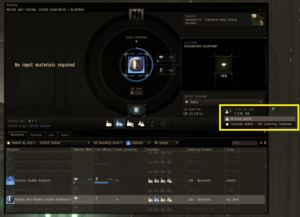
Members are responsible for paying for jobs from your own wallet. There is a small dialog box on the right hand side of the industry window. Payment SelectorSee the image to the right.
After a BPO is fully researched, it will become available for general campus use.
Campus members will be allowed and encouraged to make copies of any BPO's not currently in use. If you have a free copying slot, please use it to crank out BPCs.
BPC's are to be placed in a separate container for everyone's use in the Alpha Hanger for use by Freshman and above.
Any campus member may take any BPC from the hanger for their PERSONAL USE ONLY. This includes use by alts.
LSC members will be free to use the BPC's to make isk, to assist with campus needs, or to practice with.
The only restriction is that BPC's provided by the campus may not be resold directly. However, T2 BPCs that a member invents may be used in any manner he or she desires.
Rules
BPO's may be researched for ME/TE or COPIED ONLY. Any jobs not conforming to this requirement will be cancelled. Any job inputs will be lost.
DO NOT MANUFACTURE DIRECTLY FROM THE BPO LIBRARY.
DO NOT place anything in the BPO hanger. All donations and additions must go through a campus officer or the donation bin.
Members are expected to replace all BPC's they use, and are expected to cover all of the costs for their jobs.
The concept of "fairness" will be liberally applied to this with complete discretion of the management. We expect members to share, and to give back to the campus in equal measure.
For example, if you take a 10 run cruiser BPC, please replace it with a 10 run cruiser BPC at a minimum.
We expect BPO's to be in use by a single person for no more than a few days at a time (this does NOT include research times).
No one is required to give up their trade-secrets. Spreadsheets, manufacturing locations, alt-POS usage, sales tactics, etc are solely the property of their creators.
As the program evolves, more rules and expections will be laid out, although for now it will be rather dynamic as we all get a feel for it.
Get Involved!
Our first major effort will be researching our blueprint originals and creating a well stocked, and complete, library. This will take a lot of people, and many weeks/months. All pilots have the ability to utilize 1 research slot, so everyone can help with this with a minimal amount of SP investment. In addition the following tasks are a priority for the program:
Donating BPO's - We will gladly take donations of BPO's (reasearched or not). If you see our library missing an item, and would like to donate it, please do. All BPO donations will be made available to the program. Please place donations in the donations bin or give them to an LSC Officer.
Donate Skillbooks - donations of appropriate skillbooks will help encourage more participation.
Teach a class on any Industry topic - If you have any significant experience with industry, we'd love for you to share it with everyone.
Blueprint Research Skills
If you'd like to help out with more than just one research job you can and it will take less than one days worth of training! The following skills will allow for up to 4 industry jobs to be performed:
The following skills are required to run 4 industry jobs:
Science IV- You should have this anyways because it is a prerequisite for Thermodynamics!
Advanced Industry is optional but will grant a 3% reduction in time for all manufacturing and research jobs.
These skill books are available in the "090 - BPC Library" station container. If there are not any available they can be purchased at the nearby Slays VII - Moon 3 - Center for Advanced Studies School and all are reimbursable through the Skillbook Program.
How to Research a Blueprint Original
The campus is responsible for researching all BPO's to a minimum of 10% Material Efficiency and 16% Time Efficiency. This means that we will need to run all 10 levels of material efficiency and at least 8 levels of time efficiency.
Select the industry icon on your Neocom or in the Station Services window.
In the industry window, select the "Blueprints" tab along with the following in the drop down options:
Owned by Corp
Current Facility
Industry
Originals
All groups
You may want to sort the items by Material or Time Efficiency in order to quickly identify which BPO's need researched.
Select a BPO and then select either the Material or Time Efficiency Research button.
Set the number of runs you wish for this job.
Set the payment method to "Personal Wallet".
Finally, hit the START button.
How to Copy Blueprints
Once a BPO is researched to Material Efficiency 10 / Time Efficiency 16 (minimum) the blueprint original is available for campus members to make copies and then use the copies to manufacture the items or research tech 2.
Click the industry icon on your Neocom or in the Station Services window.
In the Industry Window select the "Blueprints" tab along with the following in the drop down options:
Owned by Corp
Current Facility
Industry
Originals
All groups
Select the blueprint original you wish to copy (make sure that the BPO is researched to ME10/TE16).
Select the "Copy" icon (It's the one that looks like two beakers).
Select the number of runs for the job and the number of runs per copy.
Select the "BPC Hanger" location for your output (this will help keep the hangers uncluttered with BPC's).
Set the payment method to "Personal Wallet"
Finally, hit the START button.
A note on "runs":
The "number of runs" will determine the number of copies made and the "runs per job" will determine the number of times a single copy can be run. Ideally, a single copy will provide enough runs for a manufacturer to build for about 24 hours. It is recommended that copies be made with 15-25 runs. This allows the manufacturer to set up a manufacturing job that will run for about 24 hours.
For invention, it may be desired to have a single copy with a very high number of runs. An invention job will burn 1 run of a BPC. There is no need to have many BPC's with only 1 run for invention.
Industry Resources
Here are some useful guides to help students get into industry and create alts that can contribute to the LSC Industry Program:
Learn about Industry: EVE University's Industry Overview This is an excellent starting point for anyone interested in industry. Manufacturing Guide Another E-Uni guide that goes into more detail on manufacturing.