After your Capsule is destroyed, you will wake up in a new Capsule in your [[Home Station]]. Vesper Calytrix, . Equip a module, train Skills and travel to meet the Career Agents.
After your Capsule is destroyed, you will wake up in a new Capsule in your [[Home Station]]. Vesper Calytrix, AIR's Vice President of Operation, will help you get back on your feet: equip a module, train [[Skills]] and travel to meet the [[Career Agents]].
# Click Board my Corvette in the Station Services Panel to board a new Ship.
# Click '''Board my Corvette''' in the [[Station Services Panel]] to board a new Ship.
# Open your Inventory by clicking the Inventory button in the NEOCOM. Here you can see what Ships and Items you have stored in the Station.
# Open your [[Inventory]] by clicking the Inventory button in the [[NEOCOM]]. Here you can see what Ships and Items you have stored in the Station.
# Open up your Item Hanger to see the Small Armour Repairer I module.
# Open up your [[Item Hanger]] to see the [[Small Armour Repairer I]] module.
# Open your Fitting interface. Here you can see your Ship statistics. Drag-and-drop your Small Armour Repairer I module from your Item Hanger to an empty Low Slot in the Fitting interface.
# Open your [[Fitting]] interface. Here you can see your Ship statistics. Drag-and-drop your Small Armour Repairer I module from your Item Hanger to an empty Low Slot in the Fitting interface.
# The Small Armour Repairer I module is grey. Bring it Online by clicking on it in the Fitting interface.
# The Small Armour Repairer I module is grey. Bring it Online by clicking on it in the Fitting interface.
# You do not have the Skills required to activate the module. Fear not because a Skillbook has appeared in your Item Hangar. Hover over it and click Inject Skill to learn it.
# You do not have the Skills required to activate the module. Fear not because a [[Skillbook]] has appeared in your Item Hangar. Hover over it and click [[Inject Skill]] to learn it.
# Open your Skill interface, then open the AIR Skill Plan, then finally click Add skills to training queue
# Open your Skill interface, then open the [[AIR Skill Plan]], then finally click Add skills to training queue
# Click Apply Skill Points and Confirm to quickly learn the new Skills. This process is called Skill Injection.
# Click Apply Skill Points and Confirm to quickly learn the new Skills. This process is called Skill Injection.
# Go back, close the Skill interfaces and click on the grayed out Small Armour Repairer I module in your Fitting interface to Online it.
# Go back, close the Skill interfaces and click on the grayed out Small Armour Repairer I module in your Fitting interface to Online it.
# Close the Fitting and Inventory interfaces.
# Close the Fitting and Inventory interfaces.
# Open your Agency interface. Here you can see just some of the opportunities New Eden has to offer. Click Agents and Missions, then Career Agents, then Set Destination.
# Open your [[Agency]] interface. Here you can see just some of the opportunities New Eden has to offer. Click [[Agents]] and [[Missions]], then Career Agents, then Set Destination.
# Your destination is just a few jumps away. When ready undock your Ship by pressing Undock.
# Your destination is just a few jumps away. When ready undock your Ship by pressing [[Undock]].
# Click the highlighted yellow Stargate, then click [[Advanced_piloting_techniques#Jump|Jump]].
# Click the highlighted yellow [[Stargate]], then click [[Advanced_piloting_techniques#Jump|Jump]].
# Continue Warping and Jumping until you reach your destination. Once there, click Dock to enter the Station.
# Continue Warping and Jumping until you reach your destination. Once there, click Dock to enter the Station.
# Open your Agency interface again. Click Start Conversation and Accept the Career Agent Mission.
# Open your Agency interface again. Click Start Conversation and Accept the Career Agent Mission.
When you finish the character creation you will be asked if you want to go through the tutorial called the New Player Experience, a story-driven experience which gives you step-by-step instructions to the basic mechanics of playing EVE. It's highly recommended that you follow the tutorial, as the game has many particular mechanics which you may not be used to.
AIR New Player Experience
"Meet the Association for Interdisciplinary Research (AIR), a new technology-focused organization making a splash on New Eden's corporate landscape. AIR's main goal is the pursuit of scientific knowledge through a variety of research and development endeavors. One such endeavor is the AIR Capsuleer Training Program, a project designed to help pilots achieve their dreams of becoming the best and brightest Capsuleers in New Eden."
AIR New Player Experience is a tutorial available after Character Creation that teaches brand new capsuleers about New Eden.
Vesper Calytrix, AIR's Vice President of Operation
To advance the tutorial, either complete the objective or click "Next" or "Continue" button.
Find a Ship
Aura, your on-board AI, tells you someone has destroyed an Association for Interdisciplinary Research (AIR) cloning facility. You are in a Capsule and need to find a Ship.
Rotate and zoom your Camera to locate a Ship, an Astero.
Left click the highlighted Ship.
Using the Selected Item interface, click Approach. Your Capsule will start flying towards the Astero.
Once you are in range, click Board Ship. You will take control of the damaged Astero.
Evacuation
Ballin Ferrus, Commander of AIR Security, has arrived with a civilian transport fleet. Join them and evacuate to a rendezvous point.
Click on Ballin Ferrus' Ship in the Overview interface. Click Approach.
Once near, Ballin will boost your Shields and repair your Armour. Wait until the fleet enters and then exits warp.
Select the Anomaly, then click Approach.
Defend the Fleet
A hostile fleet will attack the civilian transport fleet. Defend them as best as you can.
Select the Hostile Frigate, click Orbit. Left click to active the Afterburner module.
Once near, click Lock Target. Left click both Turret modules to open fire.
Select the Hostile Cruiser, Orbit, Lock Target and use the Stasis Webifier module to slow it down. Left click both Turret modules to open fire.
Select the Hostile Battleship, Orbit, Lock Target and use the Multispectral ECM module.
Die! The Hostile Battleships will destroy both your Ship and your Capsule.
A New Clone
After your Capsule is destroyed, you will wake up in a new Capsule in your Home Station. Vesper Calytrix, AIR's Vice President of Operation, will help you get back on your feet: equip a module, train Skills and travel to meet the Career Agents.
Open your Fitting interface. Here you can see your Ship statistics. Drag-and-drop your Small Armour Repairer I module from your Item Hanger to an empty Low Slot in the Fitting interface.
The Small Armour Repairer I module is grey. Bring it Online by clicking on it in the Fitting interface.
You do not have the Skills required to activate the module. Fear not because a Skillbook has appeared in your Item Hangar. Hover over it and click Inject Skill to learn it.
Open your Skill interface, then open the AIR Skill Plan, then finally click Add skills to training queue
Click Apply Skill Points and Confirm to quickly learn the new Skills. This process is called Skill Injection.
Go back, close the Skill interfaces and click on the grayed out Small Armour Repairer I module in your Fitting interface to Online it.
Close the Fitting and Inventory interfaces.
Open your Agency interface. Here you can see just some of the opportunities New Eden has to offer. Click Agents and Missions, then Career Agents, then Set Destination.
Your destination is just a few jumps away. When ready undock your Ship by pressing Undock.
Click the highlighted yellow Stargate, then click Jump.
Continue Warping and Jumping until you reach your destination. Once there, click Dock to enter the Station.
Open your Agency interface again. Click Start Conversation and Accept the Career Agent Mission.
Piloting your ship. Spaceships in EVE fly more like submarines than spaceships, as they have a maximum speed, and will slow down and stop when their engines are turned off. Also, while your ship can collide with other ships and objects, this causes no damage.
Manual piloting, by double-clicking in space, which will cause your ship to turn and fly away from your current camera position (irrespective of where in space you double-click). As a beginner you will only use this rarely.
Semi-automatic piloting, such as approaching or orbiting another ship or structure. Your ship's current command is displayed near the bottom middle of the screen.
Setting your ship's speed (via the throttle setting, from stop to its maximum speed).
Interacting with objects, either through the radial menu or the right-click menu.
Virtually every context-sensitive command in EVE can be accessed by right-clicking.
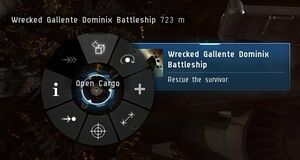
Opening a cargo container using the radial menu. The most common context-sensitive commands can also be accessed (in many, but not all, cases) through the radial menu. To use the radial menu, press and hold the left mouse button on the object you wish to interact with, move the mouse to the desired command, and releasing the mouse button.
Retrieving the contents of containers (or other objects) in space (this is referred to as "looting"; despite the name, it may not necessarily involve theft or other criminal activity). Your ship must be within 2500 m of an object to retrieve its contents; if you're further away, your ship will first fly automatically towards the object.
Using the overview to find and interact with nearby objects, which can often be much easier than finding them in space. You may want to enlarge the overview interface and resize the columns to see more information at once.
Targeting ships (or other objects in space), which is necessary if you want to (for instance) fire your weapons at them. Any ships you have locked will appear as circles in the top-right of your screen.
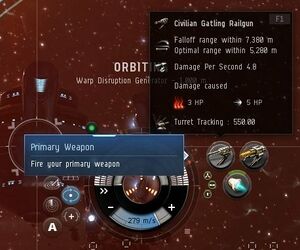
Click your weapon to fire at the currently selected target. Note your weapon's range on the tooltip. Firing your ship's weapons at both stationary and moving targets. Your weapons have a maximum range; hover over the icon to see it, and keep your ships (e.g. with the "orbit" command) within this range.
Taking and dealing damage. Your ship (as well as enemy ships) is protected by shields, armor, and structure (collectively referred to as "tank"), which are depleted sequentially by incoming weapon fire; once a ship's structure has been depleted, it will be destroyed. Your ship's tank is represented by three concentric circles at the bottom of the user interface. Shields slowly regenerate over time; armor and structure must be repaired once they've taken damage.
Using an afterburner module to increase your ship's speed. Using this module uses energy from your ship's capacitor, which regenerates over time. Your capacitor's current charge level is shown in the middle of the tanking circles (at the bottom of the user interface).
Warping to another location within the same star system, and docking at a station.
Space station
Training skills, being given a skillbook, and injecting it. Viewing your skills through the character sheet. Skills in EVE are trained in real time, even when you are not logged into the game.
Your ship's cargo bay can store a limited amount of stuff (measured by volume).
Your item and ship hangars in a station have effectively unlimited storage, but are location-specific (i.e. items stored in one station cannot be remotely accessed from another station).
Items and ships which you receive from "out of the game" (e.g. PLEX, refer-a-friend rewards, or some of the rewards from the tutorial) can be found in your "redeem items" interface.
The Info Panel (on the left-hand side of the user interface) shows where you should fly to next; right-click or use the radial menu on the location to warp/fly your ships to the location.
Manufacturing a module from a blueprint original (BPO)
Almost everything in EVE (including BPOs) can be bought on the market. While some items on the market (including BPOs) are sold by NPCs at fixed prices, most items are sold by other players, causing their prices to fluctuate with supply and demand.
Missions
Using a stargate to jump to another star system. Unlike in other space games, you can only travel inside a star system (using warp drive) or jump between star systems (using, for the most part, stargates); you cannot travel to an arbitrary point between star systems.
Plot a course to a more distant star system. Plotting a course highlights the next stargate on your journey yellow in your overview, allowing you to easily find your way even on a lengthy journey.
Automatically fly your ship to your destination. While this can be a very hands-off way of flying, it takes much longer than "manually" warping from stargate to stargate, as the autopilot will always warp you to 10 km off the next stargate, requiring an additional sub-light-speed flight to the stargate before you can jump to the next star system. Potentially unfriendly players will use this time you spend slowly flying towards a stargate to potentially attack and destroy your ship to steal your cargo; therefore, in most cases it's recommended that you only use the autopilot to plot a course, not to actually fly your ship.
Warping into a deadspace area using an acceleration gate.
Using a mini skill injector to receive 25,000 unallocated skill points, which you can use to advance your skill training (by approximately 14 Hours for Omega characters; 28 Hours for Alpha characters, as these train skills more slowly). You can also purchase regular skill injectors from the market to gain additional unallocated skill points, although these cost a substantial amount of ISK.
Receiving a new ship, assembling it, and using it. All ships and modules are sold/manufactured in a "packaged" state (think: IKEA flat-pack furniture); before a ship can be used, it must be assembled (modules are assembled automatically when fitted to a ship).
Using a Stasis Webifier ("web") module to slow down an enemy ship. Webs are often used to make enemy ships easier to hit with weapons.
Having your ship and pod destroyed, causing your character's consciousness to transfer to its medical clone.
Recommending that you fly to the station with the nearest Career Agents to do their missions. You will also receive some useful modules and ships (including a Venture mining frigate with mining modules) as a reward.
The career agents are the next step in the EVE tutorial, and it's highly recommended that you do their missions.