[[File:Career-agents-in-station-services.jpg|thumb|The career agents (like nearly all other agents) can be accessed through the Station Services window at their station. Right-click on an agent to start a conversation with them.]] The '''Career Agents''' are a part of EVE Online's new player training. Following on from the [[tutorial]], the career agents offer missions which showcase and explain some of the main [[PvE]] activities in EVE Online, as well as expanding on the topics covered in the tutorial. There are five career agents, each offering between 5 and 10 sequential missions covering a certain area of the game:
[[File:Career-agents-in-station-services.jpg|thumb|The career agents (like nearly all other agents) can be accessed through the Station Services window at their station. Right-click on an agent to start a conversation with them.]] The '''Career Agents''' are a part of EVE Online's new player training. Following on from the [[tutorial]], the career agents offer missions that showcase and explain some of the main [[PvE]] activities in EVE Online, as well as expand on the topics covered in the tutorial. There are five career agents, each offering between 5 and 10 sequential missions covering a certain area of the game:
* [[Explorer]], which teach you about [[exploration]], [[probe scanning]], [[hacking]], and [[Gas Cloud Mining|gas cloud mining]].
* [[Explorer]], which teach you about [[exploration]], [[probe scanning]], [[hacking]], and [[Gas Cloud Mining|gas cloud mining]].
* [[Enforcer (Career Agent)|Enforcer]], which teach you about basic [[PvE]] combat.
* [[Enforcer (Career Agent)|Enforcer]], which teach you about basic [[PvE]] combat.
Line 24:
Line 24:
* The career agents will sometimes give you ships, modules, or skillbooks as mission rewards. Normal mission agents almost always pay only ISK and [[Loyalty Points|loyalty points]].
* The career agents will sometimes give you ships, modules, or skillbooks as mission rewards. Normal mission agents almost always pay only ISK and [[Loyalty Points|loyalty points]].
It's possible to decline a mission from a Career Agent, but this will prevent you from completing the rest of the missions in that agent's mission arc. Therefore, if you want to take a temporary break from a mission chain, click the "Delay" button (instead of the "Reject" button) when a mission is offered. Should you nonetheless run into problems where you are mid-chain, such as declining the agent (which will prevent you from progressing further with that agent) or any other technical glitches, you can [https://support.eveonline.com/hc/en-us/requests/new open a support ticket], and usually a game master (GM) will reset the mission or even the agent for you.
It's possible to decline a mission from a Career Agent, but this will prevent you from completing the rest of the missions in that agent's mission arc. Therefore, if you want to take a temporary break from a mission chain, click the "Delay" button (instead of the "Reject" button) when a mission is offered. Should you nonetheless run into problems where you are mid-chain, such as declining the agent (which will prevent you from progressing further with that agent) or any other technical glitches, you can [https://support.eveonline.com/hc/en-us/requests/new open a support ticket], and usually, a game master (GM) will reset the mission or even the agent for you.
While many of the rewards from the Career Agents are useful in the rest of the game, some missions reward you with a "[[Tech and meta levels#Civilian|Civilian]]" module. These modules are much worse than even the basic Tech 1 modules and should be ditched at the earliest possible opportunity.
While many of the rewards from the Career Agents are useful in the rest of the game, some missions reward you with a "[[Tech and meta levels#Civilian|Civilian]]" module. These modules are much worse than even the basic Tech 1 modules and should be ditched at the earliest possible opportunity.
Many of the Career Agent missions have you interacting with objects in space (asteroids, containers, acceleration gates, etc); depending on your [[Overview]] settings these may not appear in your Overview. Therefore, the Career Agent missions are a good opportunity to get to know the Overview settings, and (if necessary) to modify them so that you can see all the relevant objects in your Overview. If you're unsure whether your Overview settings are wrong (or if you're just in the wrong place), it may be a good idea to look at the "All" Overview preset from time to time.
Many of the Career Agent missions have you interacting with objects in space (asteroids, containers, acceleration gates, etc); depending on your [[Overview]] settings these may not appear in your Overview. Therefore, the Career Agent missions are a good opportunity to get to know the Overview settings, and (if necessary) modify them so that you can see all the relevant objects in your Overview. If you're unsure whether your Overview settings are wrong (or if you're just in the wrong place), it may be a good idea to look at the "All" Overview preset from time to time.
The Career Agents assume that you've done the [[tutorial]] (or are at least familiar with the concepts taught in the tutorial) before starting their missions.
The Career Agents assume that you've done the [[tutorial]] (or are at least familiar with the concepts taught in the tutorial) before starting their missions.
Line 40:
Line 40:
# Open [[The Agency]] in-game ({{Button|Alt}}+{{Button|M}})
# Open [[The Agency]] in-game ({{Button|Alt}}+{{Button|M}})
# Navigate to the page called "AGENTS & MISSIONS".
# Navigate to the page called "AGENTS & MISSIONS".
# Select the card "Career Agents". This will open another window which will present you with the closest Career agents to your current location.
# Select the card "Career Agents". This will open another window that will present you with the closest Career agents to your current location.
# Next to each agent there will be a button labelled "Set Destination", "Dock", "Start Conversation" depending on where you currently are. If you need to travel there click it to [[Advanced piloting techniques#Autopilot|plot a route]] to the system and station where the agents are.
# Next to each agent there will be a button labeled "Set Destination", "Dock", and "Start Conversation" depending on where you currently are. If you need to travel there click it to [[Advanced piloting techniques#Autopilot|plot a route]] to the system and station where the agents are.
You can do the agents in any order you like - even accept all 5 and do them in parallel. In fact, the latter has the advantage that some of the rewards of one mission line are requested by another so you need to buy/build/get less items to finish the missions.
You can do the agents in any order you like - even accept all 5 and do them in parallel. In fact, the latter has the advantage that some of the rewards of one mission line are requested by another so you need to buy/build/get fewer items to finish the missions.
There are three sets of five career agents for each Empire faction in the game; however, they all offer identical missions, and unless you are looking to recover from low [[NPC standings|faction standings]] there is no reason to do the missions for more than one set of career agents.
There are three sets of five career agents for each Empire faction in the game; however, they all offer identical missions, and unless you are looking to recover from low [[NPC standings|faction standings]] there is no reason to do the missions for more than one set of career agents.
* [[Industrialist (Producer)#Making Mountains of Molehills (4 of 10)|Making Mountains of Molehills (4/10)]] and [[Industrialist (Producer)#Making Mountains of Molehills (8 of 10)|(8/10)]] require 7,000 and 2,640 units of Tritanium respectively, which you can reprocess from the ores you mine or buy from the market. Should you wish to mine and reprocess yourself, a [[Venture]] mining frigate given by [[Industrialist (Entrepreneur)#Balancing the Books (2 of 10)|Industrialist - Entrepreneur mission: Balancing the Books (2/10)]] may come in handy due to its mining speed and spacious orehold capacity. Alternatively, [[Frigates#Exploration|exploration frigates]] given out by [[Explorer#Gas Site Scanning (5 of 5)|Explorer mission: Gas Site Scanning (5/5)]] is also a good candidate for mining for this mission (although not for mining in general) as they usually have the largest cargohold capacity within the non-mining frigate class to minimize the number of mining trips you have to make.
* [[Industrialist (Producer)#Making Mountains of Molehills (4 of 10)|Making Mountains of Molehills (4/10)]] and [[Industrialist (Producer)#Making Mountains of Molehills (8 of 10)|(8/10)]] require 7,000 and 2,640 units of Tritanium respectively, which you can reprocess from the ores you mine or buy from the market. Should you wish to mine and reprocess yourself, a {{sh|Venture}} mining frigate given by [[Industrialist (Entrepreneur)#Balancing the Books (2 of 10)|Industrialist - Entrepreneur mission: Balancing the Books (2/10)]] may come in handy due to its mining speed and spacious orehold capacity. Alternatively, [[Frigates#Exploration|exploration frigates]] given out by [[Explorer#Gas Site Scanning (5 of 5)|Explorer mission: Gas Site Scanning (5/5)]] is also a good candidate for mining for this mission (although not for mining in general) as they usually have the largest cargohold capacity within the non-mining frigate class to minimize the number of mining trips you have to make.
* [[Industrialist (Producer)#Making Mountains of Molehills (10 of 10)|Making Mountains of Molehills (10/10)]] requires a faction-specific frigate which you can either manufacture or purchase from the market. Alternatively, if you have already completed [[Explorer#An Introduction to Cosmic Signatures (2 of 5)|Explorer mission: Introduction to Cosmic Signatures (2/5)]] and have the rewarded frigate intact, you can turn it in to immediately complete the mission.
* [[Industrialist (Producer)#Making Mountains of Molehills (10 of 10)|Making Mountains of Molehills (10/10)]] requires a faction-specific frigate which you can either manufacture or purchase from the market. Alternatively, if you have already completed [[Explorer#An Introduction to Cosmic Signatures (2 of 5)|Explorer mission: Introduction to Cosmic Signatures (2/5)]] and have the rewarded frigate intact, you can turn it in to immediately complete the mission.
The career agents (like nearly all other agents) can be accessed through the Station Services window at their station. Right-click on an agent to start a conversation with them.
The Career Agents are a part of EVE Online's new player training. Following on from the tutorial, the career agents offer missions that showcase and explain some of the main PvE activities in EVE Online, as well as expand on the topics covered in the tutorial. There are five career agents, each offering between 5 and 10 sequential missions covering a certain area of the game:
The agents are not exclusive (i.e. doing one set of missions doesn't "lock" you into a pre-set "career path", as there are no such things in EVE); you can do as many of the agents' missions as you want. There are 12 locations in total, 3 for each of the four Factions in New Eden.
It is highly recommended that you complete all the mission chains (or arcs if you will) given by the five career agents, even if you already know what you'd like to do in EVE. The missions give a good overview of some of the mechanics of the game, and good financial rewards for a new player. It is also good to have a basic idea of how each career works - for example, even if you don't plan to do any exploration, it is good to have an idea of how other players are able to scan and find you while you are in space doing any number of activities. Also, it's likely that over the course of your time in EVE you will want to try doing many different things.
Introduction
If you're doing the Career Agent missions right after the tutorial, you may notice that some of the mission mechanics have changed.
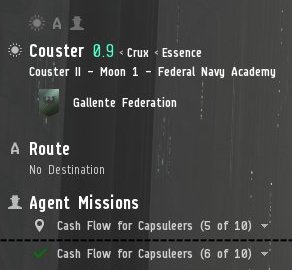
An uncompleted and a completed mission in the Info Panel. The currently active mission now shows up in the Info Panel (left side of the screen) under "Agent Missions". Each mission entry has a drop-down menu through which you can read a summary of the objectives. Additionally, once you've completed the objectives for a mission (including, if applicable, returning any items to the correct station), a green tick mark will appear in the Info Panel.
The missions will also be entered into your mission journal (accessible through the NeoCom, or Alt+J)
In order to start a mission, you must first talk to the agent (right-click on the agent (in the "Agents" panel in the Station Services window), and select "Start Conversation") and accept a mission. Once you've completed the objectives, you must return to the agent's station, and talk to him/her again to complete it. You will then be offered the next mission in the mission chain.
The career agent missions often give bonus rewards for completing them particularly quickly, although the time-frame given is usually more than generous.
Any agents you accept missions from will be automatically added to your address book (accessible through the People & Places window in the NeoCom). You can use this to find your agent again should you be unsure where to go.
In many ways, the career agents work similarly to "normal" mission agents in EVE, with two important differences:
The career agents only have a limited set of missions available. Normal mission agents will continue to offer you new missions indefinitely as long as you have the required standings
The career agents will sometimes give you ships, modules, or skillbooks as mission rewards. Normal mission agents almost always pay only ISK and loyalty points.
It's possible to decline a mission from a Career Agent, but this will prevent you from completing the rest of the missions in that agent's mission arc. Therefore, if you want to take a temporary break from a mission chain, click the "Delay" button (instead of the "Reject" button) when a mission is offered. Should you nonetheless run into problems where you are mid-chain, such as declining the agent (which will prevent you from progressing further with that agent) or any other technical glitches, you can open a support ticket, and usually, a game master (GM) will reset the mission or even the agent for you.
While many of the rewards from the Career Agents are useful in the rest of the game, some missions reward you with a "Civilian" module. These modules are much worse than even the basic Tech 1 modules and should be ditched at the earliest possible opportunity.
Many of the Career Agent missions have you interacting with objects in space (asteroids, containers, acceleration gates, etc); depending on your Overview settings these may not appear in your Overview. Therefore, the Career Agent missions are a good opportunity to get to know the Overview settings, and (if necessary) modify them so that you can see all the relevant objects in your Overview. If you're unsure whether your Overview settings are wrong (or if you're just in the wrong place), it may be a good idea to look at the "All" Overview preset from time to time.
The Career Agents assume that you've done the tutorial (or are at least familiar with the concepts taught in the tutorial) before starting their missions.
Caveat emptor – techniques are not mechanics
However, keep in mind that they offer very little training in PvP (which make up a very substantial part of the game). Additionally, EVE is a sandbox game, and much of the attraction of the game is forging your own path as opposed to following a pre-set path - so the career agent "careers" should only be seen as one of many things you can do in EVE.
Finding the Career Agents
If you've followed the tutorial, you will have flown to the station housing the career agents; all five agents are always located in the same station. If you skipped the tutorial, you can locate the closest set of career agents (there are three sets of agents per faction, but they all offer the same missions):
Select the card "Career Agents". This will open another window that will present you with the closest Career agents to your current location.
Next to each agent there will be a button labeled "Set Destination", "Dock", and "Start Conversation" depending on where you currently are. If you need to travel there click it to plot a route to the system and station where the agents are.
You can do the agents in any order you like - even accept all 5 and do them in parallel. In fact, the latter has the advantage that some of the rewards of one mission line are requested by another so you need to buy/build/get fewer items to finish the missions.
There are three sets of five career agents for each Empire faction in the game; however, they all offer identical missions, and unless you are looking to recover from low faction standings there is no reason to do the missions for more than one set of career agents.
Tutorial Systems in EVE
Setting off on your journey to the career agent, you will likely come from one of these systems and stations, from which new players are spawned to start the tutorial. The system at which you start in is dependent on the corporation you pick when you create the character, for instance, creating a new Minmatar character with a corporation of "Republic Military School" will place you in Ammold.
There is no built-in mission order for the career agents - you can complete them in whichever order you please. There are, however, some benefits to completing one mission chain before another, be it for logical or material reasons.
Everything you need for the missions is internally supplied, and thus it is an ideal candidate as an earlier choice.
While your corvette is more than sufficient for the first two missions before a more combat-appropriate frigate is granted to you as a reward for Cash Flow for Capsuleers (2/10), you can try out the two frigates rewarded from the Explorer should you wish, as they will likely be an upgrade compared to the corvette.
Since this mission chain deals with more advanced PvE combat topics, for the new players it is suggested that you complete Enforcer first.
In addition, The Exam (10/10) might pose a challenge for those who do not yet have a combat-appropriate frigate from Cash Flow for Capsuleers (2/10) or the necessary skill injected and trained to use the destroyer granted to you when the mission is accepted.
Small tip: Angel of Mercy (2/10) and The Stand (5/10) require you to fly a frigate to its destruction. Do not fit any modules on it other than what you need to complete the mission, and get it Platinum-level insured before you undock for a quick and easy pay-out on mission completion. While you need to use the frigate provided in Angel of Mercy (2/10), you can choose to use a free corvette (with a second civilian gun instead of the mining laser) for The Stand (5/10).
Balancing the Books (10/10) requires some faction-specific ammunition, which you can manufacture or purchase from the market. If you are doing this mission for a Gallente or Minmatar agent, you can use leftover ammunition which comes as a bonus reward by Enforcer: Cash Flow for Capsuleers (1/10) for at least a partial supply of required items.
Making Mountains of Molehills (4/10) and (8/10) require 7,000 and 2,640 units of Tritanium respectively, which you can reprocess from the ores you mine or buy from the market. Should you wish to mine and reprocess yourself, a Venture mining frigate given by Industrialist - Entrepreneur mission: Balancing the Books (2/10) may come in handy due to its mining speed and spacious orehold capacity. Alternatively, exploration frigates given out by Explorer mission: Gas Site Scanning (5/5) is also a good candidate for mining for this mission (although not for mining in general) as they usually have the largest cargohold capacity within the non-mining frigate class to minimize the number of mining trips you have to make.
The career agent missions reward a moderate amount of ISK (about 5-6M ISK in total), as well as a number of useful ships and modules. Additionally, completing the last mission for each of the five career agents increases your standings with the agent's faction. While this is only slightly useful for new characters (who start off with neutral standings to all the empire factions), it's a way for older characters to recover from low faction standings.
^In the past, Amarr, Caldari and Minmatar agents used to award 1.2% while only Gallente agents gave out 1.5%. This seems to have been fixed.
If you plan on applying to join EVE University, it is highly recommended that you have at least started, if not completed, all the career agent missions.




 Venture mining frigate given by Industrialist - Entrepreneur mission: Balancing the Books (2/10) may come in handy due to its mining speed and spacious orehold capacity. Alternatively, exploration frigates given out by Explorer mission: Gas Site Scanning (5/5) is also a good candidate for mining for this mission (although not for mining in general) as they usually have the largest cargohold capacity within the non-mining frigate class to minimize the number of mining trips you have to make.