
More actions
→Reimbursing other members: updating management notification channel |
m Update link. |
||
| Line 53: | Line 53: | ||
::{{co|yellow|For example:}} | ::{{co|yellow|For example:}} | ||
::''Repair Drone Operation (200k), Thermal Shield Compensation (120k), Total: 320k'' | ::''Repair Drone Operation (200k), Thermal Shield Compensation (120k), Total: 320k'' | ||
:4. Make sure you [[Auto | :4. Make sure you [[Auto linking|link]] the name of the skillbook | ||
::''This makes it easier and quicker for people to check that your skillbook qualifies for reimbursement. You can do this either by dragging and dropping the skillbook information page into the chat window, or by typing the name of the skillbook, then highlighting it, right clicking and selecting {{co|wheat|Auto Link}} and then {{co|wheat|Item Type}}.'' | ::''This makes it easier and quicker for people to check that your skillbook qualifies for reimbursement. You can do this either by dragging and dropping the skillbook information page into the chat window, or by typing the name of the skillbook, then highlighting it, right clicking and selecting {{co|wheat|Auto Link}} and then {{co|wheat|Item Type}}.'' | ||
:5. Wait for someone to notice your request and handle your reimbursement. | :5. Wait for someone to notice your request and handle your reimbursement. | ||
Revision as of 09:18, 5 August 2024
- To check on the Seeded Price for the skillbooks covered by the program, please see Skillbook Program Seeded Price.

For a summary of EVE University's rules and code of conduct, see EVE University Rules.
Members of EVE University have access to our Skillbook Program, which allows them to obtain reimbursement for up to three and a half million ISK of skillbooks per day. Reimbursement is available to any EVE University member, regardless of their current title. Members who already have the Freshman title or above are able to reimburse themselves directly, and are encouraged to reimburse other members who do not yet have any titles.
Skillbooks in the hangars
In addition to skillbook reimbursement, EVE University has some skillbooks in our Communities, so check there first. Any member with the Freshman title or above can access the hangars.
If you are taking a skillbook from the hangar, for use by yourself or another member, make sure you lock the stack afterwards. See Taking Items from the Hangar for more information on the procedure. Take only the skillbooks you will immediately use - these skillbooks should not be resold.
Rules and restrictions of the Program
In order to ensure we have enough to go around, we impose some restrictions. Members should ensure that they follow these rules when obtaining reimbursement:
- Members can request reimbursement up to a total of three and a half million (3,500,000) ISK per day, although this can be over several skillbooks.
- We take "per day" to mean the twenty-four hour period from 00:00 - 23:59 EVE time.
- The 24 hour limit resets each day and is not cumulative.
- Each skillbook must individually cost 3,500,000 ISK or less. We do not partially reimburse higher value skillbooks.
- Skillbooks with an NPC seeded price over 3,500,000 ISK are not eligible for reimbursement.
- Skillbooks can be reimbursed at either the NPC seeded market price, or at the Remote Injection price via the skill queue, provided the total is less than 3,500,000 ISK.
- If you purchase a skillbook that is listed at a different price than the NPC seeded price, you will receive reimbursement at the NPC seeded price, regardless of the amount you spent.
- Certain skillbooks are not available via Remote Injection nor via NPC seeded market listings, such as the Precursor (Triglavian) skillbooks. Despite these books sometimes costing under 3,500,000 ISK on the open market, they are not eligible for reimbursement.
- Do note that there are a handful of skillbooks that cost under 3,500,000 ISK at the NPC seeded market price, but cost more than the limit when purchased directly via Remote Injection from the skill queue.
- If these skillbooks are purchased via Remote Injection, they may be reimbursed at the NPC seeded market price.
- Members should only request reimbursement for skills they intend to use immediately.
- Members may only claim reimbursement for skillbooks purchased while they are in EVE University, not before they joined or after they leave.
- Members may only claim reimbursement for skillbooks used by their characters in EVE University. We do not reimburse skillbooks for alternate characters. Skillbooks for alternate characters within the Uni proper is permitted, and the 3,500,000 ISK limit is per character.
- If you are reimbursing a skillbook for an additional character, skillbook reimbursement must be requested from, and transferred to, the character that is training the purchased skill.
- If you're unsure on alt eligibility, a good rule of thumb is if your additional character can't access the Corp channel to make the request (ie, they are not in the Uni proper), they are not eligible for this service.
- If you make a mistake with the skillbook wallet, you can report it to any Manager or Director
Checking skillbook prices
You can look at the Skillbook Program Seeded Price page for a list of skillbook prices, or look it up yourself ingame through the Regional Market or by either right-clicking a skillbook or through the Show Info window and selecting View Market Details. For the market price, make sure that it is the NPC-seeded price you're looking at and not player offers.
-
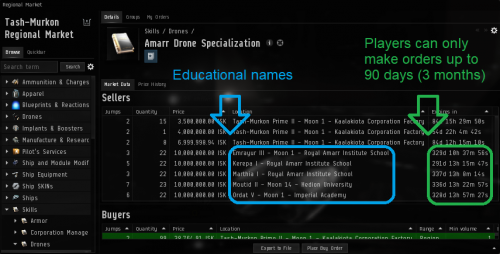
You can easily verify that it is an NPC sell order by the fact it expires in several hundred days, like the orders marked in green, where as players are limited to 90 days (3 months). Those NPC sell orders are also placed exclusively from educational places like Academies, Schools and Universities as seen by the locations marked in blue. -
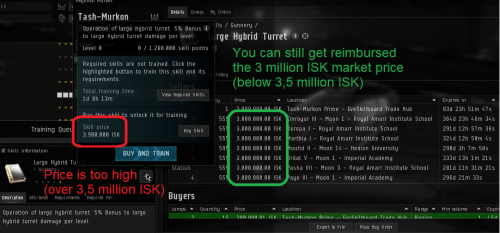
Here's an example of a skill, in this case Large Hybrid Turret, that has a (NPC) market price of 3,000,000 ISK but a direct price of 3,900,000 ISK. You'll be unable to claim the direct price of 3,900,000 ISK marked in red since it's above that limit, but you are still able to claim the market price of 3,000,000 ISK marked in green as it's still within the limit.


Obtaining reimbursement
Members with no title
Members who don't yet have any titles within EVE University can still request reimbursement for skillbooks. The procedure is as follows:
- 1. Ensure that the skillbook qualifies for reimbursement under the above rules
- I.e. it can be bought from an NPC seller on the market or directly through the skill queue for 3.5 million ISK or less.
- 2. Ensure that you have a sufficient amount of your 3.5 million ISK total daily allowance remaining to cover the cost of the skillbook.
- 3. Make a post in the Corp chat channel in the following format:
- Skillbook name (cost), Skillbook name (cost), Total cost
- For example:
- Repair Drone Operation (200k), Thermal Shield Compensation (120k), Total: 320k
- 4. Make sure you link the name of the skillbook
- This makes it easier and quicker for people to check that your skillbook qualifies for reimbursement. You can do this either by dragging and dropping the skillbook information page into the chat window, or by typing the name of the skillbook, then highlighting it, right clicking and selecting Auto Link and then Item Type.
- 5. Wait for someone to notice your request and handle your reimbursement.
- Be patient - remember people are often busy playing the game. If you have not been reimbursed within 10 minutes post your request again.
- 6. Once someone has processed your request, they will ask you to confirm you have received the ISK. Check your wallet and confirm in the channel that it has arrived.
Members with the Freshman title
Members who have the Freshman title (or higher) should reimburse themselves directly from the skillbook wallet. The procedure is as follows:
- 1. Ensure that the skillbook qualifies for reimbursement under the above rules
- I.e. it can be bought from an NPC seller on the market or directly through the skill queue for 3.5 million ISK or less.
- 2. Ensure that you have a sufficient amount of your 3.5 million ISK total daily allowance remaining to cover the cost of the skillbook.
- 3. Open your Wallet from the Neocom:

- 4. At the top left select the Corporation Wallet tab. Ensure that your active wallet division is EVE University Skillbooks.
- 5. At the top right click the Withdraw ISK button.
- 6. A box will pop up, which asks for an amount and a reason.
- For the amount enter the total amount of all the skillbooks you are requesting reimbursement for. In the reason field put the names of the skillbooks. If the full names don't fit you can abbreviate them, provided the skillbook is still recognisable.
- For example:
- Therm Shield Comp (for Thermal Shield Compensation)
- 7. Select OK and the ISK will be added to your personal wallet.

If the skillbook wallet does not contain enough ISK to fulfill your request, please let a Manager or Director know by pinging a message in our #ping-staff channel in discord. Please do not make any donation into the skillbook wallet directly.
Reimbursing other members
- Note: This policy does not apply to your alternate characters; if the alternate character is in the Uni, you must use that character to request it.
Members who have the Freshman title (or higher) are also able to reimburse other members who do not yet have the appropriate access. As per our rules: Our members are encouraged to balance "self" with "service". The procedure is as follows:
- 1. First acknowledge the request in the Corp channel so the member requesting reimbursement (and other potential helpers) know it is being handled.
- 2. You are not expected to check all the prices and totals for the skillbooks - the onus is on the person requesting reimbursement to get the correct amounts and to add them up correctly, and also to make sure they do not exceed 3.5 million ISK across the day. Having said that, you should point out to them any obvious errors, like if they are requesting more than 3.5 million ISK at once.
- 3. Open your Wallet from the Neocom:
- 4. At the top left select the Corporation Wallet tab. Ensure that your active wallet division is EVE University Skillbooks.
- 5. At the top right click the Transfer ISK button.
- 6. A box will pop up which will enable you to search for the character to be reimbursed by name. Search for their character name, select the correct one and press OK.
- 7. Another box will pop up, which asks for an amount and a reason.
- For the amount enter the total amount of all the skillbooks the members is requesting reimbursement for. In the reason field put the word "Skillbooks". You do not need to enter the name of the member you are reimbursing, as this is visible in the wallet logs.
- 8. Select OK and the ISK will be transferred to the member's personal wallet.
- 9. Once you have finished, confirm in the Corp channel that the ISK has been sent, and ask the member to confirm safe receipt.
If the skillbook wallet does not contain enough ISK to fulfill your request, please let a Manager or Director know by pinging a message in our #ping-staff channel in discord. Please do not make any donation into the skillbook wallet directly.
| |||||||||||||||||||||||||||||||||||||||||||||||||||||