
More actions
| Line 102: | Line 102: | ||
==Tactics== | ==Tactics== | ||
'' | ''Miners in the fleet can have access only to the Corporate hanger bays directly, and since corporation default permissions are used, only to the same hangers that they would have access to while docked in a station can be accessed. The ORCA pilot must move ORE from the Corporate Hanger Bay to the ORE bay or the Cargo bay when the Corporate bay gets to full. Typically, it’s good practice to place mining crystals, both T1 and T2s in the Corporate Hanger bay, so the fleet can have access to new ones when theirs burn out. This takes up just a little of the Corporate bay. | ||
The mining fleet can use the ORCAs Ship Maintenance Bay to reconfigure their mining ship, swapping out fittings for different purposes. To enable this, the ORCA pilot must configure the ORCA to allow this access. This is done by the ORCA pilot right clicking on the ORCA, clicking on the Configure Ship menu item, and clicking the “Allow Fleet Member Usage” box | |||
The use of the ORCA is not limited to having large cargo and ORE bays. A mining tactic to use when in a can flipping area is to have frigates or cruisers stored in the Corporate Maintenance Bay and have your fleet swap your mining ships for one of these. A can flipper will look twice if, after he flips your can, several cruisers, a logi, and a tackler suddenly appear. To do this, the mining ship must be within 2500m of the ORCA. This coupled with a decent drone bay, will protect a mining fleet from random pirates, while allowing a decent time to get “The Cavalry” to protect your mining fleet. A note on ship swapping, Combat ships can have nothing in their cargo bays except ammunition. Miners can have nothing in their cargo bays except mining crystals. Prior to docking, miner should jettison all ore and other articles, and the ORCAs tractor beam can haul the cans to the ORCA and put the jettisoned cargo away. | |||
'' | |||
==Notes== | ==Notes== | ||
Revision as of 18:55, 14 January 2012

 Has Huge Cargohold
HIGHLIGHTS
RELATED UNI-WIKI REFERENCES
|
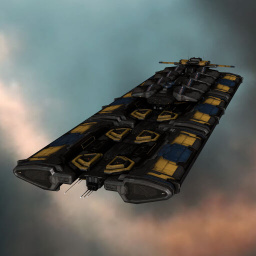
The Orca was developed as a joint venture between Outer Ring Excavations and Deep Core Mining Inc as a vessel to help meet the demands of New Eden's industry and provide a flexible platform from which mining operations can be more easily managed. SHIP BONUSES
Role Bonus:
Ship Attributes
|


Summary
While designed as a powerful fleet booster for mining operations, the Orca also gets much use as a general freighter. It has a ship bay that can carry small and medium sized ships without needing to be repackaged (which would lose rigs and insurance) and a good amount of general cargo space. Most importantly, the corporate cargo bay in the orca cannot be scanned by players and does not drop its contents on destruction, making it a secure way of transporting high value items around high sec.
More about the Orca and its various roles is listed in the Orca Guide.
Skills
Flying the ORCA, and developing the best skill set to do so, is perhaps the biggest improvement in a High-Sec mining fleet. While the ORCA has a large cargo bay, and a separate ORE bay, one of it’s best uses is giving mining fleet members a longer mining laser range, and a faster mining laser cycle time. This leads to more ISK per hour of mining for all fleet members. .Skills Relevant to ORCA Bufs
Leadership Skills in Mining Foreman, Mining Director, and Warfare Link Specialist, provide an effective skill set for ORCA operations. These skills assist fleet members in mining yield improvements. Mining Foreman links in the high slots complete the mastery of the ORCA, providing mining laser range improvements and faster mining cycle times as an integral buf improvement to a mining fleet
Fitting
A good set of Mining Foreman links are Laser Optimizer which speeds up mining lasers / gas harvester / ice harvester cycle time and Laser Field Enhancement which increases the range of the fleet's mining lasers, gas harvesters and ice harvesters. For the ORCA, it’s good to have a Tractor Beam in the third high slot, so the Harvester Capacitor Efficiency link is usually not used (or at least I don’t fit one)
ORCA cargo hold increases with pilot ORCA skill levels. The baseline cargo bay of an ORCA is 30,000 m3, which is a lot of space. That, combined with the ORE hold (50,000 m3) and the Corporate Hanger (40,000 m3) has a total ORE storage space of 120,000 m3. This is enough room to keep a small size mining fleet going for an hour or two.
With full ORCA skills, the cargo hold is increased to 37,000 m3, and with T2 Expanded Cargoholds in the low slots, the bay is increased to 60,900 m3. A fleet now has access to 159,000 m3 of storage space in a fully tricked out ORCA (without rigs). This allows an ORCA fleet a significant time in belt.
ORCAs have VERY slow locking ability against high sec NPCs or anybodies Frigate. The use of sensor boosters in the Mid slots does help when targeting RATs.
Tactics
Miners in the fleet can have access only to the Corporate hanger bays directly, and since corporation default permissions are used, only to the same hangers that they would have access to while docked in a station can be accessed. The ORCA pilot must move ORE from the Corporate Hanger Bay to the ORE bay or the Cargo bay when the Corporate bay gets to full. Typically, it’s good practice to place mining crystals, both T1 and T2s in the Corporate Hanger bay, so the fleet can have access to new ones when theirs burn out. This takes up just a little of the Corporate bay.
The mining fleet can use the ORCAs Ship Maintenance Bay to reconfigure their mining ship, swapping out fittings for different purposes. To enable this, the ORCA pilot must configure the ORCA to allow this access. This is done by the ORCA pilot right clicking on the ORCA, clicking on the Configure Ship menu item, and clicking the “Allow Fleet Member Usage” box
The use of the ORCA is not limited to having large cargo and ORE bays. A mining tactic to use when in a can flipping area is to have frigates or cruisers stored in the Corporate Maintenance Bay and have your fleet swap your mining ships for one of these. A can flipper will look twice if, after he flips your can, several cruisers, a logi, and a tackler suddenly appear. To do this, the mining ship must be within 2500m of the ORCA. This coupled with a decent drone bay, will protect a mining fleet from random pirates, while allowing a decent time to get “The Cavalry” to protect your mining fleet. A note on ship swapping, Combat ships can have nothing in their cargo bays except ammunition. Miners can have nothing in their cargo bays except mining crystals. Prior to docking, miner should jettison all ore and other articles, and the ORCAs tractor beam can haul the cans to the ORCA and put the jettisoned cargo away.
Notes
You can write additional notes for Orca here.


