
More actions
Salartarium (talk | contribs) m use sk template |
m Fix typo. Change unneeded piped link, making use of redirect. |
||
| Line 76: | Line 76: | ||
== Summary == | == Summary == | ||
The Burst is the Minmatar [[ | The Burst is the Minmatar [[Logistics Frigate]]; Burst pilots repair their fleetmates’ ships during battle. The Burst is bonused for remote shield boosting, which matches the Minmatar racial focus on shield tanking. The ship’s bonuses to remote shield booster amount, activation, and range make the underwhelming base stats of small remote shield boosters practically useful. Flying the Burst is a great first step in learning about [[Logistics]]. Burst pilots often go on train into heavier Tech I logistics cruisers (such as the Minmatar [[Scythe]]), and then Tech II logistics ships (including the [[Scalpel]] and [[Scimitar]]). But the Burst is also effective all on its own, especially as a component of frigate or destroyer gangs, where speed is key. | ||
One defining challenge of flying Tech I logistics frigates in general, and the Burst in particular, is sustaining enough capacitor to run the ship. Remote repair modules are extremely cap-intensive, so the Burst is typically fit to boost available capacitor—with capacitor power relays in low slots, capacitor control circuit rigs, and, if necessary, “Enduring” remote shield boosters (which consume less cap). Training character skills that increase capacitor will also help. It might seem that fitting the Burst with an afterburner instead of a microwarpdrive (MWD) could spare some capacitor. But the Burst needs to keep up with its small-ship fleetmates in order to repair them, so it usually needs an MWD. Pilots fitting the Burst should use the in-game fitting simulation window, or an out-of-game tool like [[Pyfa]], to match any fit to their specific skills and to gauge the ship’s cap stability. (This also means you may need to swap out modules on any pre-fit Burst hulls that you purchase on corp contracts, to make them work with your skills.) | One defining challenge of flying Tech I logistics frigates in general, and the Burst in particular, is sustaining enough capacitor to run the ship. Remote repair modules are extremely cap-intensive, so the Burst is typically fit to boost available capacitor—with capacitor power relays in low slots, capacitor control circuit rigs, and, if necessary, “Enduring” remote shield boosters (which consume less cap). Training character skills that increase capacitor will also help. It might seem that fitting the Burst with an afterburner instead of a microwarpdrive (MWD) could spare some capacitor. But the Burst needs to keep up with its small-ship fleetmates in order to repair them, so it usually needs an MWD. Pilots fitting the Burst should use the in-game fitting simulation window, or an out-of-game tool like [[Pyfa]], to match any fit to their specific skills and to gauge the ship’s cap stability. (This also means you may need to swap out modules on any pre-fit Burst hulls that you purchase on corp contracts, to make them work with your skills.) | ||
| Line 83: | Line 83: | ||
== Skills == | == Skills == | ||
{{sk| | * {{sk|Shield Emission Systems|I}} | ||
{{sk|Energy Grid Upgrades}} | * {{sk|Energy Grid Upgrades|II}} | ||
{{sk|Shield Upgrades}} | * {{sk|Shield Upgrades|I}} | ||
{{sk|Afterburner}} | * {{sk|Afterburner|I}} | ||
{{sk|Hull Upgrades}} | * {{sk|Hull Upgrades|I}} | ||
== Tactics == | == Tactics == | ||
New Burst pilots should read the [[Logistics#Logistics organization and tactics|Tactics section of the UniWiki’s Logistics | New Burst pilots should read the [[Logistics#Logistics organization and tactics|Tactics section of the UniWiki’s Logistics article]], and attend a [[Logistics (CORE class)]]; these will provide some details on how to fly logistics frigates. Some tips on flying the Burst: | ||
* '''Watch your capacitor, and activate modules only when needed.''' As explained above, you may not have enough capacitor to run every module, all the time. When you first land at an engagement, you’ll need to use your MWD to position yourself relative to the fleet. But then, once you are in position, you won’t need your MWD any more. Remember to turn it off! | * '''Watch your capacitor, and activate modules only when needed.''' As explained above, you may not have enough capacitor to run every module, all the time. When you first land at an engagement, you’ll need to use your MWD to position yourself relative to the fleet. But then, once you are in position, you won’t need your MWD any more. Remember to turn it off! | ||
Revision as of 14:57, 3 December 2022

RELATED UNI-WIKI REFERENCES
|
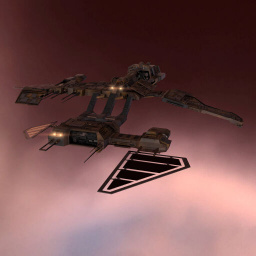
In YC114 each major empire faction, having been embroiled in a harrowing, extensive, long-term war, recognized the growing need for support and logistics functionality in their vessels during the kind of protracted interstellar warfare that might otherwise prove exhausting for its participants. In the Minmatar Republic, this led to the redesign and redeployment of the Burst. SHIP BONUSES
Minmatar Frigate bonuses (per skill level):
Ship Attributes
|



Summary
The Burst is the Minmatar Logistics Frigate; Burst pilots repair their fleetmates’ ships during battle. The Burst is bonused for remote shield boosting, which matches the Minmatar racial focus on shield tanking. The ship’s bonuses to remote shield booster amount, activation, and range make the underwhelming base stats of small remote shield boosters practically useful. Flying the Burst is a great first step in learning about Logistics. Burst pilots often go on train into heavier Tech I logistics cruisers (such as the Minmatar Scythe), and then Tech II logistics ships (including the Scalpel and Scimitar). But the Burst is also effective all on its own, especially as a component of frigate or destroyer gangs, where speed is key.
One defining challenge of flying Tech I logistics frigates in general, and the Burst in particular, is sustaining enough capacitor to run the ship. Remote repair modules are extremely cap-intensive, so the Burst is typically fit to boost available capacitor—with capacitor power relays in low slots, capacitor control circuit rigs, and, if necessary, “Enduring” remote shield boosters (which consume less cap). Training character skills that increase capacitor will also help. It might seem that fitting the Burst with an afterburner instead of a microwarpdrive (MWD) could spare some capacitor. But the Burst needs to keep up with its small-ship fleetmates in order to repair them, so it usually needs an MWD. Pilots fitting the Burst should use the in-game fitting simulation window, or an out-of-game tool like Pyfa, to match any fit to their specific skills and to gauge the ship’s cap stability. (This also means you may need to swap out modules on any pre-fit Burst hulls that you purchase on corp contracts, to make them work with your skills.)
Compared to the Caldari Bantam—the other Tech I shield logistics frigate—the Burst is much faster, but has less tank and less native capacitor. This makes the Burst and Bantam rough equals, but Omega characters may be asked to cross-train into the Caldari frigate for specific doctrines.
Skills
Tactics
New Burst pilots should read the Tactics section of the UniWiki’s Logistics article, and attend a Logistics (CORE class); these will provide some details on how to fly logistics frigates. Some tips on flying the Burst:
- Watch your capacitor, and activate modules only when needed. As explained above, you may not have enough capacitor to run every module, all the time. When you first land at an engagement, you’ll need to use your MWD to position yourself relative to the fleet. But then, once you are in position, you won’t need your MWD any more. Remember to turn it off!
- Likewise, as your fleetmates start to take damage, it’s easy to overreact by activating all three repairers at once. Instead, try to activate them gradually, one by one, to see if you can spare capacitor by running just one or two. And if you need to switch targets—say, because the enemy fleet has changed their primary—again, switch gradually.
- Stay moving, behind your fleetmates. One advantage of the Burst is its small signature radius, which makes the ship difficult to hit. But this is only an advantage if you aren’t sitting still, so always be moving. Given this, you might be tempted to right-click your repair target and “Orbit at…” your optimal range. Keep in mind, though, that this will sometimes send your fragile frigate closer to the enemy than the damage dealers. Better, instead, to manually fly in a ring orbit behind the fleet, so that you keep range and stay out of the action.
Notes
You can add notes here.
Patch History
| A long, long time ago... |
|---|
|
December v1.0 – Build: 995003 – 08.12.15
Rubicon v.1.3 - Build: 761459 - 12.03.14
Retribution v.1.0 – Build: 476047 – 04.12.12
|


